Repository navigation

Replies: 26 comments 93 replies

|
Thank you for this ticket. I answer just to subscribe the discussion. |

|
Firmware Compiled and devices upgraded. Firmware 10.0.0.2 using the recipe you mentioned |

|
Not at home now, but I will give it a try this evening @barbudor . |

I enabled the gratuitous ARP as you mentioned in all the devices, I will keep you posted. |

Could be, but it is also possible you simply didn't get the disconnect event and thus the ESP still assumes it is connected, where the AP doesn't. |
|
Today I woke up with 2 devices unaccesible even though the gratuitous ARP as you mentioned was stablished :( |

|
So the issues is something different. Maybe what TD-er is assuming. This problems can not be solved in Tasmota. Sorry. |

|
I've updated to the latest development firmware 10.0.0.2 from tasmota. On the WebGUI it says 10.0.0.3. After setting ip address to DHCP and rebooting the device, it goes into a continuous DHCP loop. ASUS WiFi logs: Nov 13 23:17:17 wlceventd: wlceventd_proc_event(527): eth5: Auth 70:03:9F:17:88:28, status: Successful (0), rssi:0 Took a tcpdump from Asus router and I still can see the same problem. ESP continuously sends DHCP_DISCOVER even if the router replies with a DHCP_OFFER. |
|
@1d4rk This is a test of the Arduino PR which maybe fixes the issues with some ASUS devices. |

|
Sorry @Jason2866 |
|
@1d4rk Please be aware that there are numerous possible issues which may show the same symptoms. |
|
|
@Jason2866 |

|
@rolupusoru Can you see what is the actual beacon interval of the Asus AP? (typical is 102.4 msec) |
|
It is. There a long running issues on GitHub regarding WiFi on the ESPs. There is something fundamentally wrong with the ESP WiFi. Either in the software/SDK or in the hardware, as the internal state does quite often not correspond with reality. |
Disabling Roaming Assistance... I will keep you posted. =) |
|
@TD-er Full acknowledge in every point. Theo did invest many hours (as you did) to get the wifi part in Tasmota for the ESP8266 stable. Luckily we have now a setup which works since a long time stable even when code changes are done. So the golden rule. Do not touch wifi code of the esp8266. |

|
Well, at the end for ASUS we have an experimental work around and, at least in my case, this is quite stable and not disturbing the daily use of all my Tasmota devices (I have 5 Tasmota SonOff ... 6 when I will fix my last R3...) . For me it is already a good point the fact that now the problem is somehow located in this wifi code of the esp8266. |
|
Just disabling roaming assistance does not work :( I'm going to test compiling tasmota with another nonosdk framework. |

|
I have updated to the firmware shared by @Jason2866 but the problem is not solved, DHCP issue (Sonoff Tasmota sends DHCP_DISCOVER even if the router replies with a DHCP_OFFER). |

Could you try Tasmota on this wonky hardware, if it has the same bad behaviour? |
|
The sad truth is that it sometimes even is a "tik-tok" of creating a new build may fix it. Sometimes it is even a fix to flash it via serial instead of OTA upgrade. I think that this extremely timing critical may play a role (just assuming it isn't WMM related) here with these new and/or high end APs like those Asus ones. But also (very expensive) Netgear ones show this behavior. Just one more example of clearly changed parameters between SDK-versions. |
|
Maybe some will find my suggestion to solve such issues shirt-sleeved. Try a other (but same looking) device from a different seller / batch. If it works, trash the other. As TD-er wrote to many unknow variables to track... |
|
Well the smaller range for antenna tuning may also hurt well designed nodes (like my own designs ;) ) as sticking a sticker antenna close to the ABS of an enclosure also detunes the antenna. |
|
With this setup everyone can try all supported current available nonos-sdk versions for Arduino Esp8266. |
|
Testing with NONOSDK22x_190313 |
|
NONOSDK22x_190313 was not the solution, I will test another one. |

|
EDIT: |
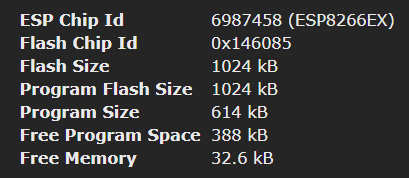
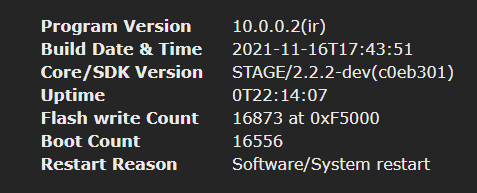
|
Please have a look at |

|
After 3.5 days it has disconnected :( Dispite of this: |
|
Unfortunately for me only NONOSDK22x_190313 is acceptable. It has disconnected after 3.5 days but at least it survives software restart. All other versions after restart require several power cycles to connect :( So for me it's over. I'll check once more how long connection will last and probably return to static IP :( |
|
This matches with our experience. Only 190703 is stable (for all non ASUS users). |

|
I just saw issue 1137 and I agree with @jaymemaurice about setoption41:
Gratuitous ARP every minute is crazy. Default off is much better and I agree with @Jason2866 : here |
|
@KF042020 If you have the need to provide a specific toolchain your platformio setup is messed up. |
|
@suzsuzuki Sadly there are so many crappy APs / Routers out there which have non working ARP treatment we decided to enable by default. It is not a big deal to switch off. Just do |

|
From #7770 (comment) Please, using latest standard Tasmota, go to the console and type |
|
I can't beleve we have never tried :) 👍 It seems working. |
|
Is this configuration only available on esp32 devices or also it is supported on esp8266 devices? |

|
ESP8266 Only |
|
@eipporko with a ESP8266 device |
|
I wasn't suggesting to build a newer version, but just to verify using an older (ancient) build of Tasmota to verify the node itself is connecting to that specific AP, just to make sure it is an issue in the software and that we're not looking at some other completely unrelated issue. |

|
The latest version before core 2.6.0 is Tasmota v6.6.0, I see, though that uses Core v2.3.0 and not v2.5.2... I read that downgrading to such an old version is difficult, so let me do esptool.py erase_flash and start from scratch with v6.6.0. Let me get back to you with my findings in a couple of days |
|
After some experiments, it appears that the choppy connection issue I was seeing was caused by the "wifi 3" mode. I guess my Asus ax58u disables 11b for performance and Tasmota in "wifi 3" mode doesn't like that. So I'm back experimenting with 10.1.0 in default 'wifi 4' mode. Initial DHCP seems to work well so far, which is great to see! I'll report back in a few days if lease renewals succeed reliably as well |

|
wifi 3 is 11b/g, so your router is configured to disable both (in other words, your router is configured as 11n-ONLY). If you want, you can try disabling 11n-only option in your router. |

|
Just to add another data point for someone who discovers this via searching in the future, the 'wifi 3' command via the console seems to have resolved my WIFI association and DHCP DISCOVER then DHCPOFFER (br0) then DHCPDISCOVER (br0) issues. The three smart plugs now come online in about 4s from powerup. I am running the stock firmware image for Tasmota 11.0.0. The router is an ASUS RT-86U running the MerlinWRT 386.5 fork of the ASUS firmware. I did not need to change anything on it. The devices are 00:00:00.002 HDW: ESP8266EX in the console at boot. The commercial model is TECKIN SP20. All I needed to do was open the web UI once the devices did (eventually) come online on the 11n network, and type 'wifi 3' in to the console. It reported switching to the 11g network then I unplugged and replugged them to confirm. Just 4s to boot now. Lovely. |

|
Noob Question: What is that, please?? Tried to get it with platform.io but failed:
Processing tasmota-core3 (platform: espressif8266; framework: arduino; board: esp8266_1M) |

|
Hi, yes git is installed and pulling the repository (in case i provide correct branch). It seems that this branch has been deleed in Jan 2022 after merging into esp8266:master... unfortunately i dont know how to retrieve a valid and working version there... |
|
esp8266 main repo does include this fix. |
|
mmhhh.. unfortunately not really knowing what exactly i am doing... but now trying to compile creates error: btw. also tested the above options for ; NONOSDK22x_xxxxxx |
|
Ahh, right. This is verified working. |
|
Now, please notice I am entirely new, i have no overview over logs/topics/things/directories i can check for.... Not happening in the other environment, though. So the other env should have this file somewhere, right?? |
|
For compiling a range extender version you can do this way |
|
well, actually thats what I did. Added to user_config_override.h.. anyways, tested the above one, facing unfortunately the same error... |
|
So the Tasmota code of rangeextender is not compatible with actual Arduino ESP8266 stage. |
|
I can not test at the moment, you can try to include |
|
OK, I think this will go far now :-D |

|
Don't know if this is "interesting", but very recently, I did a simple range extender test setup, by strictly following the docs, and running in NAPT mode for simplicity. I was able to successfully connect both an unmodified other Tasmota device (both ESP8266), and running a regular browser on a tablet connected to the range extender AP. Speed was only about 3 Mbit/sec, but still able to do useful browsing. |

|
Problem still exists! Quick workaround is to set 2.4ghz mode to Legacy, then go in the Tasmota Console and set "wifi 2". You can the reset 2.4ghz to Auto in Asus router. Shame this is an issue in 2022. |
|
Asus has landed itself a firm no-go on my mental list of router vendors... They seem to focus too much on specs-filler stuff of marginal (if any) utility for other than benchmarking... |

|
If anyone knows how to fix it, maybe you can contact the person making the Merlin firmware to have him patch it in his releases? |
|
I guess Merlin cannot do anything about the ASUS wifi that is legacy fro the original FW and not patched. |

|
I have 4 Sonof Minis running without any issue on stock firmware for about one year, when I flashed them (OTA) to tasmota, this wifi issues started to happen immediatelly... Not sure if it may helps anyways, but seems to be related to the firmware, not hardware at all. Running version 12.3.1 |
|
Testing here and yet to post long term results, but after adjusting all of them to wifi 2 and in the AX router 2,4G professional config changed the modulation scheme to "up to MCS 7 ( 802.11n)" seems to have solved at least the issues to reconnect after software resets. |
|
We know it is the espressif software part. It is the closed source part from espressif which has to be used when programming via Arduino. Feature less software like the stock firmware uses a different framework (non Arduino). So in short the info does not help. |
|
Sad to hear, hopefully espressif may address it in the future. But so far with the settings I mentioned, seems to be working. Thank you ! |
|
Not only "closed source" but also no changelog, nothing. Just a binary blob and the devs may try and spend an infinite amount of time on finding out what may or may not work. |

|
Exciting to see how the new espressif NonOs version is going to affect this problem! |
|
@drrossum No reason for being excited. Just another attempt. Since the buggy beta build NonOs SDK version 3.0.x is used which maybe!! solves this WiFi problem. It will introduce other problems. We had used this already and dropped it, since it decreases esp8266 performance a lot. If the performance problem is not solved it is not an option. |
|
@Jason2866 You had identified the problem being the NonOs closed-source code that Tasmota relies on and regretted that it was EOL. Now, how is it not exciting to see a new version coming out that even explicitly addresses the missing WMM support, since WMM is no longer optional on 802.11ax APs? I'll be happy to try a custom build but what "performance issues" do I need to look out for (in addition to checking for wifi connectivity and re-connectivity issues)? |
To list a few (not limited to these):
|
|
Those WDTs can almost all be related to the less predictable WiFi connection. |

|
I'm having the same problem. My configuration is an RT-AX92U as a router with the Wifi turned off and two ZenWifi Mini (XD4) as nodes, with wifi turned on. |

|
Had the same problem, |

|
Because I experienced this issue as well, I subscribed to this topic with the hope there will be some solution. I set up another device as DHCP server in my network about two weeks ago and I see no more interruption and kick out for the wifi smart devices. In the past, first I thought it is the AImesh problem and set up the network as router + AP in classic manner, each AP having different channel. (3 x Lyra AC2200 as APs) I was about to go crazy since I have also three Mitsubishi Air condition units ("Winstron" wifi chipsets) which also were kick out of the network. I set up lease time in RTAC66Ub1 to 7 days hoping it will be less issues. I know this is a workaround and probably does not work if there is an AiMesh setup. |
After 72H I had no drops from Tasmotas. I'll report back here as I change configs. |

|
Man I have been waiting ap long time to see if this works! Hurry up already and let us know! lol |
|
How I solved the situation... First I set-up an old TPlink wr1043n in the network as DHCP server and stopped the service on Asus. So the main problem seems to be the DHCP Asus protocol. After that I took the radical way (in the beginning of May2024)
I have no more this disconnection issue. |

|
What fixed it for me. Wireless - Enable Smart Connect: Off On the tasmota devices (Sonoff Basic): Since then, after 3 days, I had no further issues with my devices. |

|
It is good it worked for you. Still I dont't get what is the purpose of blacklisting the tasmotas for 5Ghz since it is phisically impossible for it to try to enroll 5Ghz network (no 5Ghz transceiver) On my side I do not use "smart connect" since I have different ssid for 2.4 and 5Ghz networks. Regarding the Wifi mode 3, I remember I have tried without improvement. |
|
I know it's a complex situation, my tasmotas (Sonoff Mini R2) have been pretty stable for at least a year and even after migrating from RT-AX88u (router) + 2 Meshs (AX88u - AC86u) to BE-96U + 2Meshs (Ax88u) I had no issues. They are in a 2.4ghz guest network, no smart connect, their Mac addresses are listed on /jffs/configs/dnsmasq.conf.add (Merlin FW), here a print of my professional tab and example of dnsmasq.conf this is the backlog configuration I apply to any new tasmotas coming to the network Backlog Wifi 4; NTPSERVER1 192.168.x.x; Timezone -3:00; mqtthost 192.168.x.x; mqttport xxx; mqttuser xxxx; mqttpassword xxx; SSID2 xxx; Password2 xxxxx; topic xxxx; savedata 1 I know there are many controversies possible within this configuration, but it's stable and even migrating to a newer router was pretty simple. They SSID2/Password2 was a fallback network (with and very old router) I had to deal with issues, it's off for a long time but still configured within all tasmotas is case any failure occurs. I hope it may help.
|
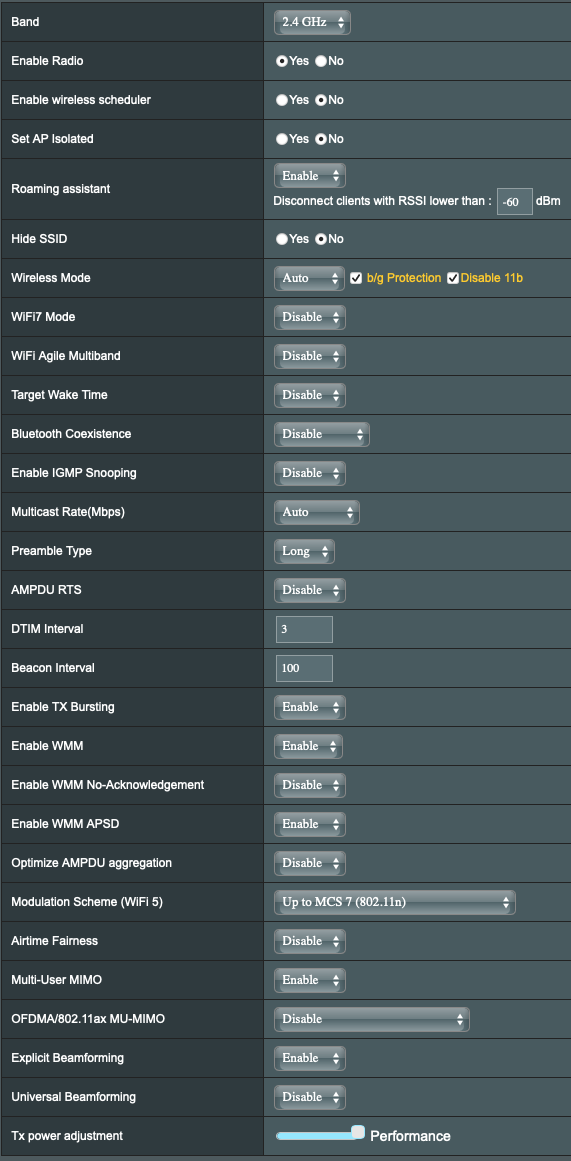


 and others
Uh oh!
There was an error while loading. Please reload this page.
Uh oh!
There was an error while loading. Please reload this page.
You can build a Tasmota ESP8266 version with the Arduino (PR8319) which maybe fixes the DHCP issues with some ASUS routers. Please give us or the Arduino crew feedback if this PR does solve the issue. Thx!
Copy the text box below in
platformio_tasmota_cenv_sample.inisomewhere and rename the file toplatformio_tasmota_cenv.iniAfter restarting VSC you can compile it with
platformio run -e tasmota-core3from the terminal or as described in the Tasmota documentation.Edit: added precompiled firmware with above settings.
tasmota-core3.bin.gz
EDIT 2 (2022/09/05): There is no "clean" solution possible. Only the workaround(s).
All reactions