


Shorthand is a superset and friendlier variant of JSON designed with several use-cases in mind:
| Use Case | Example |
|---|---|
| CLI arguments/input | my-cli post 'foo.bar[0]{baz: 1, hello: world}' |
| Patch operations | name: undefined, item.tags[]: appended |
| Query language | items[created before 2022-01-01].{id, tags} |
| Configuration format | {json.save.autoFormat: true} |
The shorthand syntax supports the following features, described in more detail with examples below:
- Superset of JSON (valid JSON is valid shorthand)
- Optional commas, quotes, and sometimes colons
- Support for comments & trailing commas
- Automatic type coercion
- Support for bytes, datetimes, and maps with non-string keys
- Nested object & array creation
- Loading values from files
- Editing existing data
- Appending & inserting to arrays
- Unsetting properties
- Moving properties & items
- Querying, array filtering, and field selection
The following are all completely valid shorthand and result in the same output:
foo.bar[]{baz: 1, hello: world}
{
  // This is a comment
  foo.bar[]{
    baz: 1
    hello: world
  }
}
{
  "foo": {
    "bar": [
      {
        "baz": 1,
        "hello": "world"
      }
    ]
  }
}
This library has excellent test coverage to ensure correctness and is additionally fuzz tested to prevent panics.
The CLI shorthand syntax is not the only one you can use to generate data for CLI commands. Here are some alternatives:
For example, the shorthand example given above could be rewritten as:
$ jo -p foo=$(jo -p bar=$(jo -a $(jo -p baz=1 hello=world)))The shorthand syntax implementation described herein uses those and the following for inspiration:
It seems reasonable to ask, why create a new syntax?
- Built-in. No extra executables required. Your tool ships ready-to-go.
- No need to use sub-shells to build complex structured data.
- Syntax is closer to YAML & JSON and mimics how you do queries using tools like
jqandjmespath. - It's optional, so you can use your favorite tool/language instead, while at the same time it provides a minimum feature set everyone will have in common.
You can use the included j executable to try out the shorthand format examples below. Examples are shown in JSON, but the shorthand parses into structured data that can be marshalled as other formats, like YAML or TOML if you prefer.
go install github.com/danielgtaylor/shorthand/cmd/j@latestAlso feel free to use this tool to generate structured data for input to other commands.
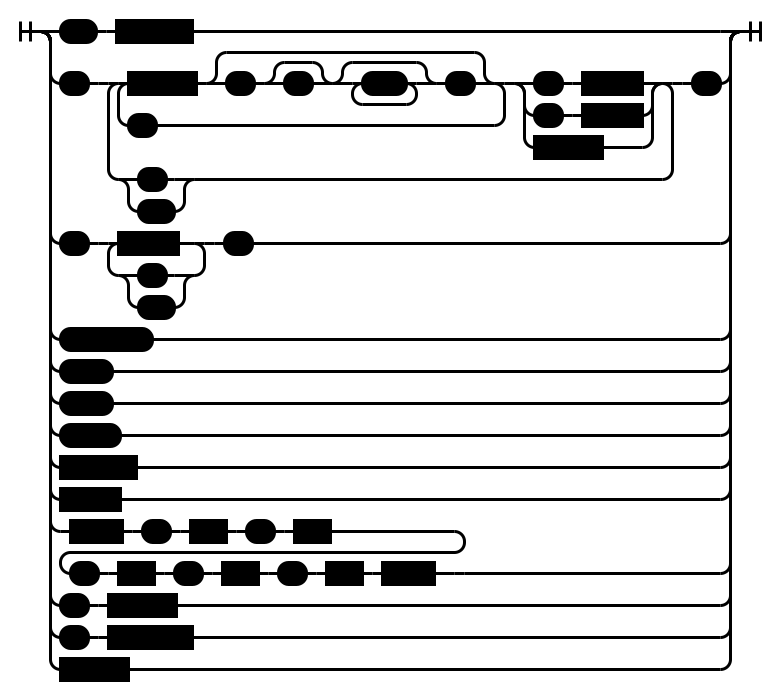
Here is a diagram overview of the language syntax, which is similar to JSON's syntax but adds a few things:
Note:
stringcan be quoted (with") or unquoted.- The
querysyntax in the diagram above is described below in the Querying section.
At its most basic, a structure is built out of key & value pairs. They are separated by commas:
$ j hello: world, question: how are you?
{
  "hello": "world",
  "question": "how are you?"
}Shorthand supports the standard JSON types, but adds some of its own as well to better support binary formats and its query features.
| Type | Description |
|---|---|
null |
JSON null |
boolean |
Either true or false |
number |
JSON number, e.g. 1, 2.5, or 1.4e5 |
string |
Quoted or unquoted strings, e.g. hello or "hello" |
bytes |
%-prefixed, unquoted, base64-encoded binary data, e.g. %wg== |
time |
RFC3339 date/time, e.g. 2022-01-01T12:00:00Z |
array |
JSON array, e.g. [1, 2, 3] |
object |
JSON object, e.g. {"hello": "world"} |
Well-known values like null, true, and false get converted to their respective types automatically. Numbers, bytes, and times also get converted. Similar to YAML, anything that doesn't fit one of those is treated as a string. This automatic coercion can be disabled by just wrapping your value in quotes.
# With coercion
$ j empty: null, bool: true, num: 1.5, string: hello
{
  "bool": true,
  "empty": null,
  "num": 1.5,
  "string": "hello"
}

# As strings
$ j empty: "null", bool: "true", num: "1.5", string: "hello"
{
  "bool": "true",
  "empty": "null",
  "num": "1.5",
  "string": "hello"
}

# Passing the empty string
$ j blank1: , blank2: ""
{
  "blank1": "",
  "blank2": ""
}Nested objects use a . separator when specifying the key.
$ j foo.bar.baz: 1
{
  "foo": {
    "bar": {
      "baz": 1
    }
  }
}
Properties of nested objects can be grouped by placing them inside { and }. The : becomes optional for nested objects, so foo.bar: {...} is equivalent to foo.bar{...}.
$ j foo.bar{id: 1, count.clicks: 5}
{
  "foo": {
    "bar": {
      "count": {
        "clicks": 5
      },
      "id": 1
    }
  }
}
Arrays are surrounded by square brackets like in JSON:
# Simple array
$ j [1, 2, 3]
[
  1,
  2,
  3
]
Array indexes use square brackets [ and ] to specify the zero-based index to set an item. If the index is out of bounds then null values are added as necessary to fill the array. Use an empty index [] to append to the an existing array. If the item is not an array, then a new one will be created.
# Nested arrays
$ j [0][2][0]: 1
[
  [
    null,
    null,
    [
      1
    ]
  ]
]

# Appending arrays
$ j a[]: 1, a[]: 2, a[]: 3
{
  "a": [
    1,
    2,
    3
  ]
}Sometimes a field makes more sense to load from a file than to be specified on the commandline. The @ preprocessor lets you load structured data, text, and bytes depending on the file extension and whether all bytes are valid UTF-8:
# Load a file's value as a parameter
$ j foo: @hello.txt
{
  "foo": "hello, world"
}

# Load structured data
$ j foo: @hello.json
{
  "foo": {
    "hello": "world"
  }
}
Remember, it's possible to disable this behavior with quotes:
$ j 'twitter: "@user"'
{
  "twitter": "@user"
}Partial updates are supported on existing data, which can be used to implement HTTP PATCH, templating, and other similar features. The suggested content type for HTTP PATCH is application/shorthand-patch. This feature combines the best of both:
Partial updates support:
- Appending arrays via
[] - Inserting before via
[^index] - Removing fields or array items via
undefined - Moving/swapping fields or array items via
^- The right hand side is a path to the value to swap. See Querying below for the path syntax.
Note: When sending shorthand patches file loading via @ should be disabled as the files will not exist on the server.
Some examples:
# First, let's create some data we'll modify later
$ j id: 1, tags: [a, b, c] >data.json

# Now let's append to the tags array
$ j <data.json 'tags[]: d'
{
  "id": 1,
  "tags": [
    "a",
    "b",
    "c",
    "d"
  ]
}

# Array item insertion (prepend the array)
$ j <data.json 'tags[^0]: z'
{
  "id": 1,
  "tags": [
    "z",
    "a",
    "b",
    "c"
  ]
}

# Remove stuff
$ j <data.json 'id: undefined, tags[1]: undefined'
{
  "tags": [
    "a",
    "c"
  ]
}

# Rename the ID property, and swap the first/last array items
$ j <data.json 'id ^ name, tags[0] ^ tags[-1]'
{
  "name": 1,
  "tags": [
    "c",
    "b",
    "a"
  ]
}A data query language is included, which allows you to query, filter, and select fields to return. This functionality is used by the patch move operations described above and is similar to tools like:
The query language supports:
- Paths for objects & arrays
foo.items.name - Wildcards for unknown props
foo.*.name - Array indexing & slicing
foo.items[1:2].name(both ends inclusive:[1:2]returns items at indexes 1 and 2)- Including negative indexes
foo.items[-1].name
- Including negative indexes
- Array filtering via mexpr
foo.items[name.lower startsWith d] - Object property selection
foo.{created, names: items.name} - Recursive search
foo..name - Stopping processing with a pipe
| - Flattening nested arrays
[]
The query syntax is recursive and looks like this:
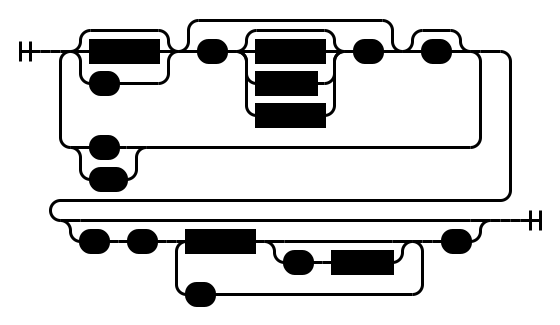
The filter syntax is described in the documentation for mexpr.
Examples:
# First, let's make a complex file to query
$ j 'users: [{id: 1, age: 5, friends: [a, b]}, {id: 2, age: 6, friends: [b, c]}, {id: 3, age: 5, friends: [c, d]}]' >data.json

# Query for each user's ID
$ j <data.json -q 'users.id'
[
  1,
  2,
  3
]

# Get the users who are friends with `b`
$ j <data.json -q 'users[friends contains b].id'
[
  1,
  2
]

# Get the ID & age of users who are friends with `b`
$ j <data.json -q 'users[friends contains b].{id, age}'
[
  {
    "age": 5,
    "id": 1
  },
  {
    "age": 6,
    "id": 2
  }
]
Note on slice ranges: Shorthand uses inclusive ranges on both ends, so
[1:2]returns items at indexes 1 and 2. This is an intentional design choice: shorthand is meant to be intuitive for query use, where "items 1 to 2" naturally means both endpoints. Dijkstra's classic argument for exclusive end ranges (empty range, length arithmetic, concatenation) applies to programming with ranges, not to querying. Users familiar with jq or JMESPath (which use exclusive end) need only remember this one difference.
Aside from Marshal and Unmarshal functions, the GetInput function provides an all-in-one quick and simple way to get input from both stdin and passed arguments for CLI applications:
package main

import (
  "fmt"
  "os"

  "github.com/danielgtaylor/shorthand/v2"
)

func main() {
  result, isStructured, err := shorthand.GetInput(os.Args[1:], shorthand.ParseOptions{
    EnableFileInput:       true,
    EnableObjectDetection: true,
  })
  if err != nil {
    panic(err)
  }
  if !isStructured {
    panic("input is not structured data")
  }

  fmt.Println(result)
}
It's also possible to get the shorthand representation of an input, for example:
example := map[string]interface{}{
  "hello": "world",
  "labels": []interface{}{
    "one",
    "two",
  },
}

// Prints "hello: world, labels: [one, two]"
fmt.Println(shorthand.MarshalCLI(example))Shorthand v2 has been completely rewritten from the ground up, putting it at a similar speed/efficiency as the standard library's encoding/json package while supporting some compelling additional features:
# Core parsing and formatting benchmarks
BenchmarkMinJSON-12            723205    1471 ns/op    1808 B/op    31 allocs/op
BenchmarkFormattedJSON-12      715772    1684 ns/op    1712 B/op    30 allocs/op
BenchmarkShorthand-12          569120    2160 ns/op    1648 B/op    38 allocs/op
BenchmarkPretty-12             540336    2274 ns/op    1648 B/op    38 allocs/op
BenchmarkParse-12             1342033     894.8 ns/op   152 B/op    11 allocs/op
BenchmarkApply-12              985106    1248 ns/op    1493 B/op    27 allocs/op

# Query benchmarks
BenchmarkGetPathSimple-12     26379883      49.28 ns/op    0 B/op     0 allocs/op
BenchmarkGetPath-12            3301216     345.3 ns/op   456 B/op     7 allocs/op
BenchmarkGetPathFlatten-12     5693767     209.7 ns/op   320 B/op     6 allocs/op
There is also a separate comparison benchmark module under benchmarks/ that compares Shorthand query evaluation against Go implementations of JMESPath and jq.
The shorthand syntax is implemented as a custom parser split into two pieces: parse.go to parse a shorthand input into a set of operations and apply.go to provide the mechanism for applying those operations on an existing input (or nil). Every operation will either set, delete, or swap some value or path. For example:
# Input
foo.bar{id: 1, tags: [{value: a}, {value: b}]}

# Parsed
[
  [OpSet, "foo.bar.id", 1],
  [OpSet, "foo.bar.tags[0].value", "a"],
  [OpSet, "foo.bar.tags[1].value", "b"]
]

# Existing
{"foo": {"baz": 2}}

# Applied Output JSON
{
  "foo": {
    "bar": {
      "id": 1,
      "tags": [
        {"value": "a"},
        {"value": "b"}
      ]
    },
    "baz": 2
  }
}
This simplifies the code to apply changes, as it can process each operation independently.
The file get.go provides an implementation of query parsing. It also utilizes danielgtaylor/mexpr, a top-down operator precedence (Pratt) parser for simple filter expressions.
No special steps are necessary to test local changes to the grammar. You can just run the included j utility to test:
$ cd cmd/j
$ go run . your: new feature here