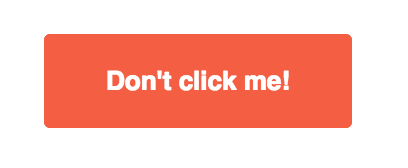
Displays a customizable button.
Important
The mj-button won't be fully clickable because of client support.
See discussion at
Issue #359.
<mjml>
  <mj-body>
    <mj-section>
      <mj-column>
        <mj-button font-family="Helvetica" background-color="#f45e43" color="white">
          Don't click me!
         </mj-button>
      </mj-column>
    </mj-section>
  </mj-body>
</mjml>
Note
mj-button is an "ending tag", which means that it can contain HTML code but it cannot contain other MJML components.
More information about ending tags in this section.
| attribute | accepts | description | default value |
|---|---|---|---|
| align | left center right |
horizontal alignment | center |
| background-color | CSS color formats | button background-color | #414141 |
| border | string | CSS border format | none |
| border-bottom | string | CSS border format | |
| border-left | string | CSS border format | |
| border-radius | string | border radius | 3px |
| border-right | string | CSS border format | |
| border-top | string | CSS border format | |
| color | CSS color formats | text color | #ffffff |
| container-background-color | CSS color formats | button container background color | |
| css-class | string | class name, added to the root HTML element created | |
| font-family | string | font name | Ubuntu, Helvetica, Arial, sans-serif |
| font-size | px |
text size | 13px |
| font-style | string | CSS values, e.g. normal italic oblique |
|
| font-weight | string | text thickness | normal |
| height | px % |
button height | |
| href | string | URL format | |
| inner-padding | px % |
inner button padding, supports up to 4 parameters |
10px 25px |
| letter-spacing | px em |
letter-spacing | |
| line-height | px % |
line-height on link | 120% |
| name | string | specify the name attribute for the button link | |
| padding | px % |
button container padding, supports up to 4 parameters | 10px 25px |
| padding-bottom | px % |
button container bottom padding | |
| padding-left | px % |
button container left padding | |
| padding-right | px % |
button container right padding | |
| padding-top | px % |
button container top padding | |
| rel | string | specify the rel attribute for the button link | |
| target | string | specify the target attribute for the button link | _blank |
| text-align | left center right |
text-align button content | |
| text-decoration | string | underline/overline/none | none |
| text-transform | string | capitalize/uppercase/lowercase | none |
| title | string | tooltip & accessibility | |
| vertical-align | top bottom middle vertical |
vertical alignment | middle |
| width | px % |
button width |