Conversation


| return indent(body, spacing) | ||
| } | ||
|
|
||
| public renderList(input: (string | undefined)[][], opts: {indentation: number; multiline?: boolean; stripAnsi?: boolean; spacer?: string}): string { |
There was a problem hiding this comment.
This method is unchanged, just brought over from list.ts.

| * `config=Interfaces.Config` or `opts=Interface.HelpOptions`. | ||
| * | ||
| * ```javascript | ||
| * '<%= config.bin =>` // will resolve to the bin defined in `pjson.oclif`. |
There was a problem hiding this comment.
I think you meant to have a ` here instead of a '
| /** | ||
| * An array of examples to show at the end of the command's help. | ||
| * | ||
| * IF only a string is provide, it will try to look for a line that starts |
There was a problem hiding this comment.
Is this worth mentioning in the migration doc?

 mdonnalley
left a comment
mdonnalley
left a comment
mdonnalley
left a comment
There was a problem hiding this comment.
- Found one issue while testing:
In the messages.md folder I have:
# examples

- happy path example\n<%= config.bin %> <%= command.id %> --jwt-key-file myorg.key --username me@salesforce.com --clientid XXXX
But the help shows:
EXAMPLES
  happy path example\nsf login org jwt --jwt-key-file myorg.key --username me@salesforce.com --clientid XXXX
- I noticed that the
FLAG DESCRIPTIONSdidn't behave as I expected: When I added asummaryto one of my flags, I expected to see the new section in help but I didn't. I had to make sure that mydescriptionwas also multiple lines in order to see the new section. I think my preference is to always add theFLAG DESCRIPTIONSsection if thesummaryprop exists - regardless of whether or not my description is long enough - I think the
FLAGSandCLI FLAGSdistinction is unclear. I feel like there's a better way to communicate "these flags are specific to this command, and these other flags are generally available on all commands" - Lastly, if I understand correctly consumers have to implement flag groups on their own? Would it better to simply expose that as part of the flag options, e.g.
    alias: Flags.string({
      description: messages.getMessage('alias'),
      group: 'foo',
    }),
    clientid: Flags.string({
      description: messages.getMessage('clientId'),
      group: 'bar',
    }),

|

 RodEsp
left a comment
RodEsp
left a comment
RodEsp
left a comment
There was a problem hiding this comment.
Consider changing all the references to \n for EOL for windows compatibility?

Co-authored-by: Rodrigo Espinosa de los Monteros <1084688+RodEsp@users.noreply.github.com>
Co-authored-by: Rodrigo Espinosa de los Monteros <1084688+RodEsp@users.noreply.github.com>
Co-authored-by: Rodrigo Espinosa de los Monteros <1084688+RodEsp@users.noreply.github.com>
| const title = command.description && this.render(command.description).split('\n')[0] | ||
| if (title) console.log(title + '\n') | ||
| const summary = this.summary(command) // command.description && this.render(command.description).split('\n')[0] | ||
| if (summary) console.log(summary + '\n') |
There was a problem hiding this comment.
This is still pulling from the command description, not the summary but I can't understand why.
| protected summary(c: Interfaces.Command): string { | ||
| if (c.summary) return this.render(c.summary.split('\n')[0]) | ||
|
|
||
| return this.render((c.description || '').split('\n')[0]) |
There was a problem hiding this comment.
I believe this should be c.summary but for some reason the .summary isn't being added to the command. See comment above.
| return this.render((c.description || '').split('\n')[0]) | |
| return this.render((c.summary|| '').split('\n')[0]) |
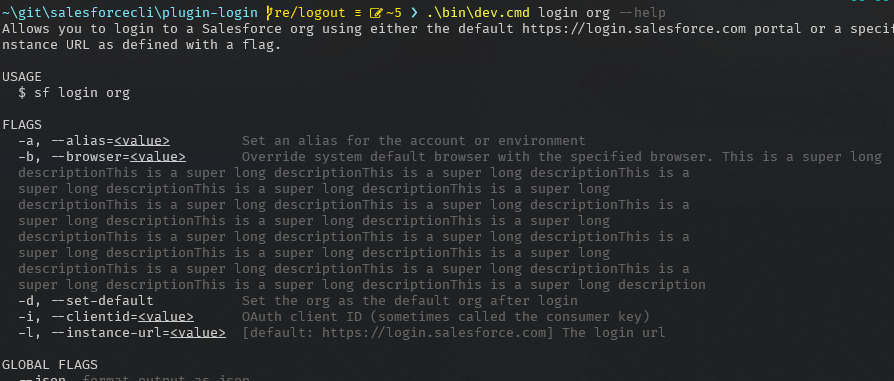
|
|
||
| const body = flagsWithExtendedDescriptions.map(flag => { | ||
| return `${this.flagHelpLabel(flag, true)} ${flag.summary}\n\n${this.indent(this.wrap(flag.description || '', this.indentSpacing * 2))}` | ||
| // Guaranteed to be set because of the filter above, but make ts happy |


3 participants


Command and Flag Summary
Oclif will use the first line of
command.descriptionas the "summary" which is used as the first line on command help as well as in the command list. This is clever, but can also be hidden and confusing. There is now asummaryproperty on command and flag, which if provided, will be used as the first line on command help and in the command list. It will also be repeated in theDESCRIPTIONsection of help for increased usability.The summary property should be one line.
Flag Descriptions
Multiline flag descriptions can be hard to read in a wrapped list view. Oclif will render the list different if there is one descriptions is more than 4 lines, but at that point it may be too late. Not only that, it can still be useful to have a short, easy to digest flag list, with more description down below. Now the
summaryproperty on flag, if provided, will be used in the in the flag list and the description will be put in an extended section down below.Flag Help Groups
Help for commands with a large number of flags can be hard to read. It can be hard to pick out related flags. Or it can be hard to pick out flags that may not be directly related to the command, such as flags added by a CLI or a particular plugin. For example,
--jsonor table flags.Flag help groups help solve this.
Refactor help and extend customizability
There are time where a CLI may just want to add an extra help section or change a section heading in the command help. Or maybe the CLI wants to override the help options. With oclif@1, a CLI could really only override the
Helpclass which did not provide any helpful methods for command help or options. Now, theCommandHelpclass is loaded from theHelpclass so it can be extended. Also, help options can be defined inpjson.oclif.helpOptions. Seetest/help/show-customized-help.test.ts.In addition, code like
wrap(body, this.opts.maxWidth - spacing, {hard: true, trim: false}and creating a section with[bold(header), indent(body, 2)].join('\n')was called all over the place. These have been abstracted into a base class which all help classes now extend, providing those utilities to custom help classes as well.Example Descriptions
Having a list of examples with no descriptions is not very useful, which the existing example structure encourages. Consumers can add descriptions themselves but it is less than idea.
Now, examples can be an object
{description, command}which will be formatted appropriately. If a sting is provided, it will try to figure our what is a description and what is a command to format in a more readable output.