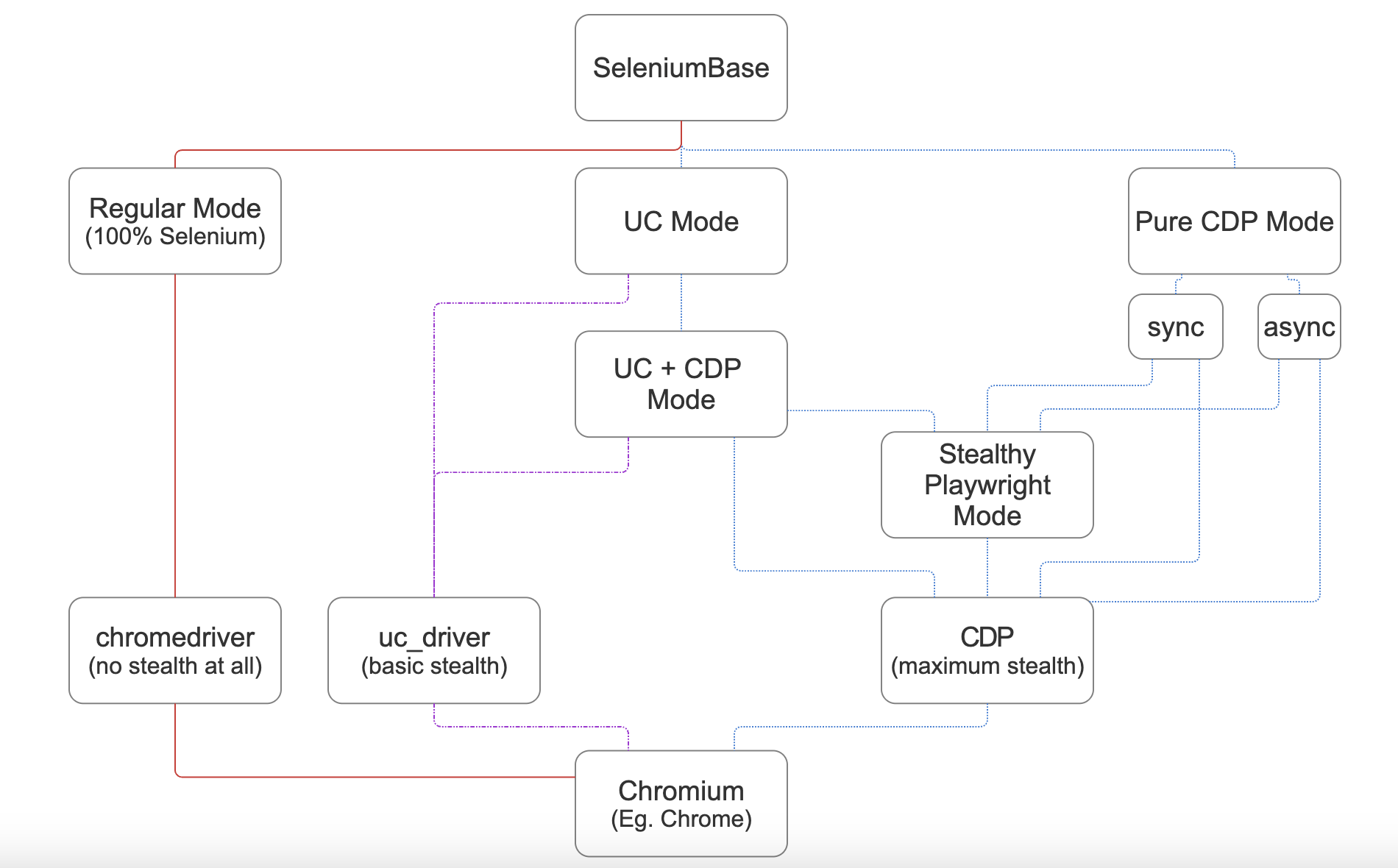
🎭 Stealthy Playwright Mode is a subset of SeleniumBase CDP Mode where Playwright calls connect_over_cdp() to attach itself onto a stealthy SeleniumBase browser session via the remote-debugging-port. This gives Playwright the ability to bypass bot-detection, and allows APIs of both frameworks to be used together.

(See Stealthy Playwright Mode on YouTube!
If playwright isn't already installed, then install it first:
pip install playwrightStealthy Playwright Mode comes in 3 formats:
sb_cdpsync formatSB()nested sync formatcdp_driverasync format
from playwright.sync_api import sync_playwright
from seleniumbase import sb_cdp

sb = sb_cdp.Chrome()
endpoint_url = sb.get_endpoint_url()

with sync_playwright() as p:
    browser = p.chromium.connect_over_cdp(endpoint_url)
    context = browser.contexts[0]
    page = context.pages[0]
page.goto("https://example.com")from playwright.sync_api import sync_playwright
from seleniumbase import SB
with SB(uc=True) as sb:
sb.activate_cdp_mode()
endpoint_url = sb.cdp.get_endpoint_url()
with sync_playwright() as p:
browser = p.chromium.connect_over_cdp(endpoint_url)
context = browser.contexts[0]
page = context.pages[0]
page.goto("https://example.com")import asyncio
from seleniumbase import cdp_driver
from playwright.async_api import async_playwright
async def main():
driver = await cdp_driver.start_async()
endpoint_url = driver.get_endpoint_url()
async with async_playwright() as p:
browser = await p.chromium.connect_over_cdp(endpoint_url)
context = browser.contexts[0]
page = context.pages[0]
await page.goto("https://example.com")
if __name__ == "__main__":
loop = asyncio.new_event_loop()
loop.run_until_complete(main())The sb_cdp and cdp_driver formats don't use WebDriver at all, meaning that chromedriver isn't needed. From these two formats, Stealthy Playwright Mode can call CDP Mode methods and Playwright methods.
The SB() format requires WebDriver, therefore chromedriver will be downloaded, modified for stealth, and renamed as uc_driver if not already present. The SB() format has access to Selenium WebDriver methods via the SeleniumBase API. When using Stealthy Playwright Mode from the SB() format, all the APIs are accessible: Selenium, SeleniumBase, UC Mode, CDP Mode, and Playwright.
Default timeout values are different between Playwright and SeleniumBase. For instance, a 30-second default timeout in a Playwright method might only be 10 seconds in the equivalent SeleniumBase method.
When specifying custom timeout values, Playwright uses milliseconds, whereas SeleniumBase uses seconds. Eg. page.wait_for_timeout(2000) in Playwright is the equivalent of sb.sleep(2) in SeleniumBase.
Although hard sleeps are generally discouraged, they become a tactical tool in stealth mode because that extra waiting helps the automation look more human. Hard sleeps are used in multiple examples to prevent rate limits from being exceeded.
🎭 Here's an example that queries Microsoft Copilot:
from playwright.sync_api import sync_playwright
from seleniumbase import sb_cdp

sb = sb_cdp.Chrome()
endpoint_url = sb.get_endpoint_url()

with sync_playwright() as p:
    browser = p.chromium.connect_over_cdp(endpoint_url)
    context = browser.contexts[0]
    page = context.pages[0]
    page.goto("https://copilot.microsoft.com")
    page.wait_for_selector("textarea#userInput")
    page.wait_for_timeout(1000)
    query = "Playwright Python connect_over_cdp() sync example"
    page.fill("textarea#userInput", query)
    page.click('button[data-testid="submit-button"]')
    page.wait_for_timeout(4000)
    sb.solve_captcha()
    page.wait_for_selector('button[data-testid*="-thumbs-up"]')
    page.wait_for_timeout(4000)
    page.click('button[data-testid*="scroll-to-bottom"]')
    page.wait_for_timeout(3000)
    chat_results = '[data-testid="highlighted-chats"]'
    result = page.locator(chat_results).inner_text()
    print(result.replace("\n\n", " \n"))
(From examples/cdp_mode/playwright/raw_copilot_sync.py)
🎭 Here's an example that solves the Bing CAPTCHA:
from playwright.sync_api import sync_playwright
from seleniumbase import sb_cdp

sb = sb_cdp.Chrome(locale="en")
endpoint_url = sb.get_endpoint_url()

with sync_playwright() as p:
    browser = p.chromium.connect_over_cdp(endpoint_url)
    context = browser.contexts[0]
    page = context.pages[0]
    page.goto("https://www.bing.com/turing/captcha/challenge")
    page.wait_for_timeout(2000)
    sb.solve_captcha()
    page.wait_for_timeout(2000)
(From examples/cdp_mode/playwright/raw_bing_cap_sync.py)
🎭 For all included examples, see examples/cdp_mode/playwright.
If you have a regular Playwright script that looks like this:
from playwright.sync_api import sync_playwright

with sync_playwright() as p:
    browser = p.chromium.launch(channel="chrome", headless=False)
    context = browser.new_context()
    page = context.new_page()
    page.goto("https://example.com")
Then the Stealthy Playwright Mode version of that would look like this:
from playwright.sync_api import sync_playwright
from seleniumbase import sb_cdp

sb = sb_cdp.Chrome()
endpoint_url = sb.get_endpoint_url()

with sync_playwright() as p:
    browser = p.chromium.connect_over_cdp(endpoint_url)
    context = browser.contexts[0]
    page = context.pages[0]
page.goto("https://example.com")Stealthy Playwright Mode uses the system's Chrome browser by default. There's also the option of setting use_chromium=True to use the unbranded Chromium browser instead, which still supports extensions. (With regular Playwright, you would generally need to run playwright install to download a special version of Chrome before running Playwright scripts, unless you set channel="chrome" to use the system's Chrome browser instead.)
Playwright's :has-text() selector is the equivalent of SeleniumBase's :contains() selector, except for one small difference: :has-text() isn't case-sensitive, but :contains() is.
In the sync formats, get_endpoint_url() also applies nest-asyncio so that nested event loops are allowed. (Python doesn't allow nested event loops by default). Without this, you'd get the error: "Cannot run the event loop while another loop is running" when calling CDP Mode methods (such as solve_captcha()) from within the Playwright context manager. This nest-asyncio call is done behind-the-scenes so that users don't need to handle this on their own.
To use an authenticated proxy in Stealthy Playwright Mode, do these two things:
1. Set theproxy arg when launching Chrome.
-- Eg: sb_cdp.Chrome(proxy="USER:PASS@IP:PORT") or cdp_driver.start_async("USER:PASS@IP:PORT").
2. Open the URL with SeleniumBase before using endpoint_url to connect to the browser with Playwright.
use_chromium=True so that you can use the base Chromium browser, which still allows extensions, unlike regular branded Chrome, which removed the --load-extension command-line switch. (An extension is used to set the auth for the proxy, which is needed when CDP can't set the proxy alone, such as for navigation after the initial page load).
In the sync format, use sb.open(url) to open the url before connecting Playwright:
sb = sb_cdp.Chrome(use_chromium=True, proxy="user:pass@server:port")
sb.open(url)
endpoint_url = sb.get_endpoint_url()
# ...
In the async format, use, driver.get(url) to open the url before connecting Playwright:
driver = await cdp_driver.start_async(use_chromium=True, proxy="user:pass@server:port")
await driver.get(url)
endpoint_url = driver.get_endpoint_url()
# ...
Here's an example of using an authenticated proxy with Stealthy Playwright Mode:
(The URL is opened before attaching Playwright so that proxy settings take effect)
from playwright.sync_api import sync_playwright
from seleniumbase import sb_cdp

sb = sb_cdp.Chrome(use_chromium=True, proxy="user:pass@server:port")
sb.open(url)
endpoint_url = sb.get_endpoint_url()

with sync_playwright() as p:
    browser = p.chromium.connect_over_cdp(endpoint_url)
    context = browser.contexts[0]
    page = context.pages[0]
    # ...
(Fill in the url and the proxy details to complete the script.)
Here's the same thing for the async format:
import asyncio
from playwright.async_api import async_playwright
from seleniumbase import cdp_driver

async def main():
    driver = await cdp_driver.start_async(use_chromium=True, proxy="user:pass@server:port")
    await driver.get(url)
    endpoint_url = driver.get_endpoint_url()

    async with async_playwright() as p:
        browser = await p.chromium.connect_over_cdp(endpoint_url)
        context = browser.contexts[0]
        page = context.pages[0]
        # ...

if __name__ == "__main__":
    loop = asyncio.new_event_loop()
    loop.run_until_complete(main())
(Fill in the url and the proxy details to complete the script.)
(See the CDP Mode ReadMe for more information about that.)