Is your feature request related to a problem? Please describe.
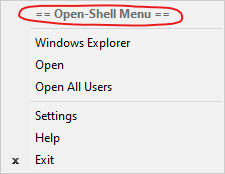
In the OSM context menu for the Start button, it displays the text == Open-Shell Menu == at the top. There is no built-in option to customize or remove the text if the user finds it unnecessary.
Describe the solution you'd like
In the "Context Menu" section of the Start menu settings, there should be a toggle to enable or disable the header. This option should also remove the separator underneath it, if necessary. Additionally, it would be nice to be able to customize the text, so it could display information such as your name or the Windows version.
Additional context
I will also add that I think the default text should just say Open-Shell Menu instead of == Open-Shell Menu ==. I think the equal signs are unnecessary, but this is up to the developers to decide.
Screenshot

Is your feature request related to a problem? Please describe.
In the OSM context menu for the Start button, it displays the text
== Open-Shell Menu ==at the top. There is no built-in option to customize or remove the text if the user finds it unnecessary.Describe the solution you'd like
In the "Context Menu" section of the Start menu settings, there should be a toggle to enable or disable the header. This option should also remove the separator underneath it, if necessary. Additionally, it would be nice to be able to customize the text, so it could display information such as your name or the Windows version.
Additional context
I will also add that I think the default text should just say
Open-Shell Menuinstead of== Open-Shell Menu ==. I think the equal signs are unnecessary, but this is up to the developers to decide.Screenshot
