


AI-powered code review tool for TypeScript developers. Get instant, intelligent feedback on your code through a CLI tool or automated GitHub Pull Request reviews.
- Overview
- Installation
- Usage
- How It Works
- Features
- Local Development
- Project Structure
- Team & License
Manual code reviews are vital but don't scale—they consume valuable time and often miss subtle issues.
BugLess bridges this gap by leveraging AI to provide instant, intelligent feedback. Whether through our CLI or automatic GitHub integration, BugLess catches bugs, security vulnerabilities, and performance issues in real-time, allowing teams to merge faster and with greater confidence. It integrates seamlessly into existing workflows through two interfaces:
- CLI Tool: Review code locally before committing
- GitHub App: Automatic reviews on every Pull Request
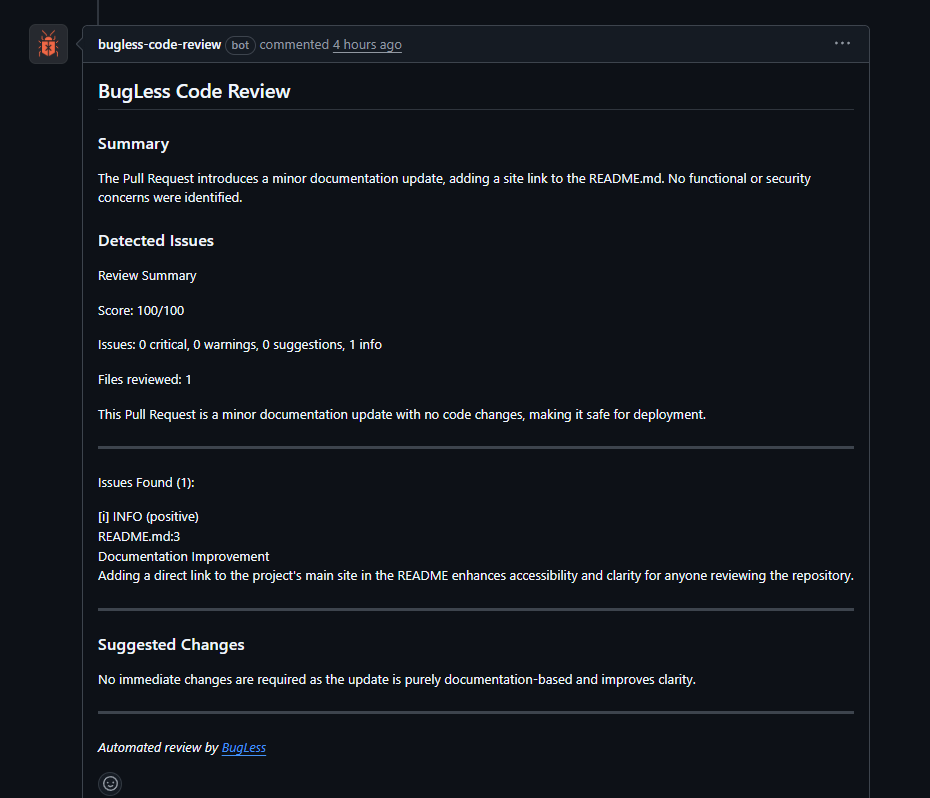
Automatic PR analysis running directly on GitHub
npm install -g bugless-cli
bugless
Install BugLess on your repositories
┌─────────────────────────────────────────────────────────────────┐
│                        BugLess Architecture                     │
├─────────────────────────────────────────────────────────────────┤
│                                                                 │
│   Developer                                                     │
│       │                                                         │
│       ├──► CLI ──────────────────┐                              │
│       │    bugless -b main       │                              │
│       │                          ▼                              │
│       │                   ┌─────────────┐     ┌──────────────┐  │
│       │                   │   Backend   │────►│  PostgreSQL  │  │
│       │                   │  (Express)  │     └──────────────┘  │
│       │                   └──────┬──────┘                       │
│       │                          │                              │
│       └──► GitHub PR ────►  Webhook  │      ┌──────────────┐    │
│            (Auto Review)         │    ├────►│    Redis     │    │
│                                  ▼    │     │   (BullMQ)   │    │
│                           ┌──────────┐│     └──────────────┘    │
│                           │  Worker  ││                         │
│                           │ (Gemini) │◄─────────────────────    │
│                           └────┬─────┘                          │
│                                │                                │
│                                ▼                                │
│                         Code Review                             │
│                    (Streamed in real-time)                      │
│                                                                 │
└─────────────────────────────────────────────────────────────────┘
| Feature | Description |
|---|---|
| Multiple Review Modes | PR diffs, uncommitted changes, specific commits, or custom code snippets |
| Review Presets | Standard, security-focused, performance-focused, quick, or thorough analysis |
| Real-time Streaming | Watch the AI review as it's being generated |
| GitHub Integration | Automatic comments on Pull Requests with actionable feedback |
| Project Context | Custom instructions per project for domain-specific reviews |
# Interactive mode - select what to review
bugless

# Review changes against a branch (PR-style)
bugless -b main

# Review uncommitted changes
bugless -u

# Review a specific commit
bugless -c abc1234

# Use a specific review preset
bugless -b main -p security    # Focus on vulnerabilities
bugless -u -p performance      # Focus on performance issues
bugless -u -p thorough # Comprehensive analysis| Layer | Technologies |
|---|---|
| Backend | Node.js, Express 5, Prisma ORM, PostgreSQL, Redis, BullMQ |
| AI | Google Gemini API |
| CLI | TypeScript, React, Ink (React for CLIs), simple-git |
| Frontend | Next.js 16, React 19, Tailwind CSS 4, Framer Motion |
| Infrastructure | Docker, GitHub Apps, Webhooks |
bugless/
├── back/           # REST API & background workers
│   ├── src/
│   │   ├── controllers/    # Request handlers
│   │   ├── services/       # Business logic
│   │   ├── workers/        # BullMQ job processors
│   │   ├── providers/      # External services (AI)
│   │   ├── routes/         # API endpoints
│   │   ├── middleware/    # Auth & webhook middleware
│   │   ├── schemas/        # Validation schemas
│   │   ├── config/         # Configuration files
│   │   ├── database/       # Database connection
│   │   └── utils/          # Utility functions
│   └── prisma/             # Database schema & migrations
│
├── cli/            # Command-line interface
│   └── src/
│       ├── modes/          # Review modes (branch, commit, etc.)
│       ├── components/     # Ink UI components
│       ├── services/       # Git & API integration
│       ├── hooks/          # React hooks
│       └── prompts/        # AI prompts & presets
│
└── front/          # Landing page
    └── src/
        ├── app/            # Next.js App Router
        ├── components/     # React components
        └── lib/            # Utilities & helpers
- Node.js 18+
- Docker & Docker Compose
- pnpm (recommended)
# Clone the repository
git clone https://github.com/ProgramadoresSemPatria/HB03-2025_bugless.git
cd HB03-2025_bugless

# Start infrastructure (PostgreSQL + Redis)
cd back
cp .env.example .env    # Configure your environment
docker-compose up -d

# Install dependencies and start backend
npm install
npm run prisma:migrate
npm run dev

# In another terminal - start CLI in dev mode
cd cli
cp .env.example .env
npm install
npm run dev

# In another terminal - start frontend
cd front
cp .env.example .env
pnpm install
pnpm devBackend (back/.env)
| Variable | Description |
|---|---|
PORT |
Server port (default: 3000) |
DATABASE_URL |
PostgreSQL connection string |
REDIS_PORT |
Redis port |
REDIS_PASSWORD |
Redis password |
JWT_SECRET |
Secret for JWT tokens |
GOOGLE_API_KEY |
Google Gemini API key |
GITHUB_APP_ID |
GitHub App ID |
GITHUB_PRIVATE_KEY |
GitHub App private key |
GITHUB_WEBHOOK_SECRET |
Webhook signature secret |
CLI (cli/.env)
| Variable | Description |
|---|---|
BUGLESS_API_URL |
Backend API URL |
BUGLESS_WEB_URL |
Frontend URL (for OAuth) |
BUGLESS_USE_MOCK |
Use mock data for development |
Frontend (front/.env)
| Variable | Description |
|---|---|
NEXT_PUBLIC_API_URL |
Backend API URL |
| Method | Endpoint | Description |
|---|---|---|
POST |
/auth/register |
Register new user |
POST |
/auth/login |
Authenticate user |
POST |
/auth/cli/session |
Create CLI auth session |
POST |
/submissions |
Submit code for review |
GET |
/submissions/:id/stream |
SSE stream for real-time review |
POST |
/webhooks/github |
GitHub webhook receiver |
Quick local testing with Smee:
npm install -g smee-client
smee -u https://smee.io/YOUR_CHANNEL -t http://localhost:3000/webhooks/githubBuilt for Borderless Coding Hackathon 2025.
MIT License - see LICENSE for details.