Puntalytics/open-source-football
Folders and files
| Name | Name | Last commit date | ||
|---|---|---|---|---|

Repository files navigation
---
title: "Contributing to Open Source Football"
description: |
  A brief guide how to contribute content.
author:
  - name: Sebastian Carl
    url: https://twitter.com/mrcaseb
    affiliation: nflfastR
    affiliation_url: https://twitter.com/nflfastR
date: 08-21-2020
repository_url: "https://github.com/mrcaseb/open-source-football"
output:
  distill::distill_article:
    toc: true
    toc_depth: 3
---

```{r setup, include=FALSE}
knitr::opts_chunk$set(echo = TRUE)
```

## Preface

The key idea of Open Source Football is to make football related analysis and
the corresponding code publicly available. To achieve this we need volunteers
who are willing to make a contribution.

Articles posted on Open Source Football are authored using [Distill for R
Markdown](https://rstudio.github.io/distill). If you would like to contribute
you'll have to have installed R and R Markdown. However, this expressly **does not
mean that we want to limit ourselves exclusively to R code** because R Markdown
[supports many other languages as well](https://bookdown.org/yihui/rmarkdown-cookbook/other-languages.html)!
You'll need R and R Markdown to create the post and the formal structure but the
most important thing - your code and it's output - can be anything you want
(please see [Ben's python contributing example](https://mrcaseb.github.io/open-source-football/posts/2020-08-20-python-contributing-example/)).

This guide is intended to help all contributors to get their articles ready for
publishing. Since all of this is very new it's a work in progress and if I see
typical problems I will update this site with the corresponding solutions. If
you have questions or think something is unclear or wrong please [create an
issue](https://github.com/mrcaseb/open-source-football/issues/new) and I will
look into it.

## Step by Step Overview

If you are willing to contribute you will have to follow the below steps (we will
discuss some steps more detailed in the next section). Please note we assume that
you have [RStudio](https://rstudio.com/) and git (I highly recommend [Hadley's
git section](http://r-pkgs.had.co.nz/git.html) in "R packages") installed.

1. Install the R packages you will need to contribute
1. Create a copy of the website repo to your GitHub (you'll need a free account)
1. Load it into a new RStudio project and start working in a new branch
1. Create the new article (see [the
repo](https://github.com/mrcaseb/open-source-football/tree/master/_posts) for
some examples and check the [Distill for R
Markdown](https://rstudio.github.io/distill) website) and please don't forget
to add [metadata and chunk options](#start-working-on-the-post) like suggested
in the next section
1. Commit all to your post related files and push them into the new branch in
your GitHub repo (please see [Push your work into your repo](#push-your-work-into-your-repo)
for details what you should do to **avoid merge conflicts**)
1. Visit your repo and create a pull request to merge your post into the
open-source-football repo

With the last step we will be notified and will take a look at your article,
suggest changes as necessary, then publish it when it’s ready by merging it into
the main repo.

## More Detailed Instruction

### Install the packages

Install the packages `distill` and `rmarkdown` with

```{r, eval=FALSE}
install.packages(c("distill", "rmarkdown"))
```

### Fork the repo

Login to your GitHub account, view the
[website repo](https://github.com/mrcaseb/open-source-football) and fork it by
clicking the "Fork" button. The current version of the repo will be copied into
your GitHub.

```{r echo=FALSE}
knitr::include_graphics("https://user-images.githubusercontent.com/38586519/90563320-ed936480-e1a3-11ea-90b0-9fbc00a6808b.png")
```

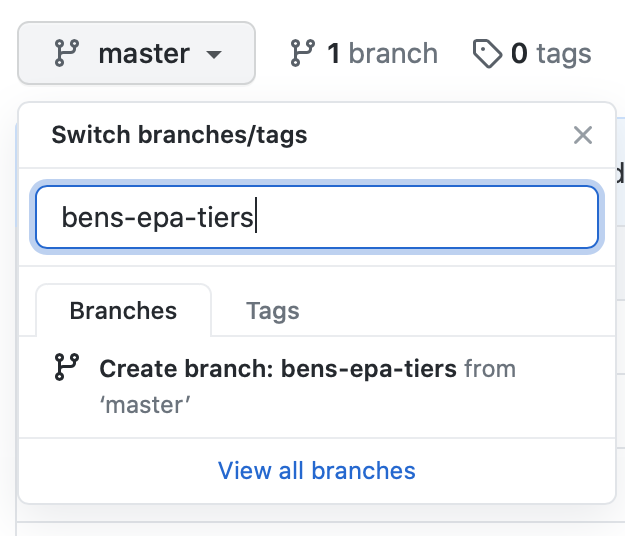
Create a new branch within your repo and try to choose a descriptive name

```{r, echo=FALSE, out.width="50%", fig.align='center'}
knitr::include_graphics("https://user-images.githubusercontent.com/38586519/90564133-24b64580-e1a5-11ea-91cc-5e34224f63d5.png")
```

### Import the repo into a RStudio Project

Copy the web url of the new repo into your clipboard

```{r, echo=FALSE, out.width="50%", fig.align='center'}
knitr::include_graphics("https://user-images.githubusercontent.com/38586519/90564521-cccc0e80-e1a5-11ea-8fd7-493f40b74cd3.png")
```

In RStudio choose *Create a Project* > *Version Control* > *Git*, paste the
Repository URL from above and click "Create Project". The whole thing will be
downloaded and the project opened.

Important: Make sure you switch into your newly created branch from the previous
section!

For further information please visit [happygitwithr.com](https://happygitwithr.com/rstudio-git-github.html).

```{r, echo=FALSE, fig.align='center'}
knitr::include_graphics("https://user-images.githubusercontent.com/38586519/90626505-57028a00-e21b-11ea-847d-621083af7771.png")
```

### Start working on the post

Create the new article by running

```{r, eval=FALSE}
distill::create_post("Title of your post")
```

This will create a new folder in `_posts` and name it with the current date and
your chosen title. Additionally the RMarkdown file in which you will write your
post will be opened automatically. It will look something like this

```{r, echo=FALSE, fig.align='center'}
knitr::include_graphics("https://user-images.githubusercontent.com/38586519/90627998-1dcb1980-e21d-11ea-8ea9-e307f81087c4.png")
```

We need to tweak the metadata as well as the chunk setup a little bit in order
for the post to meet our expectations. Please have a look at [example
file](https://github.com/mrcaseb/open-source-football/blob/master/_sample_meta_and_options.Rmd)
for a little template.

```{r, echo=FALSE, fig.align='center'}
knitr::include_graphics("https://user-images.githubusercontent.com/38586519/90628632-3e47a380-e21e-11ea-9bae-a01ac6720026.png")
```

Now you are ready to write your post. Please see [Distill for R
Markdown](https://rstudio.github.io/distill) as well as some of [the
already published posts](https://github.com/mrcaseb/open-source-football/tree/master/_posts).
And if you feel like you need more information about R Markdown please feel free
to check the [R Markdown Cookbook](https://bookdown.org/yihui/rmarkdown-cookbook/).

### Push your work into your repo

Using git within RStudio is easy because you can do it graphically. However, it
doesn't make sense to provide a ton of screenshots and text here. Instead I
recommend two sources:

* The short one is [happygitwithr.com](https://happygitwithr.com/rstudio-git-github.html)
* The detailed one is [Hadley's section](http://r-pkgs.had.co.nz/git.html)

Commit all files **which are related to your post** and go on with the last step.
There are 4 files not related to your post causing merge conflicts when you push
them without updating them before your pull request. To avoid this please run the
following code right before you commit all your files.

```{r, eval=FALSE}
source("https://raw.githubusercontent.com/mrcaseb/open-source-football/master/_update_con_files.R")
```

Never mind if you forget that. You can create the pull request anyway and GitHub
will inform you if there are conflicts. Just run the above lines and commit and
push the updated files `docs/index.html`, `docs/index.xml`, `docs/posts/posts.json`,
`docs/sitemap.xml`.


### Create the Pull Request

To create the Pull Request visit your GitHub repo and you will notice a banner
indicating that you’ve recently pushed a new branch and that you can "compare &
pull request". Follow the steps for [creating a pull request from a fork](https://docs.github.com/en/github/collaborating-with-issues-and-pull-requests/creating-a-pull-request-from-a-fork)
and you are finally done.



Releases
No releases published
Languages
- HTML 86.9%
- JavaScript 12.3%
- Other 0.8%