A modern, zero-dependency datepicker with first-class support for the Persian (Jalali/Shamsi) calendar and an optional Gregorian calendar mode. Built on a pluggable engine abstraction, headless state management, and a full accessibility and keyboard-navigation layer.
| Popover — Single Date | Popover — Range Selection |
|---|---|
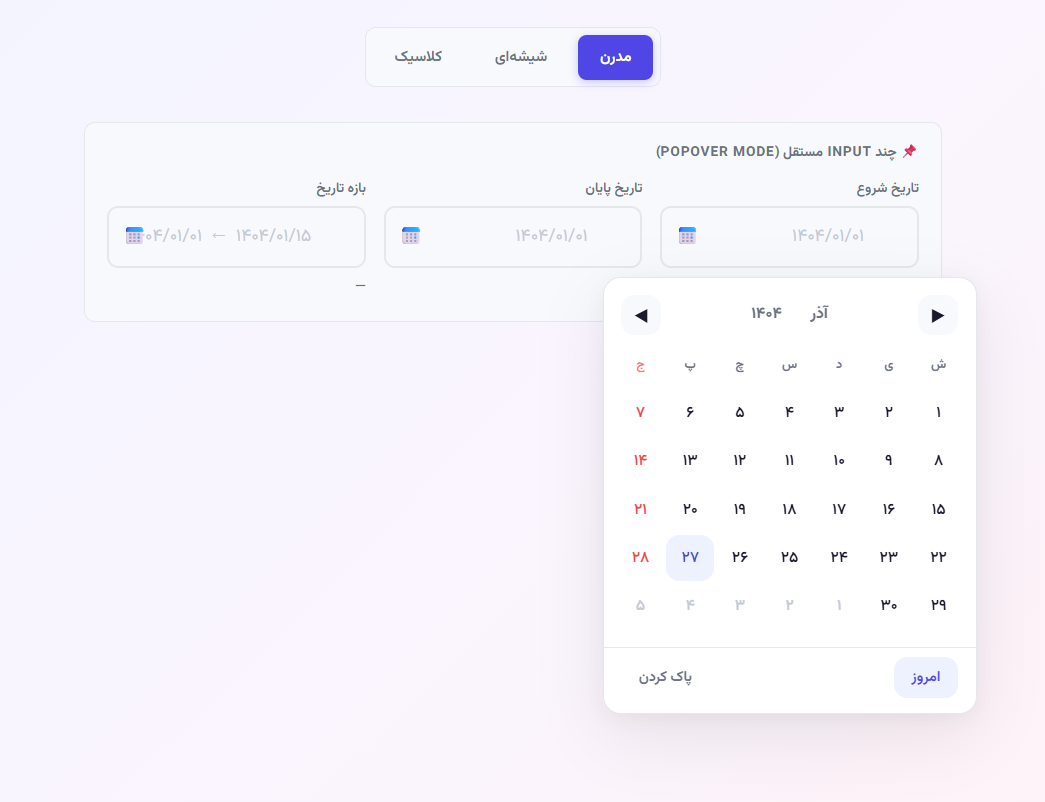 |
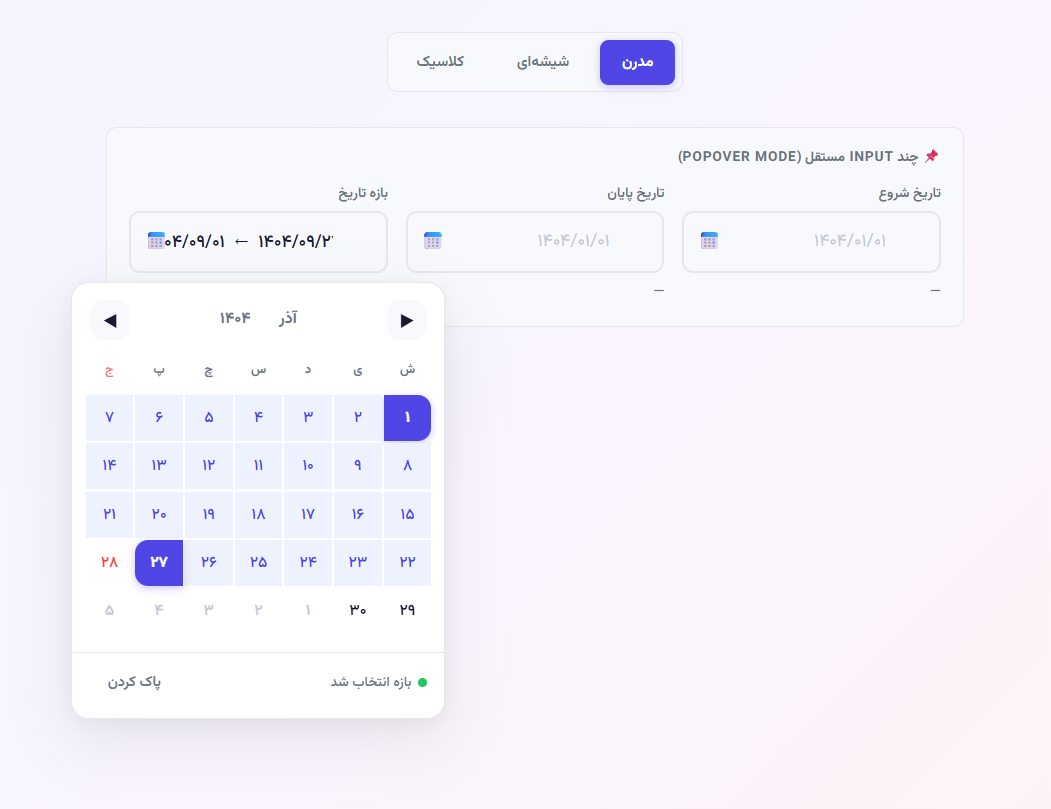 |
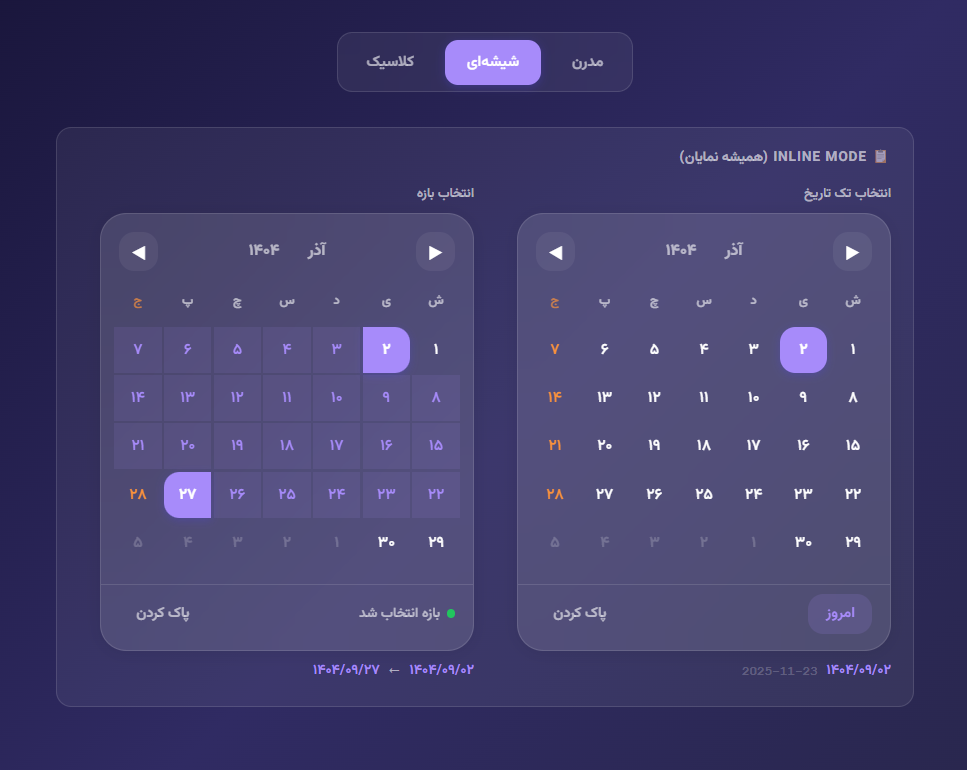
Inline Mode — Glassmorphism Theme
- Jalali calendar — default calendar system with precise Jalaali ↔ Gregorian conversion
- Gregorian calendar — opt-in via
calendar: 'gregorian'(v3); correct century and 400-year leap rules - Pluggable engine abstraction —
JalaliEngineandGregorianEngineimplement a commonCalendarEngineinterface; the architecture is ready for additional calendar systems in the future - Zero dependencies — pure vanilla JS, no external libraries
- TypeScript support — hand-authored
.d.tsdeclarations for all public types and APIs - Headless architecture — engine, renderer, and input mask are fully decoupled
- Locale / i18n system — built-in locales (
fa-IR,en-US,en-US-gregorian,fa-IR-gregorian); pluggable custom locales viaPARDIS_LOCALESregistry - RTL / LTR — direction controlled by the active locale; arrow-key and swipe navigation respect the writing direction
- Range selection — start/end date picking with hover preview, preset ranges, and max-range enforcement
- Input masking — auto-formats digits with slash separators
- Accessibility — ARIA roles,
aria-liveannouncements, full keyboard navigation (arrows, PageUp/Down, Home/End, T), screen-reader support - Touch & swipe — swipe left/right to navigate months on touch devices
- Three built-in themes — Modern, Glassmorphism, Classic/Dark
- Multi-instance — any number of independent pickers on one page
- Inline mode — always-visible calendar without an input field
- E2E tested — 25 Playwright tests across Jalali, Gregorian, range, and keyboard scenarios
npm install pardis-jalali-datepickerimport { PardisDatepicker } from 'pardis-jalali-datepicker';
import 'pardis-jalali-datepicker/lib/pardis-jalali-datepicker.css';<link rel="stylesheet" href="dist/index.global.css">
<script src="dist/index.global.js"></script>
<script>
const { PardisDatepicker } = PardisJalaliDatepicker;
new PardisDatepicker('#myInput', { /* options */ });
</script>Note: The library uses the
Vazirmatnfont by default (via--pardis-font). Load it from Google Fonts or override the CSS variable with your preferred font.
In v2.0.0 the lib/ source became an ES module. Plain <script src="lib/..."> no longer works:
<!-- ❌ v1 — no longer valid -->
<script src="lib/pardis-jalali-datepicker.js"></script>

<!-- ✅ v2+ — use the IIFE build -->
<script src="dist/index.global.js"></script>
The global namespace changed from PardisDatepicker to PardisJalaliDatepicker.PardisDatepicker.
Jalali is the default calendar. No calendar option is required for existing integrations.
<link rel="stylesheet" href="lib/pardis-jalali-datepicker.css">
<input id="myInput" class="pardis-input" type="text" placeholder="۱۴۰۴/۰۱/۰۱">
<script src="dist/index.global.js"></script>
<script>
  const { PardisDatepicker } = PardisJalaliDatepicker;

  const dp = new PardisDatepicker('#myInput', {
    onChange(payload) {
      console.log(payload.jalali.formatted);    // '1404/01/01'
      console.log(payload.gregorian.formatted); // '2025-03-21'
    }
  });
</script>
The onChange payload always includes both Jalali and Gregorian representations. See Date Payload for the full structure.
Pass calendar: 'gregorian' to switch to a Gregorian calendar. Use the en-US-gregorian locale for English month names and Sunday-first week layout, or fa-IR-gregorian for Persian labels with RTL direction.
const dp = new PardisDatepicker('#dateInput', {
  calendar: 'gregorian',
  locale: 'en-US-gregorian',
  onChange(payload) {
    console.log(payload.gregorian.year);     // 2025
    console.log(payload.gregorian.month);    // 3
    console.log(payload.gregorian.day);      // 21
    console.log(payload.gregorian.formatted); // '2025-03-21'
    console.log(payload.iso);               // '2025-03-21'
  }
});
Gregorian specifics:
- Leap year rules follow the Gregorian standard: divisible by 4, except centuries, except 400-year multiples (1900 is not a leap year; 2000 is).
- Sunday is the first day of the week in
en-US-gregorian; Saturday infa-IR-gregorian. - Day cells expose
.gy/.gm/.gdshim properties for backward-compatible DOM access.
Multiple pickers with different calendars can coexist on the same page:
const jalaliPicker    = new PardisDatepicker('#input-fa', { calendar: 'jalali' });
const gregorianPicker = new PardisDatepicker('#input-en', { calendar: 'gregorian', locale: 'en-US-gregorian' });| Locale key | Language | Calendar | Direction | Week start |
|---|---|---|---|---|
fa-IR |
Persian | Jalali | RTL | Saturday |
en-US |
English | Jalali | LTR | Saturday |
en-US-gregorian |
English | Gregorian | LTR | Sunday |
fa-IR-gregorian |
Persian | Gregorian | RTL | Saturday |
No breaking changes in v3. All v2 code works unchanged.
calendardefaults to'jalali'— omitting the option has no effect on existing behavior.localedefaults to'fa-IR'— RTL, Persian numerals, Jalali months.- Event payloads, method signatures, and CSS class names are unchanged.
{jy, jm, jd}objects inminDate/maxDateare still accepted. A one-time console deprecation warning is emitted; update to{year, month, day}at your convenience.
| Option | Type | Default | Description |
|---|---|---|---|
calendar |
'jalali' | 'gregorian' |
'jalali' |
Calendar system to use. Jalali is the default and requires no change for existing integrations. |
locale |
'fa-IR' | 'en-US' | 'en-US-gregorian' | 'fa-IR-gregorian' | LocaleObject | null |
'fa-IR' |
Display locale. Controls month/weekday names, numeral style, and text direction. Pass a built-in string key or a custom locale object. |
inline |
boolean |
false |
Render as always-visible calendar inside the target element (no input required) |
rangeMode |
boolean |
false |
Enable range selection (start + end date) |
outputFormat |
'both' | 'jalali' | 'gregorian' |
'both' |
Shape of the payload passed to callbacks |
initialYear |
number |
current year | Year to display on first render |
initialMonth |
number |
current month | Month (1–12) to display on first render |
minDate |
{year, month, day} |
null |
Earliest selectable date. Legacy {jy, jm, jd} accepted with deprecation warning. |
maxDate |
{year, month, day} |
null |
Latest selectable date. Legacy {jy, jm, jd} accepted with deprecation warning. |
disabledDates |
{year,month,day}[] | (year,month,day) => boolean |
null |
Dates to disable — array of date objects or a predicate function. Arguments are in the active calendar's coordinate system. |
highlightedDates |
{year,month,day,className?}[] |
null |
Dates to mark with a custom CSS class (defaults to 'highlighted') |
maxRange |
number |
null |
Maximum number of days allowed in a range selection |
numeralType |
'persian' | 'latin' | 'arabic' |
locale default | Digit style. Overrides locale.numerals when set explicitly. |
onChange |
function |
null |
Called when a single date is selected. Receives a date payload |
onRangeStart |
function |
null |
Called when the first date of a range is picked. Receives a date payload |
onRangeSelect |
function |
null |
Called when both range dates are selected. Receives { start, end } where each is a date payload |
onClear |
function |
null |
Called when the selection is cleared |
| Method | Description |
|---|---|
dp.open() |
Open the popover (no-op in inline mode) |
dp.close() |
Close the popover (no-op in inline mode) |
dp.getValue() |
Returns the current date payload, or null if nothing is selected |
dp.setValue(jy, jm, jd) |
Programmatically select a date by Jalali coordinates (Jalali calendar mode) |
dp.clear() |
Clear the current selection |
dp.setOption(key, value) |
Update an option after construction and re-render. Supports: calendar, locale, rangeMode, outputFormat, minDate, maxDate, disabledDates, highlightedDates, maxRange, numeralType |
dp.destroy() |
Remove all event listeners and DOM elements created by this instance |
dp.goToToday() |
Navigate the view to today (does not select if today is disabled) |
dp.getPresetRange(name) |
Returns a {start, end} date range for 'thisWeek', 'thisMonth', 'last7Days', or 'last30Days' |
Access the underlying engine directly via dp.engine for advanced use.
When outputFormat: 'both' (default), callbacks receive:
{
  jalali: {
    year,             // 1404
    month,            // 1
    day,              // 1
    monthName,        // 'فروردین'
    formatted,        // '1404/01/01'
    formattedPersian, // '۱۴۰۴/۰۱/۰۱'
    timestamp         // Unix ms
  },
  gregorian: {
    year,             // 2025
    month,            // 3
    day,              // 21
    monthName,        // 'March'
    formatted,        // '2025-03-21'
    date,             // native Date object
    timestamp         // Unix ms
  },
  iso,                // '2025-03-21'
  timestamp           // Unix ms
}
When outputFormat: 'jalali' or outputFormat: 'gregorian', the corresponding fields are returned directly (no nesting).
const dp = new PardisDatepicker('#dateInput', {
  onChange({ jalali, gregorian, iso }) {
    console.log(jalali.formattedPersian); // '۱۴۰۴/۰۱/۰۱'
    console.log(gregorian.formatted);     // '2025-03-21'
    console.log(iso);                     // '2025-03-21'
  },
  onClear: () => console.log('cleared')
});const dp = new PardisDatepicker('#rangeInput', {
rangeMode: true,
onRangeSelect({ start, end }) {
console.log(start.jalali.formatted); // '1404/01/05'
console.log(end.jalali.formatted); // '1404/01/15'
}
});// target must be a container element, not an input
const dp = new PardisDatepicker('#calendarContainer', {
inline: true,
onChange: (payload) => console.log(payload.jalali.formatted)
});const dp = new PardisDatepicker('#input', {
minDate: { year: 1404, month: 1, day: 1 },
maxDate: { year: 1404, month: 6, day: 31 },
onChange: (payload) => console.log(payload)
});// Disable specific dates (array)
const dp = new PardisDatepicker('#input', {
disabledDates: [
{ year: 1404, month: 1, day: 13 }, // Sizdah Be-dar
{ year: 1404, month: 1, day: 1 }, // Nowruz
]
});
// Disable dates with a predicate (e.g. disable all Fridays — Jalali mode)
const dp2 = new PardisDatepicker('#input2', {
disabledDates: (year, month, day) => {
// In Jalali mode, arguments are Jalali year/month/day
const { gy, gm, gd } = JalaaliUtil.toGregorian(year, month, day);
return new Date(gy, gm - 1, gd).getDay() === 5; // Friday
}
});const dp = new PardisDatepicker('#input', {
highlightedDates: [
{ year: 1404, month: 1, day: 1, className: 'holiday' }, // custom class
{ year: 1404, month: 1, day: 13 }, // uses default 'highlighted' class
]
});/* Style your highlighted dates */
.pardis-day.holiday { background: #ffeeba; border-radius: 50%; }const dp = new PardisDatepicker('#input', {
rangeMode: true,
maxRange: 30, // reject selections longer than 30 days
onRangeSelect({ start, end }) {
console.log(start.jalali.formatted, '→', end.jalali.formatted);
}
});
// Preset buttons (هفته جاری, ماه جاری, ۷ روز گذشته, ۳۰ روز گذشته)
// appear automatically in the footer when rangeMode is true.const dp = new PardisDatepicker('#input', {
numeralType: 'latin', // render 1 2 3 instead of ۱ ۲ ۳
});When the calendar is open, the following keys work in day view:
| Key | Action |
|---|---|
| Arrow keys | Move focus one day (←→) or one week (↑↓) |
| Page Up / Page Down | Previous / next month |
| Shift + Page Up / Down | Previous / next year |
| Home / End | First / last day of the current week row |
| T | Jump to today |
| Enter / Space | Select the focused date |
| Escape | Close the picker |
const dp = new PardisDatepicker('#input');

dp.setValue(1404, 3, 15);   // select Jalali 1404/03/15
dp.getValue();               // returns current payload or null
dp.clear();                  // clear selection
dp.open();                   // open popover
dp.close();                  // close popover
dp.destroy();                // remove DOM and listeners

// Toggle range mode at runtime
dp.setOption('rangeMode', true);dp.engine.goToNextMonth();
dp.engine.goToPrevMonth();
dp.engine.goToNextYear();
dp.engine.goToPrevYear();
dp.engine.goToToday();
dp.engine.setViewMode('month'); // 'day' | 'month' | 'year'
dp.engine.on('viewChange', ({ year, month, monthName, viewMode }) => {
console.log(monthName, year);
});// Build a full payload for a Jalali date without creating a picker
const payload = PardisEngine.buildDatePayload(1404, 1, 1, 'both');
// Build a full payload for a Gregorian date
const payload = PardisEngine.buildGregorianPayload(2025, 3, 21, 'both');The library is composed of the following classes:
| Class | Role |
|---|---|
JalaaliUtil |
Pure Jalaali ↔ Gregorian math — no DOM, no state. Do not call directly in new code. |
JalaliEngine |
Implements CalendarEngine using JalaaliUtil under the hood |
GregorianEngine |
Implements CalendarEngine with standard Gregorian leap rules |
PardisEngine |
Calendar state machine — selection, navigation, event emitter. Uses _calEngine for all date arithmetic. |
PardisRenderer |
Binds engine state to a DOM container, re-renders on change |
PardisInputMask |
Handles digit input and auto-slash formatting |
PardisDatepicker |
Public API — wires the above together, manages popover/inline lifecycle |
PardisEngine no longer calls JalaaliUtil directly. All date arithmetic is delegated through the CalendarEngine abstraction, which exposes: toJDN, fromJDN, getDaysInMonth, isLeapYear, getWeekdayOffset, toGregorian, fromGregorian.
This design makes the library ready for additional calendar systems in the future. Hijri calendar is not yet implemented.
You can use PardisEngine and PardisRenderer directly to build a fully custom UI without using PardisDatepicker.
For the detailed multi-calendar architecture design, see docs/architecture/multi-calendar-rfc.md.
pardis-jalali-datepicker/
├── lib/
│   ├── pardis-jalali-datepicker.js    # Library source (ES module)
│   ├── pardis-jalali-datepicker.css   # CSS variables, themes, component styles
│   └── pardis-jalali-datepicker.d.ts  # TypeScript declarations
├── dist/
│   ├── index.mjs          # ESM build
│   ├── index.cjs          # CommonJS build
│   └── index.global.js    # IIFE build (browser global)
├── e2e/
│   ├── jalali.spec.ts
│   ├── gregorian.spec.ts
│   ├── range.spec.ts
│   └── keyboard.spec.ts
├── scripts/
│   ├── year-boundary-test.js
│   └── gregorian-engine-test.js
├── demo/
└── index.html             # Interactive demo page
Apply a theme by setting data-pardis-theme on <html>:
| Theme | data-pardis-theme |
<body> class |
|---|---|---|
| Modern (default) | (remove attribute) | theme-modern |
| Glassmorphism | glass |
theme-glass |
| Classic / Dark | classic |
theme-classic |
// Switch to glass theme
document.documentElement.setAttribute('data-pardis-theme', 'glass');
document.body.className = 'theme-glass';

// Switch back to modern
document.documentElement.removeAttribute('data-pardis-theme');
document.body.className = 'theme-modern';
CSS custom properties are prefixed --pardis-*. Override them to create custom themes without modifying the library.
Add the pardis-input class to your <input> for the built-in styled input:
<div class="pardis-input-wrapper">
  <input class="pardis-input" id="myInput" type="text"
         placeholder="۱۴۰۴/۰۱/۰۱" autocomplete="off">
  <span class="pardis-input-icon">📅</span>
</div>
The input wrapper is created automatically by PardisDatepicker if it does not already exist.
The library has two levels of automated tests.
Validate headless engine math — Jalali ↔ Gregorian conversion, leap year logic, JDN round-trips, range mode, and constraint handling — using plain Node.js scripts with no test runner required.
npm testCovers:
scripts/year-boundary-test.js— Jalali year boundary and leap year casesscripts/gregorian-engine-test.js— Gregorian engine: leap year rules (1900, 2000, 2024), JDN round-trips, payload shape, range mode, backward-compat shims, constraint handling (12 tests)
Validate real browser interaction via Playwright. Tests run against Chromium in headless mode.
# Run all E2E tests (headless)
npm run test:e2e

# Open the interactive Playwright UI
npm run test:e2e:ui

# Run unit tests + E2E in sequence
npm run test:all
Prerequisites: Build the library first, then install Playwright browsers once:
npm run build
npx playwright install chromium
Test coverage:
| File | Tests | What it covers |
|---|---|---|
e2e/jalali.spec.ts |
8 | Popover open, Esfand leap/non-leap cell counts, click select, payload shape, month nav, today cell, year grid |
e2e/gregorian.spec.ts |
8 | February 2023/2024/1900/2000 cell counts, payload shape, Sunday-first weekday, instance independence, month nav |
e2e/range.spec.ts |
4 | Range start hint, range end + in-range cells, "This Month" preset, clear |
e2e/keyboard.spec.ts |
5 | ArrowRight focus, Enter select, Escape close, Tab no errors, full keyboard flow |
- run: npm run build
- run: npx playwright install --with-deps chromium
- run: npm run test:allThe following features are planned but not yet implemented:
- Hijri (Islamic) calendar — the
CalendarEngineabstraction is designed to accommodate additional calendar systems; a Hijri engine is the primary planned addition - Mobile bottom-sheet UI — a touch-optimized bottom-sheet popover for small screens (the
mobileModeoption has been removed until this is ready) - Additional locale coverage — more built-in locale objects
- Accessibility enhancements — ongoing improvements toward full WCAG 2.1 AA compliance
Contributions are welcome. Please open an issue before submitting a pull request for significant changes.
- Fork the repository and create a feature branch.
- Run
npm run buildto verify the build succeeds. - Add or update unit tests in
scripts/and E2E tests ine2e/as appropriate. - Run
npm run test:alland confirm all tests pass. - Submit a pull request with a clear description of the change.
Works in all modern browsers (Chrome, Firefox, Safari, Edge). No polyfills required.
MIT