
Simple promise to wait for server ready or DOM ready inside a mocha specification


server-listening is a lightweight helper utility to reduce the amount of boilerplate code needed to startup servers when running mocha specifications.
Install package:
$ npm install --save-dev server-listeningImport package:
import { serverListening } from 'server-listening';Three primary tools:
serverListening.ready(server)Waits for your node server application to start upserverListening.startWebServer(options)Starts and waits for static web server (express), see: start-web-server.spec.jsserverListening.loadWebPage(url, options)Uses JSDOM to load and wait for a web page, see: load-web-page.spec.js
(for similar functionality using Puppeteer instead, see the puppeteer-browser-ready project).
import { server } from '../server.js';
before(() => serverListening.ready(server));
after(() =>  serverListening.close(server));
Example usage:
hello-world/mocha.spec.js
NOTE:
Mocha's default timeout is 2,000 milliseconds which often is not enough time for a node server to shutdown.
Use the --timeout flag to help avoid this problem:
"scripts": {
   "test": "mocha *.spec.js --timeout 7000"
}The setPort(options) function is just a handy way to set the environment variable for the
HTTP port. This function is for convenience and is not required.
serverListening.setPort({ port: 9000 });| Option | Meaning | Default |
|---|---|---|
| port | Port number for server (0 means choose an unused port). |
0 |
| name | Environment variable name to store port number. | 'port' |
The ready(server) and close(server) functions return a
promise, enabling
chaining of operations.
For example, a port variable could be set after the server is ready using:
let port;
before(() => serverListening.ready(server).then(() => port = server.address().port));// Mocha Specification Suite
// Imports
import { assertDeepStrictEqual } from 'assert-deep-strict-equal';
import { serverListening } from 'server-listening';
// Setup
const url = 'https://pretty-print-json.js.org/';
let web; //fields: url, dom, window, document, title, html, verbose
const loadWebPage = () => serverListening.loadWebPage(url).then(webInst => web = webInst);
const closeWebPage = () => serverListening.closeWebPage(web);
////////////////////////////////////////////////////////////////////////////////
describe('The web page', () => {
const getTags = (elems) => [...elems].map(elem => elem.nodeName.toLowerCase());
before(loadWebPage);
after(closeWebPage);
it('has the correct URL', () => {
const actual = { url: web.window.location.href };
const expected = { url: url };
assertDeepStrictEqual(actual, expected);
});
it('body has exactly one header, main, and footer', () => {
const actual = getTags(web.document.querySelectorAll('body >*'));
const expected = ['header', 'main', 'footer'];
assertDeepStrictEqual(actual, expected);
});
});
////////////////////////////////////////////////////////////////////////////////
describe('The document content', () => {
before(loadWebPage);
after(closeWebPage);
it('has a 🚀 traveling to 🪐!', () => {
const html = web.document.body.outerHTML;
const actual = { '🚀': !!html.match(/🚀/g), '🪐': !!html.match(/🪐/g) };
const expected = { '🚀': true, '🪐': true };
assertDeepStrictEqual(actual, expected);
});
});Above mocha test will output:
  The web page
    ✓ has the correct URL -> https://pretty-print-json.js.org/
    ✓ body has exactly one header, main, and footer

  The document content
    ✓ has a 🚀 traveling to 🪐!
Example of loading a web page into jsdom from a local node server:
https://github.com/dna-dom/data-dashboard/blob/main/spec/spec.js
See the TypeScript declarations at the top of the src/server-listening.ts file.
The declarations provide type information about the API, such as the options for calling
serverListening.setPort():
type ServerListeningOptions = {
   port?:  number,  //0 = find unused port
   name?:  string,  //environment variable to pass port number
};To try out server-listening locally, enter the following terminal commands:
$ git clone https://github.com/center-key/server-listening.git
$ cd server-listening/hello-world
$ npm install
$ npm test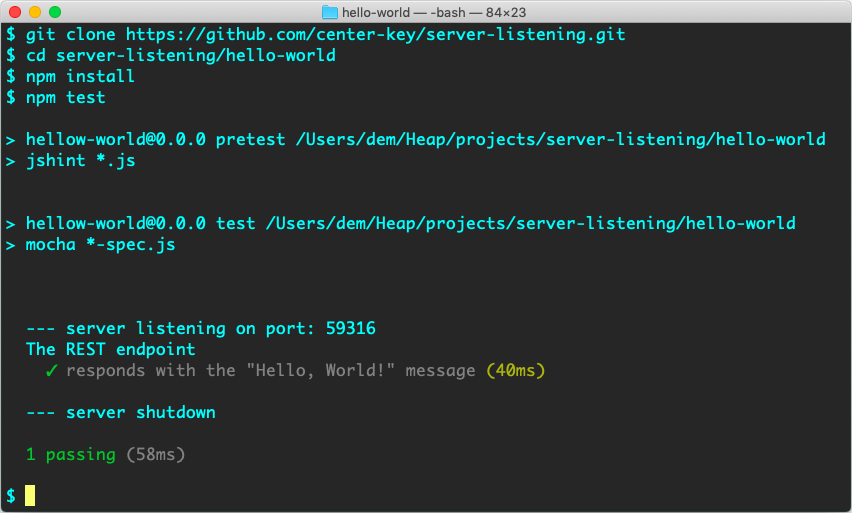
You can also run the server locally:
$ npm startand then use a browser to view the 'Hello, World!' message at: http://localhost:3300
server-listening is open source under the MIT License.