MRTK Toolbox#7176
Conversation


 Troy-Ferrell
requested review from
CDiaz-MS,
Railboy,
cre8ivepark,
david-c-kline,
julenka,
keveleigh,
thalbern and
wiwei
Troy-Ferrell
requested review from
CDiaz-MS,
Railboy,
cre8ivepark,
david-c-kline,
julenka,
keveleigh,
thalbern and
wiwei

|
Love this!!!!!! That's amazing @Troy-Ferrell 🎆 |

 thalbern
left a comment
thalbern
left a comment
thalbern
left a comment
There was a problem hiding this comment.
If this is not in experimental we would need a doc page for it and also i would write a test that ensures that all the prefabs in the json file are available and instantiable.
Assets/MixedRealityToolkit/Inspectors/MixedRealityToolboxWindow.cs
Outdated
Show resolved
Hide resolved

|
Is this the fabled Mixed Reality Toolkit Toolbox?! But actually this is pretty neat - going forward we'll have to figure out how to add another suffix on maybe... Mixed Reality Toolkit Toolbox Toolset? |
Indeed! I forgot to add this last night to the draft. @thalbern I am actually interested in people's thoughts on making this experimental or not. |

…w.cs

Co-Authored-By: Bernadette Thalhammer <36998103+thalbern@users.noreply.github.com>

|
Very interesting development @Troy-Ferrell , will be watching intently. Although, why build it im imgui, this would be a lot better in ui elements (granted, not sure thats available in 2018) |

Assets/MixedRealityToolkit/Inspectors/Data/DefaultToolboxItems.json
Outdated
Show resolved
Hide resolved
Yes I am not aware that the new Unity UI Elements in available/truly supported in 2018. I also have less experience with that API compared to IMGUI, which is also how everything else in MRTK is built |

|
This is beautiful @Troy-Ferrell ! I'll work on the thumbnail images. what's the recommended width x height to make it fill the button without distortion? |
imo we should follow our feature guidelines that say that new features have to be covered by tests and documentation - I think one test that checks if those prefabs are valid should be fine and a small article / paragraph / mention about the toolbox in the docs. |
|
@Troy-Ferrell Is it possible to use existing images in the Documentation folder? |
|
@thalbern yes, that makes sense. Adding a test and some docs is trivial. It's more just a question if it should be experimental to begin with or not @cre8ivepark I copied a lot of the photos from the documentation folder into the new folder under Assets\MRTK. But we can't use the existing documentation folder directly, especially since the documentation doesn't ship as part of the unity packages. The RelativeIconPath in the JSON is the relative path under "Assets/MixedRealityToolkit/" only (because of the module path setting = 1) @cre8ivepark regarding to size...I'd say 128x128 or maybe 256x256? Whatever their resolution is, they'll be down-sampled to fit in the button which is like 150 pixels |
|
/azp run |

|
Azure Pipelines successfully started running 2 pipeline(s). |


|
Suggestion: I noticed that release notes are not included in this change. It would be good to mention this cool new feature in our release notes for 2.4. |

|
@cre8ivepark I think it's time to give this one more test, when you get a chance, with my changes to the Unity UI section. Pending that, anybody else's tests, and @julenka's request for adding this to the release notes, I think we're good to go! |
|
/azp run |
|
Azure Pipelines successfully started running 2 pipeline(s). |

 CDiaz-MS
left a comment
CDiaz-MS
left a comment
CDiaz-MS
left a comment
There was a problem hiding this comment.
Tested out the new Unity UI element portion and it works for me.


Great suggestion!

Co-authored-by: CDiaz-MS <53493796+CDiaz-MS@users.noreply.github.com>
|
/azp run |
|
Azure Pipelines successfully started running 2 pipeline(s). |

 cre8ivepark
left a comment
cre8ivepark
left a comment
cre8ivepark
left a comment
There was a problem hiding this comment.
Added minor polish for the information text!
Tested and works well!
|
/azp run |
|
Azure Pipelines successfully started running 2 pipeline(s). |
|
@keveleigh I'll fix the docs error |
|
@keveleigh Fixed TOC issue. |
|
/azp run |
|
Azure Pipelines successfully started running 2 pipeline(s). |
|
@cre8ivepark Ah shoot, my bad. Thanks for fixing! |


9 participants


Overview
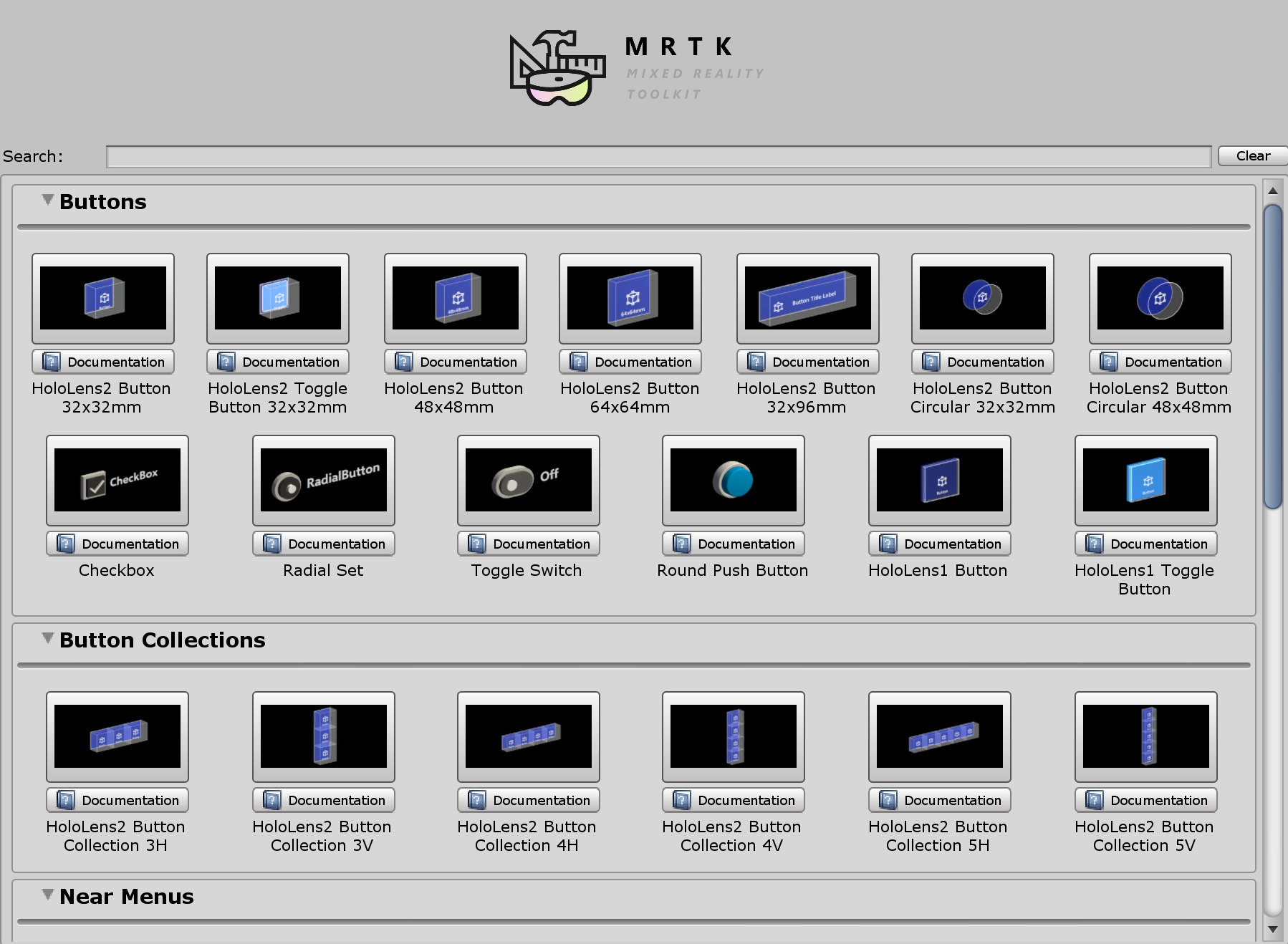
The Mixed Reality Toolkit could use a toolbox! Inspired to make this after realizing that we had progress indicator prefabs available in MRTK....and I didn't even know they existed.
The purpose of this toolbox is similar to other frameworks such as WPF etc, one could easily drag and drop pre-built components from a toolbox. Drag'n'drop proved to be harder than I imagined so I opted to just use a grid of buttons for the short term.
Updated UI:
Changes
Verification