Simple. Modern. Efficient.
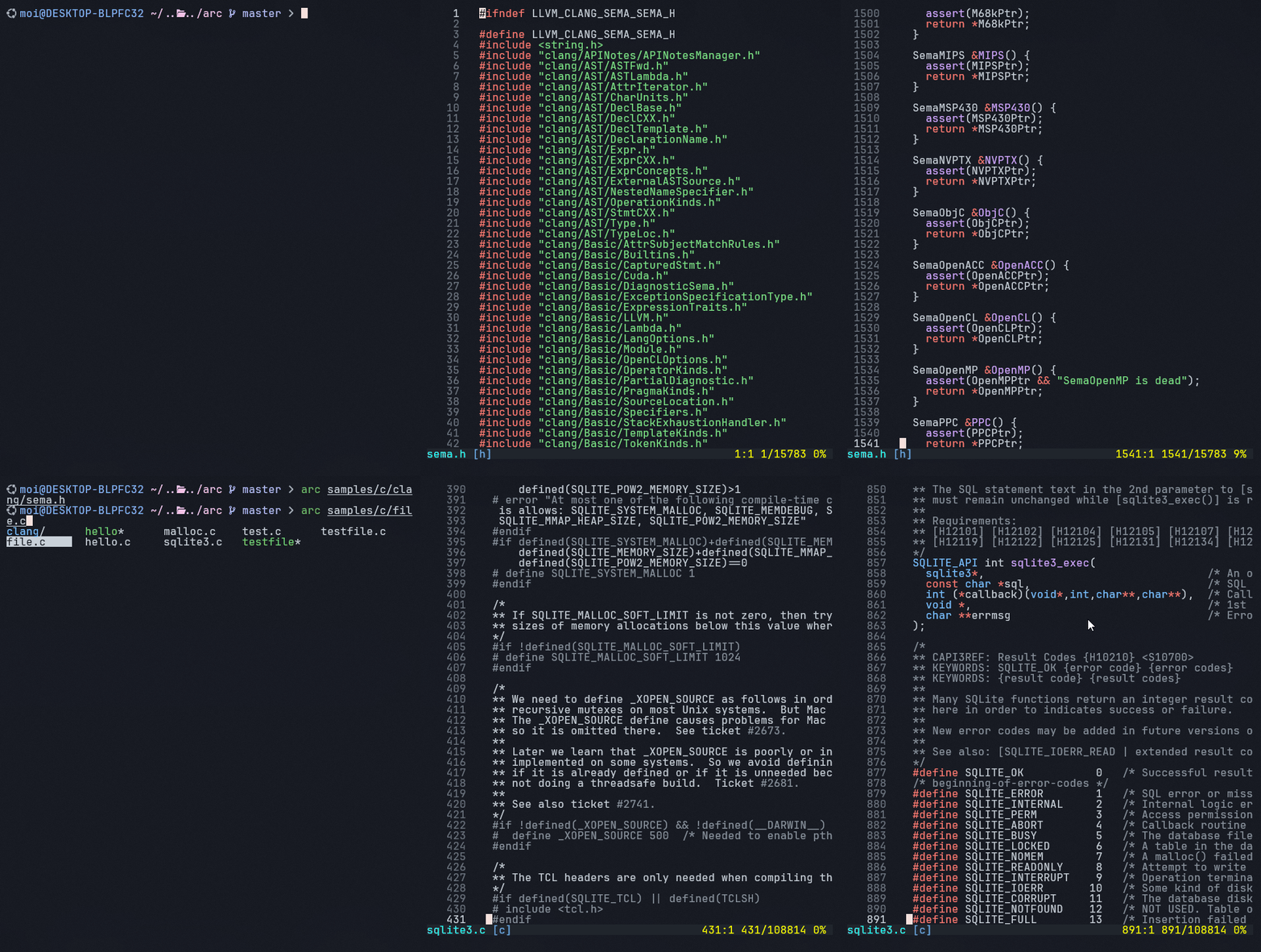
A modern terminal-based text editor with Tree-sitter powered syntax highlighting.





Arc combines the accessibility of nano with powerful features and a clean interface.
Arc is currently under active development and is not production-ready. Expect bugs, breaking changes, and incomplete features.
- Windows: Cursor bouncing and rendering artifacts
- Color Rendering: Theme color mismatches across platforms
- Project Structure: Code organization is being refactored
- Stability: Crashes and unexpected behavior may occur
We recommend:
- Using Arc for experimental purposes only
- Testing in non-critical environments
- Reporting bugs to help improve stability
- Checking back regularly for updates
- Intuitive Interface: Minimal, focused on your content with smart viewport management
- Advanced Syntax Highlighting: Tree-sitter powered, accurate AST-based coloring
- Modern Editing: Gap buffer for efficient text ops, unlimited undo/redo
- Smart Selection: Visual selection with copy, cut, paste
- Live Configuration: Hot-reload themes and settings
- Cross-Platform: Windows (PDCurses), Linux, macOS (NCurses)
- Lightweight: Fast startup, minimal resource usage
- Customizable: Multiple color themes, configurable behavior
- All Platforms: CMake 3.16+, C++20 compiler, Git (for submodules)
- Linux:
build-essential cmake libncurses5-dev libyaml-cpp-dev - macOS:
cmake ncurses yaml-cpp(via Homebrew) - Windows: Visual Studio 2019+ with vcpkg
Linux/Ubuntu
sudo apt install build-essential cmake libncurses5-dev libyaml-cpp-dev
git clone --recursive https://github.com/moisnx/arc.git
cd arc
mkdir build && cd build
cmake .. -DCMAKE_BUILD_TYPE=Release
make -j$(nproc)
./arc
macOS
brew install cmake ncurses yaml-cpp
git clone --recursive https://github.com/moisnx/arc.git
cd arc
mkdir build && cd build
cmake .. -DCMAKE_BUILD_TYPE=Release
make -j$(sysctl -n hw.ncpu)
./arc
Windows
git clone https://github.com/microsoft/vcpkg.git C:\tools\vcpkg
cd C:\tools\vcpkg
.\bootstrap-vcpkg.bat
.\vcpkg integrate install
.\vcpkg install pdcurses:x64-windows-static yaml-cpp:x64-windows-static

git clone --recursive https://github.com/moisnx/arc.git
cd arc
mkdir build
cd build
cmake .. -DCMAKE_TOOLCHAIN_FILE=C:/tools/vcpkg/scripts/buildsystems/vcpkg.cmake `
         -DVCPKG_TARGET_TRIPLET=x64-windows-static
cmake --build . --config Release
.\Release\arc.exe
Note: Forgot
--recursive? Rungit submodule update --init --recursive
- C/C++
- Python
- Rust
- JavaScript/TypeScript (incl. JSX/TSX)
- Markdown (with inline code)
- Go
- Zig
# Open a file
arc filename.txt

# Start with empty buffer
arc

# View help
arc --helpShow Key Bindings
| Key | Action |
|---|---|
| Ctrl+S | Save file |
| Ctrl+Q | Quit (with unsaved changes prompt) |
| Key | Action |
|---|---|
| Ctrl+Z | Undo |
| Ctrl+Y | Redo |
| Backspace | Delete char before cursor |
| Delete | Delete char at cursor |
| Enter | Insert new line |
| Tab | Insert 4 spaces |
| Key | Action |
|---|---|
| Arrow Keys | Move cursor |
| Home/End | Line start/end |
| PgUp/PgDn | Scroll viewport |
| Key | Action |
|---|---|
| Shift+Arrows | Extend selection |
| Ctrl+A | Select all |
| Ctrl+C | Copy selection |
| Ctrl+X | Cut selection |
| Ctrl+V | Paste from clipboard |
| Esc | Clear selection |
Arc auto-creates config files on first run:
- Linux/macOS:
~/.config/arceditor/ - Windows:
%APPDATA%\arceditor\
appearance:
  theme: default

editor:
  tab_size: 4
  line_numbers: true
  cursor_style: auto

syntax:
highlighting: viewport- 14 built-in themes.
- Add custom themes in
.config/arceditor/themes/. - Supports hex, 256-color, and named colors.
- Hot-reload: Changes are auto-reloaded.
# mytheme.theme
name: "My Theme"
background: "#1e1e2e"
foreground: "#cdd6f4"
keyword: "#cba6f7"
string_literal: "#a6e3a1"
comment: "#6c7086"
# ... see existing themes for all optionsProject Structure
arc/
├── src/
│   ├── core/
│   ├── features/
│   ├── ui/
│   └── main.cpp
├── deps/                  # Git submodules: tree-sitter, efsw, etc.
├── treesitter/
│   ├── languages.yaml
│   └── queries/
├── .config/arceditor/
└── CMakeLists.txt
Note: Project structure is currently being refactored and may change significantly.
See build.md for advanced setup and troubleshooting.
- Multiple file tabs/buffers
- Advanced search/replace (regex)
- Git integration (diff, blame)
- LSP support
- Plugin system
- Mouse support enhancements
- Split panes
- Configurable keybindings
💡 Contributions welcome!
Since Arc is in early development, contributions that help stabilize core functionality are especially appreciated.
- Fork & create a feature branch
- Follow .gitmessage for commits
- Run tests before submitting
- Open a PR
- Issues: GitHub Issues
- Discussions: GitHub Discussions
- Docs: build.md | quickstart.md
MIT License – see LICENSE for details.
- Tree-sitter
- NCurses
- PDCurses
- EFSW
- yaml-cpp
- Inspired by nano, micro, and helix editors
Arc Editor – Simple. Modern. Efficient.