A blazingly fast, beautiful terminal file browser built with C++ and Notcurses
Flux (fx) is a modern file browser for the terminal that combines the speed of C++ with gorgeous UI design powered by Notcurses. Built with a clean, modular architecture, Flux provides both a standalone file browser and a flexible API for building custom file management applications.



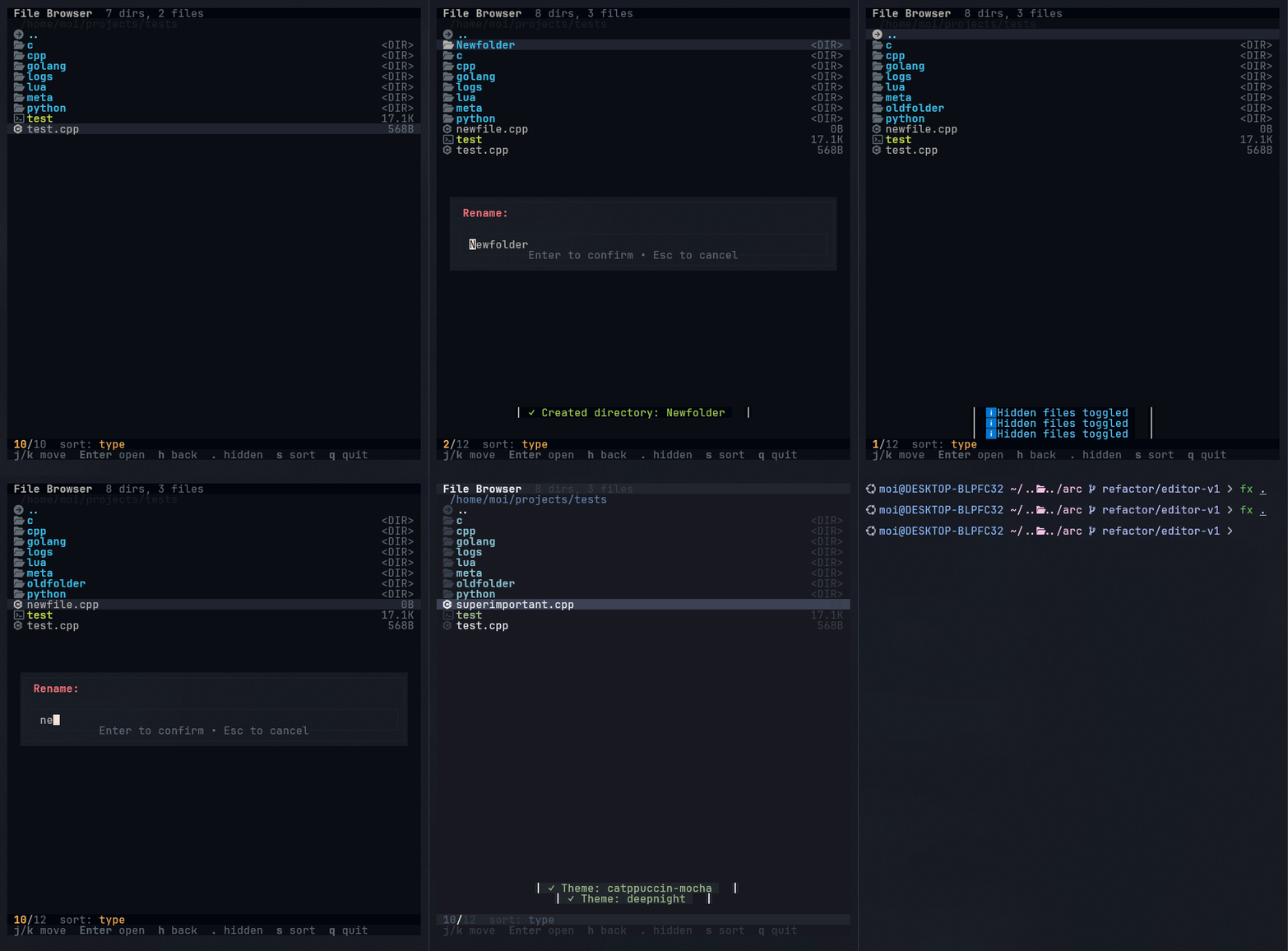
- Lightning fast - Instant startup and snappy navigation
- Beautiful themes - Multiple color schemes with full customization
- True color support - Powered by Notcurses for rich terminal graphics
- Nerd Font icons - File type icons using Nerd Fonts
- Vim-like navigation - hjkl keybindings for efficient browsing
- Smart sorting - Sort by name, size, date, or type
- Hidden files - Toggle visibility with a single key
- File operations - Copy, paste, delete, rename, and create files/directories
- Flexible API - Build custom file management tools on top of Flux
- Multi-file selection
- Fuzzy search and filtering
- File preview pane
- Git integration
- Archive browsing
- Bookmarks
- Extended configuration options
Prerequisites:
- CMake 3.16+
- C++20 compatible compiler (GCC 10+, Clang 11+, MSVC 2019+)
- Notcurses library (3.0+)
Linux/macOS:
# Install dependencies
# Ubuntu/Debian:
sudo apt-get install libnotcurses-dev

# Arch Linux:
sudo pacman -S notcurses

# macOS:
brew install notcurses

# Build
git clone https://github.com/moisnx/flux.git
cd flux
mkdir build && cd build
cmake ..
make
sudo make install
Windows (MSYS2):
# Install Notcurses via MSYS2
pacman -S mingw-w64-x86_64-notcurses

# Build in MSYS2 MinGW64 environment
mkdir build && cd build
cmake .. -G "MinGW Makefiles"
make# Browse current directory
fx
# Browse specific directory
fx ~/projects
# Use specific theme
fx --theme nord
# ASCII mode (no icons)
fx --no-icons
# Show help
fx --help| Key | Action |
|---|---|
j / ↓ |
Move down |
k / ↑ |
Move up |
h / ← |
Go to parent directory |
l / → / Enter |
Enter directory / open file |
g / Home |
Jump to top |
G / End |
Jump to bottom |
Ctrl+u |
Half page up |
Ctrl+d |
Half page down |
Ctrl+b / PgUp |
Full page up |
Ctrl+f / PgDn |
Full page down |
| Key | Action |
|---|---|
n |
Create new file |
N |
Create new directory |
r |
Rename file/directory |
d |
Delete file/directory |
| Key | Action |
|---|---|
. |
Toggle hidden files |
s |
Cycle sort mode |
R / F5 |
Refresh directory |
T |
Theme selector |
| Key | Action |
|---|---|
q / Ctrl+Q / Esc |
Quit |
Flux comes with several beautiful built-in themes:
- Default - Clean dark theme with blue accents
- Dracula - The popular Dracula color scheme
- Nord - Arctic, north-bluish color palette
- Gruvbox Dark - Retro groove colors
- Tokyo Night - Modern dark theme
- Deep Night - Deep, rich dark theme
Create a TOML file in ~/.config/fx/themes/:
# ~/.config/fx/themes/mytheme.toml
name = "My Custom Theme"

[colors]
background = "#1E1E2E"
foreground = "#CDD6F4"
selected = "#313244"
directory = "#89B4FA"
executable = "#A6E3A1"
hidden = "#6C7086"
symlink = "#94E2D5"
parent_dir = "#F5C2E7"
status_bar_bg = "#181825"
status_bar_fg = "#CDD6F4"
status_bar_active = "#89B4FA"
ui_secondary = "#6C7086"
ui_border = "#313244"
ui_error = "#F38BA8"
ui_warning = "#FAB387"
ui_accent = "#CBA6F7"
ui_info = "#89DCEB"
ui_success = "#A6E3A1"
Then use it with:
fx --theme mythemeNote: Use "transparent" for background to use your terminal's background color.
Flux provides a clean API for building file management applications. The core components (Browser, FileClipboard) are framework-agnostic and can be integrated into any application - whether you want to build a GUI file manager, a custom TUI, or integrate file browsing into your existing tools.
Flux is organized into modular components:
flux::Browser- Core file browsing logic (navigation, sorting, filtering)flux::FileClipboard- File operation handling (copy, cut, paste, delete)
The standalone fx application demonstrates how to use these components with Notcurses, but you're free to build your own interface using any framework.
#include <flux/core/browser.h>
#include <flux/core/file_clipboard.h>

// Create core components
flux::Browser browser(".");
flux::FileClipboard clipboard;

// In your application loop
const auto& entries = browser.getCurrentEntries();
int selected = browser.getSelectedIndex();

for (size_t i = 0; i < entries.size(); ++i) {
    const auto& entry = entries[i];
    bool is_selected = (i == selected);

    // Render with your framework (Qt, GTK, ImGui, etc.)
    yourFramework.drawItem(entry.name, entry.is_directory, is_selected);
}

// Handle navigation
void handleKey(int key) {
    switch (key) {
        case KEY_UP: browser.selectPrevious(); break;
        case KEY_DOWN: browser.selectNext(); break;
        case KEY_LEFT: browser.navigateUp(); break;
        case KEY_RIGHT:
            if (browser.isSelectedDirectory()) {
                browser.navigateInto(browser.getSelectedIndex());
            }
            break;
    }
}The Flux API is designed to be portable:
- Framework agnostic - Core logic works with any UI framework
- No rendering assumptions - You control how files are displayed
- Minimal dependencies - Only C++ standard library for core components
- Your UI, your rules - Integrate however fits your architecture
Potential use cases:
- Build a Qt or GTK file manager
- Add file browsing to an ImGui application
- Create a custom TUI with your preferred library
- Integrate into game engines or media applications
- Build web-based file managers with the core logic
flux/
├── include/flux/          # Public API headers
│   └── core/             # Framework-agnostic core logic
│       ├── browser.h     # Directory browsing and navigation
│       └── file_clipboard.h # File operations (copy/paste/delete)
├── src/                  # Core implementation
│   └── core/
├── fx/                   # Standalone file browser (Notcurses)
│   ├── main.cpp
│   ├── config/           # Default config and themes
│   ├── include/          # Application-specific headers
│   │   ├── ui/           # Notcurses UI components
│   │   │   ├── renderer.h
│   │   │   ├── theme.h
│   │   │   └── icon_provider.h
│   │   ├── theme_loader.h
│   │   ├── config_loader.h
│   │   └── file_opener.h
│   └── src/              # Application implementations
└── docs/                 # Documentation
# Build standalone binary only
cmake .. -DBUILD_STANDALONE=ON

# Build as shared library
cmake .. -DBUILD_SHARED_LIBS=ON

# Debug build with symbols
cmake .. -DCMAKE_BUILD_TYPE=Debug

# Install library and headers
sudo make installFlux is built on these core principles:
- Performance First - C++ speed with optimized algorithms
- Beautiful by Default - Gorgeous themes and rich terminal graphics
- Modular Architecture - Clean separation of concerns
- Framework Agnostic Core - Build any interface on top
- Zero Config - Works great immediately, customize if you want
- Keyboard Driven - Vim-like efficiency for power users
- Directory browsing and navigation
- Vim-like keybindings
- Multiple sort modes
- Theme system with customization
- Nerd Font icon support
- Basic file operations (copy, paste, delete, rename, mkdir)
- Notcurses integration with true color support
- Multi-file selection
- Batch operations
- Extended configuration options
- Improved error handling and user feedback
- Custom file handlers
- Fuzzy search and filtering
- File preview pane
- Git status integration
- Bookmarks and quick navigation
- Archive browsing (.zip, .tar.gz, etc.)
- Tabs/split panes
- Bulk rename with patterns
- Trash/recycle bin support
- Plugin system for extensibility
- Extended API documentation
- Language: C++20
- UI Library: Notcurses (for standalone
fx) - Build System: CMake
- Configuration: TOML
- Platform Support: Linux, macOS, Windows (via MSYS2)
Contributions are welcome! Please feel free to submit issues and pull requests.
git clone https://github.com/moisnx/flux.git
cd flux
mkdir build && cd build
cmake .. -DCMAKE_BUILD_TYPE=Debug
makeMIT License - see LICENSE file for details
- Inspired by ranger, lf, and nnn
- Powered by Notcurses for beautiful terminal graphics
- Icons provided by Nerd Fonts
- TOML parsing with tomlplusplus
- GitHub: @moisnx
- Issues: GitHub Issues