Bug: Value input in Slider component doesn't respect max/min constraints. #5893


Description

If I try to enter a value that's larger than the prescribed maximum, it should be constrained to what's shown on the slider.
Constraints work if I try to enter a value directly to the value input - after clicking enter a value that exceeds the maximum change to the maximum allowed value. What seems to be an issue is that prescribed constraints don't work when I use carets to increase or decrease the value by set increments over the maximum/ minimum.
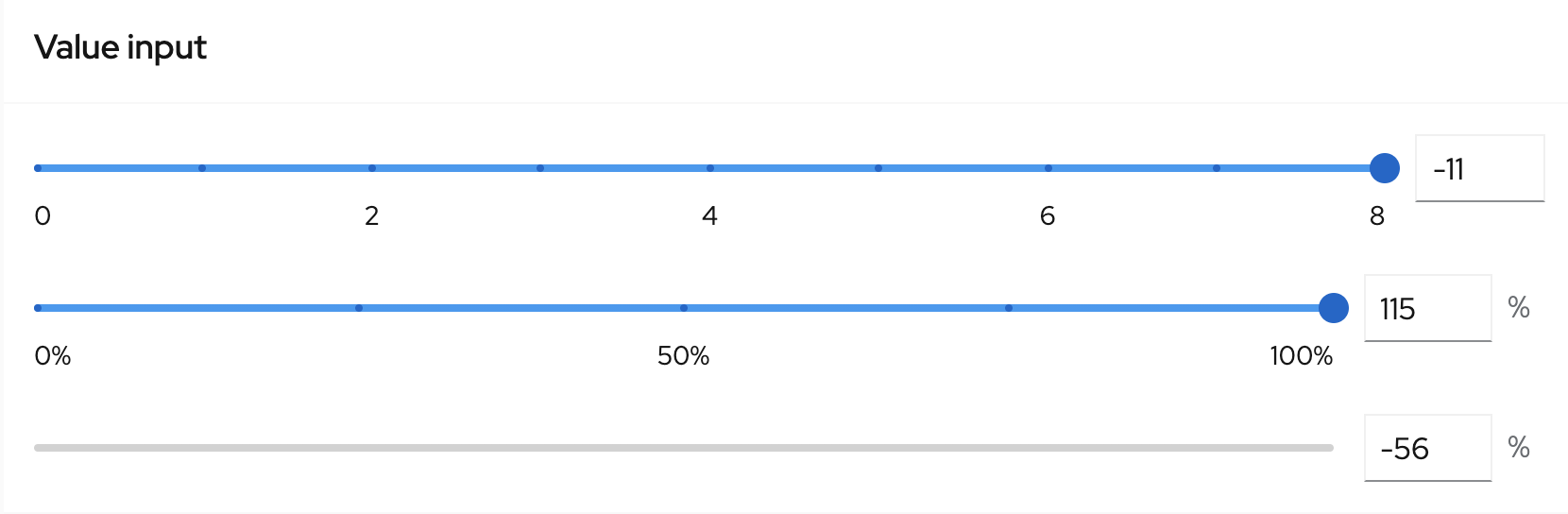
Thumb value input
What's more, if I enter a value lesser than a prescribed minimum to a thumb value input it let me do that (see the picture below)

But after clicking enter, a thumb and a thumb value input moved far left from 0 (minimum) - out of the sight. It appears again if you click anywhere on a slider. This is the case for both direct inputs and for value changes made by carets as well.
Value entered -4

Value entered -14

Allowed maximimum is 100 (this bugcan be reproduce by using carets but sometimes also by direct input)

Check all the value inputs on this page as none of them seems to be working correctly.