You signed in with another tab or window. Reload to refresh your session.You signed out in another tab or window. Reload to refresh your session.You switched accounts on another tab or window. Reload to refresh your session.Dismiss alert
{{ message }}
Repository navigation
fix(web): sidebar edge uses the same resize cursor as side panels - #33083
The left sidebar's edge and the right panel's edge both resize when you drag them, but they show different pointers. The right panel's edge shows ↔ (col-resize). The sidebar's edge shows ⇤ (w-resize), which suggests "collapse to the left" rather than "resize". Once the drag starts, the pointer switches to ↔ anyway, because useResizeDrag sets col-resize on the page for the drag.
Change
When the sidebar can be resized (it's open and resizable), its edge shows ↔ (col-resize), the same as the right panel's edge and the pointer during the drag. When the edge only opens or closes the sidebar (collapsed, or a sidebar that can't be resized), it keeps the arrows that point the way it will open or close.
Scope and approval
There's no prior issue or discussion. It's a small, focused consistency fix: one class on SidebarRail, using the cursor the app already shows for the same action.
Verification
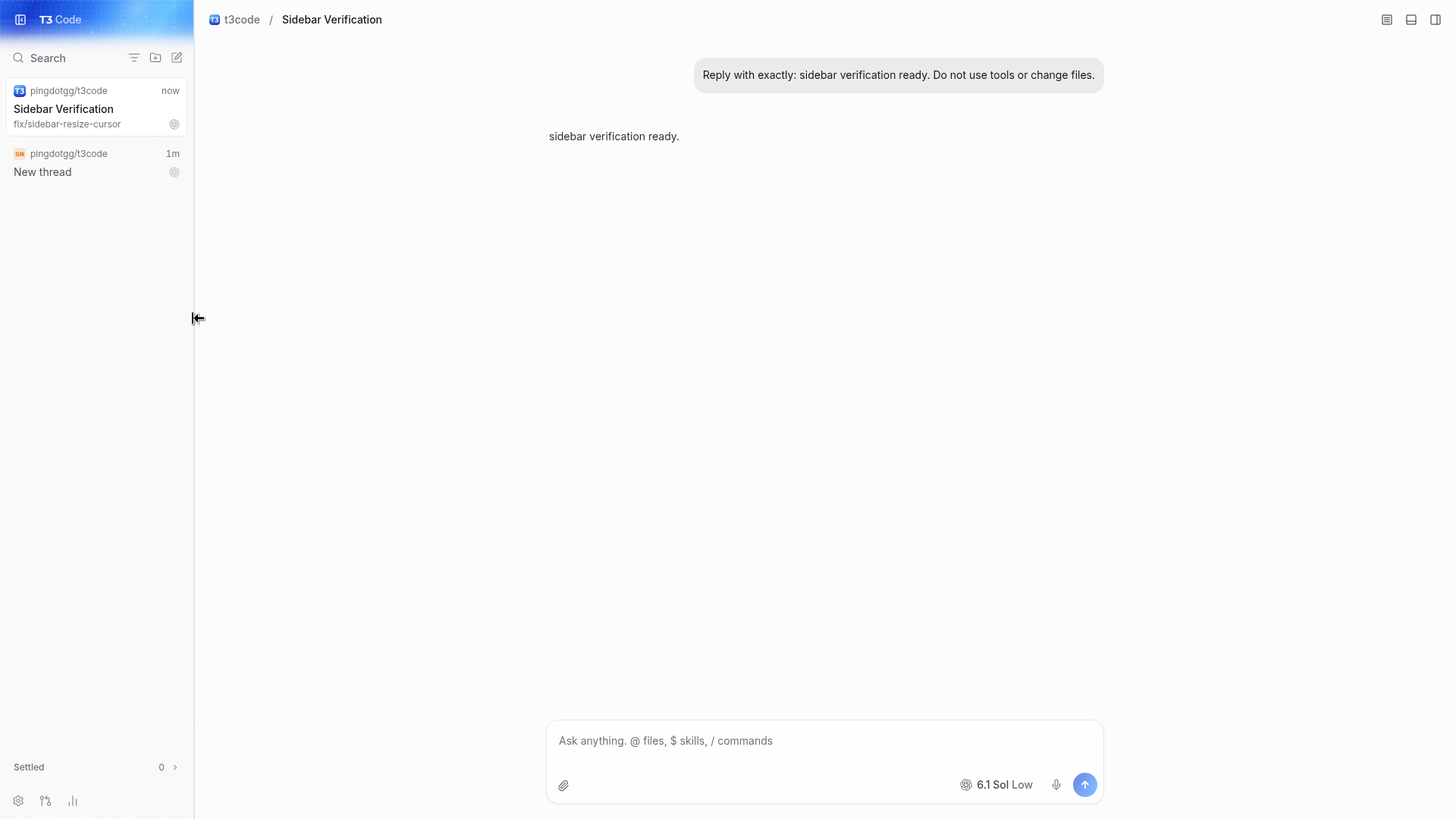
Sidebar edge, before
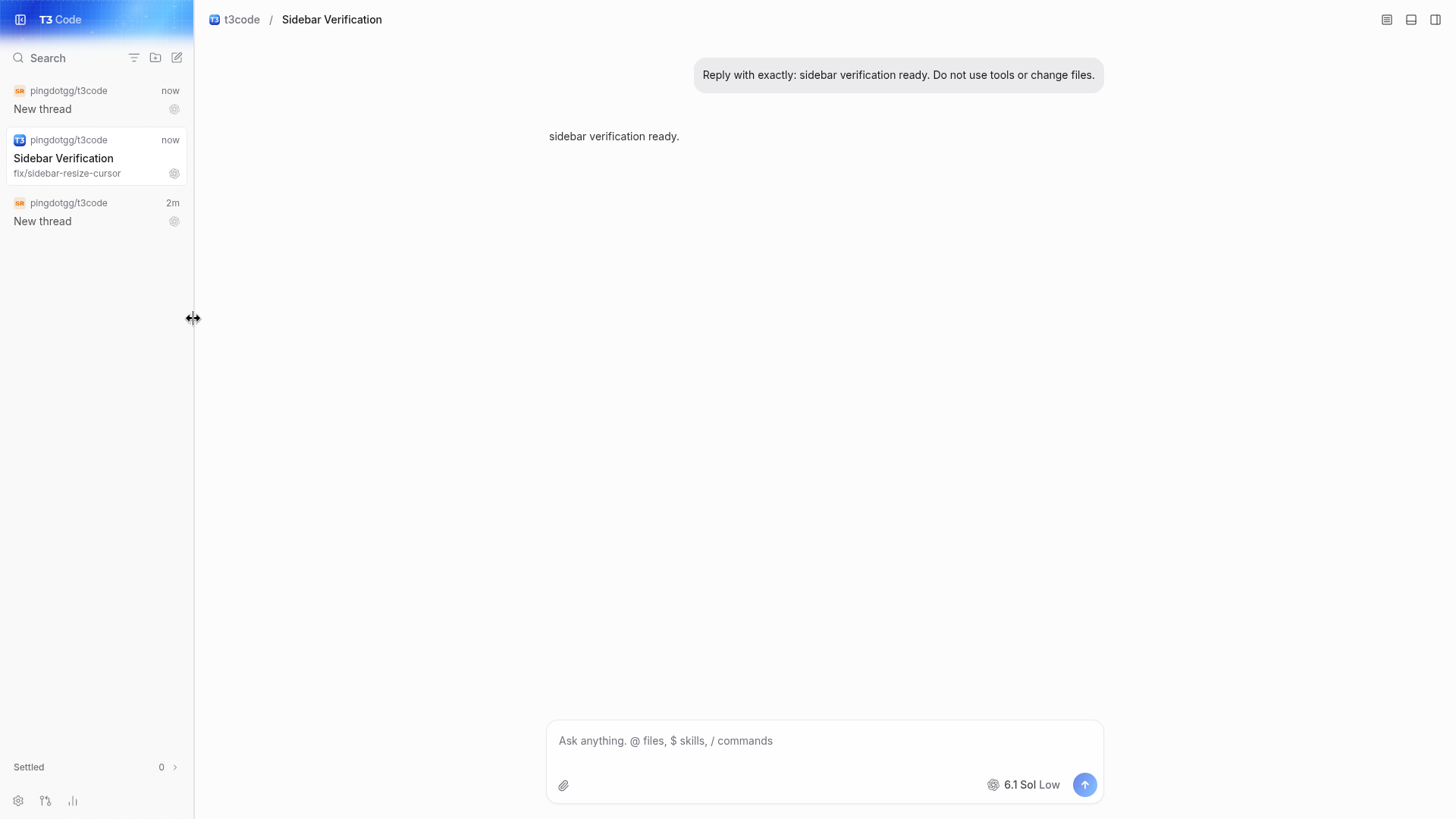
Sidebar edge, after
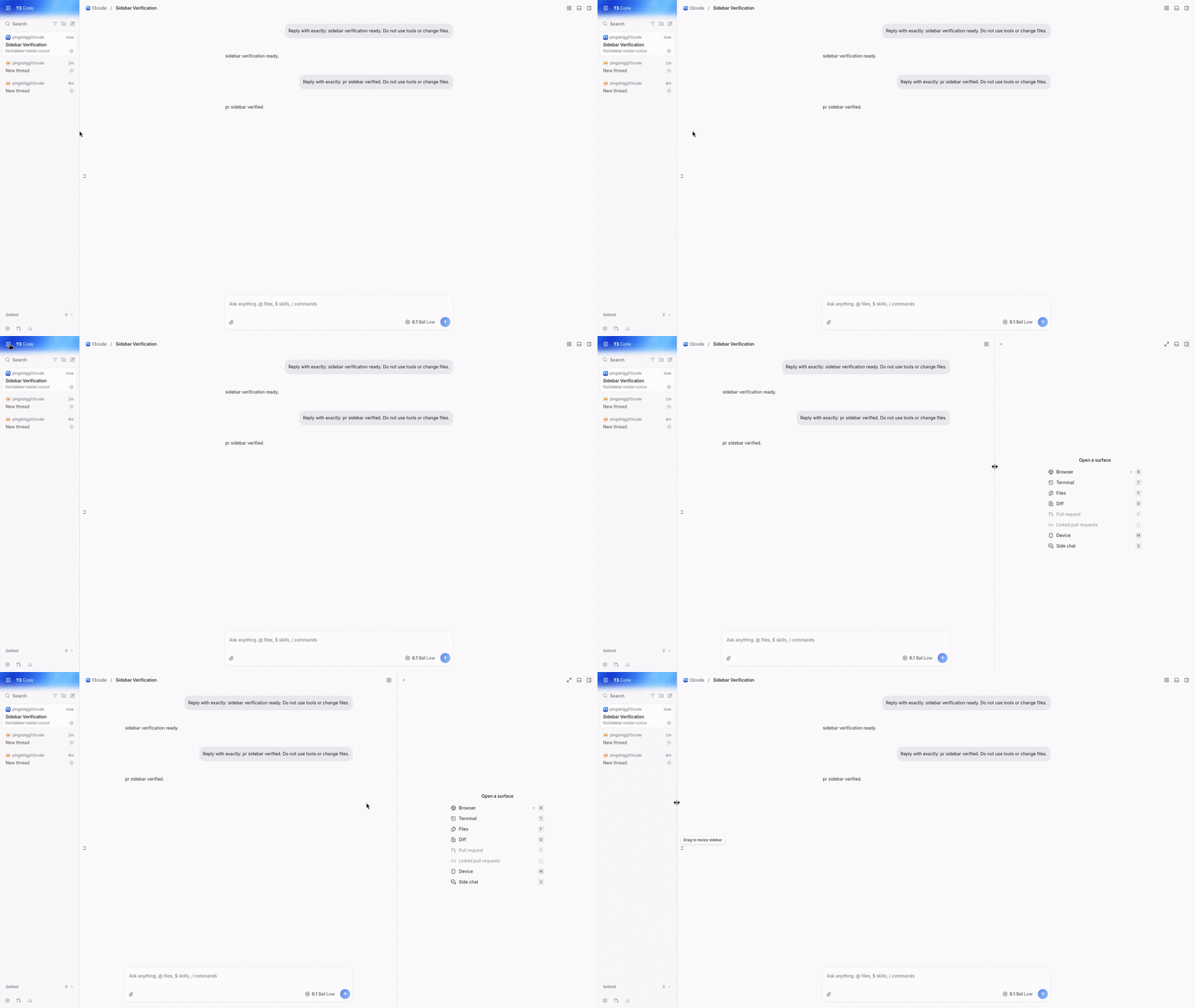
Right panel edge (unchanged)
These are real pointer captures from the desktop dev build on Linux, taken with the X server's pointer drawn in (Notwaita cursor theme, 32 px). The left two shots are the same spot before and after the change, which hot-reloaded in between.
Open sidebar: its edge reports w-resize before and col-resize after.
Collapsed sidebar: its edge still reports e-resize. Reopened, it's col-resize again.
vp run check:changed passes.
Web renders the same sidebar component. The mobile app has its own navigation and isn't affected.
🤖 Generated with Claude Code (Claude Opus 5.5), run from T3 Code.
Macroscope's review found this PR approvable — The sidebar rail displays a column-resize cursor when resizing is available, while retaining directional cursors otherwise. This is a presentation-only change with no change to resizing or collapse behavior.
You can add or adjust custom eligibility rules. Learn more.
No actionable comments were generated in the recent review.
Walkthrough
SidebarRail uses a column-resize cursor when resizing is available. Otherwise, it retains the existing side- and collapsed-state-specific directional cursors.
The sidebar cursor now matches the resizable panel; no merge-blocking risk is identified.
Pre-merge checks: 4
Check name
Status
Explanation
Title check
The title clearly identifies the sidebar cursor change and its consistency with side-panel resize behavior.
Description check
The description covers the problem, change, scope and approval rationale, and verification. It includes before-and-after screenshots and reports the check results.
Linked Issues check
Check skipped because no linked issues were found for this pull request.
Out of Scope Changes check
Check skipped because no linked issues were found for this pull request.
Finishing Touches
Generate unit tests (beta)
Create a new PR
Autofix · Keep fixing CodeRabbit findings and required CI, and resolving merge conflicts
Reviewing files that changed from the base of the PR and between a322bec and 2033a0a.
Files selected for processing: 1
apps/web/src/components/ui/sidebar.tsx
Included review availability: This review used your included allowance. Your plan provides up to 10 included reviews per hour; 9 remain after this review.
the head conflicted with main after #33066 added touch-none to the same SidebarRail class lines. merged github/main (524a53183d) with a merge commit, no rebase. the resolution keeps touch-none unconditionally and keeps this pr's canResize ? "cursor-col-resize" : <directional cursors> choice. no other changes.
real app via playwright and /usr/bin/google-chrome on the merged head: open rail computes cursor: col-resize, collapsed rail e-resize, reopened col-resize. touch-action: none holds in all three.
no review bot left an actionable finding.
Earlier verification (gpt-6.1-sol, head a322becdd2)
verified exact head a322becdd2930650ae78bea8f77356c6be799f21 as-is on a linux boat vm, using playwright 1.60.0 and /usr/bin/google-chrome against vp run dev. no code changes.
reproduced on github/main (fa2f4ff2a2), installed in a separate worktree: the open sidebar rail shows w-resize, switches to col-resize during drag, then returns to w-resize.
stopped main before starting the pr server. added a real git project through the app and completed codex gpt-6.1-sol turns through the composer on both servers. the same task-created conversation is shown below.
on the pr, hover, drag, and release all show col-resize. width changes from 256 to 356 px and survives reload. double-click resets it to 256 px.
collapse/reopen works. the collapsed offcanvas rail retains e-resize and pointer-events: none; reopening restores col-resize.
the right panel still shows col-resize and resizes. dark mode at 1280×800 also resizes and resets correctly; the matching light-mode captures are 1920×1080.
blacksmith: vp test run apps/web/src/components/ui/sidebar.browser.test.tsx passed both existing tests, covering focus handoff and collapse during drag. existing head ci reports 29 successful checks, zero pending or failing.
native electron shell, macos/windows cursor themes, ios/android, and remote/relay/tunnel connections were not exercised on this linux vm. the app uses the left resizable offcanvas sidebar; a right-side or non-resizable SidebarRail configuration has no user-reachable instance here and was inspected in code only. no performance claim is made.
This file contains hidden or bidirectional Unicode text that may be interpreted or compiled differently than what appears below. To review, open the file in an editor that reveals hidden Unicode characters.
Learn more about bidirectional Unicode characters
size:XS0-9 changed lines (additions + deletions).vouch:unvouchedPR author is not yet trusted in the VOUCHED list.
2 participants
Add this suggestion to a batch that can be applied as a single commit.This suggestion is invalid because no changes were made to the code.Suggestions cannot be applied while the pull request is closed.Suggestions cannot be applied while viewing a subset of changes.Only one suggestion per line can be applied in a batch.Add this suggestion to a batch that can be applied as a single commit.Applying suggestions on deleted lines is not supported.You must change the existing code in this line in order to create a valid suggestion.Outdated suggestions cannot be applied.This suggestion has been applied or marked resolved.Suggestions cannot be applied from pending reviews.Suggestions cannot be applied on multi-line comments.Suggestions cannot be applied while the pull request is queued to merge.Suggestion cannot be applied right now. Please check back later.


 github-actions
Bot
added
vouch:unvouched







Problem
The left sidebar's edge and the right panel's edge both resize when you drag them, but they show different pointers. The right panel's edge shows ↔ (
col-resize). The sidebar's edge shows ⇤ (w-resize), which suggests "collapse to the left" rather than "resize". Once the drag starts, the pointer switches to ↔ anyway, becauseuseResizeDragsetscol-resizeon the page for the drag.Change
When the sidebar can be resized (it's open and resizable), its edge shows ↔ (
col-resize), the same as the right panel's edge and the pointer during the drag. When the edge only opens or closes the sidebar (collapsed, or a sidebar that can't be resized), it keeps the arrows that point the way it will open or close.Scope and approval
There's no prior issue or discussion. It's a small, focused consistency fix: one class on
SidebarRail, using the cursor the app already shows for the same action.Verification
These are real pointer captures from the desktop dev build on Linux, taken with the X server's pointer drawn in (Notwaita cursor theme, 32 px). The left two shots are the same spot before and after the change, which hot-reloaded in between.
w-resizebefore andcol-resizeafter.e-resize. Reopened, it'scol-resizeagain.vp run check:changedpasses.Web renders the same sidebar component. The mobile app has its own navigation and isn't affected.
🤖 Generated with Claude Code (Claude Opus 5.5), run from T3 Code.