                    .__            .___            .__                 __
                    |__| ____    __| _/____ ___  __|  |   ____ _____  |  | __
                    |  |/    \  / __ |/ __ \\  \/  /  | _/ __ \\__  \ |  |/ /
                    |  |   |  \/ /_/ \  ___/ >    <|  |_\  ___/ / __ \|    <
                    |__|___|  /\____ |\___  >__/\_ \____/\___  >____  /__|_ \
                            \/      \/    \/      \/         \/     \/     \/




A powerful MCP (Model Context Protocol) server for discovering and analyzing exposed directory listings on web servers. Perfect for security researchers, penetration testers, and cybersecurity professionals.
- 🔍 Directory Enumeration: Automatically discover and scan exposed directory listings
- 📊 Risk Assessment: Intelligent classification and risk scoring of discovered files
- 🎯 Pagination Support: Handle large directories with efficient pagination
- ⚡ Real-time Analysis: Live scanning and classification of sensitive data
- 🛡️ Security Focus: Built specifically for cybersecurity and OSINT operations
- Security Audits: Identify exposed sensitive files and directories
- Penetration Testing: Discover potential attack vectors through directory traversal
- OSINT Research: Gather intelligence from publicly accessible directories
- Compliance Checks: Verify that sensitive data isn't publicly exposed
- Vulnerability Assessment: Systematic analysis of web server misconfigurations
- Go 1.23 or higher
- Cursor IDE (for MCP integration)
# Clone the repository
git clone https://github.com/riza/indexleak-scanner.git
cd indexleak-scanner

# Build the binary
go build -o indexleak-scanner main.go

# Make it executable
chmod +x indexleak-scannerThis IndexLeak scanner supports the Model Context Protocol (MCP) and can be integrated with various MCP-compatible applications:
- 🎯 Cursor IDE - Primary development environment with native MCP support
- 🤖 Claude Desktop - Anthropic's desktop application with MCP integration
- 💬 Continue.dev - VS Code extension with MCP support
- 🔧 Custom MCP Applications - Any application implementing the MCP protocol
-
Add to MCP Configuration
Edit your Cursor MCP configuration file (
~/.cursor/mcp.json):{ "mcpServers": { "indexleak": { "command": "/path/to/your/indexleak-scanner/indexleak-scanner", "args": [""], "env": {} } } } -
Restart Cursor IDE
After adding the configuration, restart Cursor to load the MCP server.
-
Verify Installation
You should now see the IndexLeak tools available in your Cursor IDE's MCP tools panel.
-
Add to Claude Desktop Configuration
Edit your Claude Desktop MCP configuration file:
Windows:
%APPDATA%\Claude\claude_desktop_config.jsonmacOS:~/Library/Application Support/Claude/claude_desktop_config.jsonLinux:~/.config/claude/claude_desktop_config.json{ "mcpServers": { "indexleak": { "command": "/path/to/your/indexleak-scanner/indexleak-scanner", "args": [], "env": {} } } } -
Restart Claude Desktop
Close and restart Claude Desktop to load the MCP server.
-
Access Tools
The IndexLeak scanner tools will be available in Claude Desktop's tool interface.
For other MCP-compatible applications, follow their specific MCP server configuration process using:
- Server Command:
/path/to/your/indexleak-scanner/indexleak-scanner - Server Args:
[](empty array) - Environment Variables:
{}(none required)
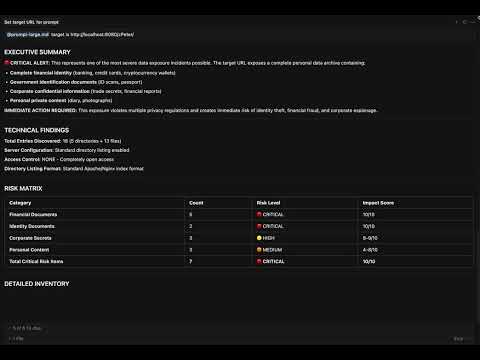
Watch the IndexLeak MCP Server in action - demonstrating directory scanning, risk assessment, and security analysis capabilities.
Scans and analyzes directory listings from web servers.
Parameters:
url(required): Target URL to scanpage(optional): Page number for pagination (default: 1)page_size(optional): Items per page (default: 30)
Example:
URL: http://example.com/files/
Page: 1
Page Size: 50
This tool can be used with detailed instructions in the prompts/prompt-large.md file for comprehensive security analysis. This file includes:
- Systematic Scanning Protocol: Step-by-step guide ensuring 100% coverage of all directories
- Risk Classification Matrix: Detailed risk scoring system based on file types
- Security Assessment Template: Professional security reporting format
- Compliance Analysis: Assessment from GDPR and other data protection regulations perspective
For detailed security analysis, you can use it by replacing the TARGET HERE section in the prompts/prompt-large.md file with your target URL.
-
Start a Security Scan
Use the enter_directory tool to scan: http://target-server.com/ -
Analyze Results The tool will automatically:
- Classify each file and directory
- Assign risk scores (1-10)
- Identify sensitive data exposure
The tool uses an intelligent risk scoring system:
| Score | Level | Description |
|---|---|---|
| 10 | 🔴 Critical | Cryptographic keys, database files, credentials |
| 8-9 | 🟠 High | Configuration files, sensitive documents |
| 6-7 | 🟡 Medium | Business documents, archives |
| 4-5 | 🔵 Low | Media files, executables |
| 1-3 | 🟢 Minimal | Public content, documentation |
Directory contents (http://example.com/files/):

Page 1 of 3 (Total entries: 87, Entries per page: 30)

FILE: config.php (http://example.com/files/config.php)
FILE: database_backup.sql (http://example.com/files/database_backup.sql)
DIRECTORY: admin (http://example.com/files/admin/)
FILE: users.csv (http://example.com/files/users.csv)
...
- Ethical Use Only: This tool is designed for legitimate security testing and research
- Permission Required: Always ensure you have proper authorization before scanning
- Responsible Disclosure: Report findings through appropriate channels
- Legal Compliance: Follow applicable laws and regulations in your jurisdiction
This project is licensed under the MIT License - see the LICENSE file for details.
This tool is intended for educational and authorized security testing purposes only. Users are responsible for ensuring they have proper permission before scanning any systems. The authors are not responsible for any misuse or damage caused by this tool.
- Built with the Model Context Protocol (MCP)
- Powered by Go MCP SDK
- Compatible with Cursor IDE, Claude Desktop, and other MCP-enabled applications
- Supports the growing ecosystem of MCP-compatible tools and platforms
- 🐛 Bug Reports: GitHub Issues
- 💡 Feature Requests: GitHub Discussions
- 📧 Contact: rizasabuncu[at]outlook.com
Made with ❤️ for the cybersecurity community