Repository navigation
Address default permissions with webuser or www-data users #253

Description

Discussed in #252
Originally posted by jaydrogers December 5, 2023
Background
- In the v2 of the PHP images,
webuserwas added with an ID of9999 - In the v3 Beta, no such user is added. It defaults to
www-data, but this user ID can change between Debian & Alpine
Request for comment
- Should we add a default user like
webuserback? Or should we stick withwww-data? - Is there concern about the UID changing between operating systems?
Next steps
At Server Side Up, we're working on other projects that will likely run into some issues relating to this discussion. As we advance on those projects, we will update this discussion as well. Please chime in with your own experiences too.
Activity
dreadfullyposh commentedon Dec 11, 2023
Personally I don't care if a
webuseris added or ifwww-datais used, and it doesn't bother me that the default user ID might change between Debian and Alpine.What is important for me is the ability to remap the UID and GID of whatever user is running PHP-FPM. I frequently run containers from multiple users that do not have root/sudo access, so having this control is critical to ensuring those users have permissions to directories/files that are bind-mounted into the container.
jeremynz21 commentedon Dec 12, 2023
Personally I would prefer to use the defaults. I had been trying to switch our Silverstripe sites which are using default PHP images to use the serversideup v2 images and it created a bit of a headache trying to change the user or convert mounted file system permissions.
Alternatively if the default was changed, an option to revert back to defaults or set the PHP user via an env variable would be handy.
Love the work you doing!
sneycampos commentedon Dec 12, 2023
i prefer to use the defaults too with the ability to change the UID/GID
shinsenter commentedon Dec 22, 2023
I believe that regardless of whether you use
webuser,www-dataor any custom user:group or UID:GID values, problems may arise if a user run your docker image along with other containers and share directories.Therefore, it’s best to use the default user:group of the base OS and allow users to modify it according to their project setup. Avoid hard-coding UID:GID unless you’re certain that processes in your container don’t share any data with other containers. That’s my personal perspective when initializing Docker containers.
jaydrogers commentedon Jan 10, 2024
Thanks for your feedback everyone. I am leaning to NOT add a
webuserlike I did before and just use the system defaults ofwww-data.👉 My new, but related question
www-data?This is why I created
webuserbefore, so I could have a dedicated user.Use case
It's nice to have shell when I need to run
php artisancommands as the app user. Here you can see we currently do not have this in the beta.Is adding a shell to www-data a good idea? Do you feel it is secure to do this? Thoughts?
shinsenter commentedon Jan 10, 2024
@jaydrogers
Think of
www-datalike a cafeteria worker at school. Their job is just to serve food in the cafeteria - they don't need access to other parts of the school. Givingwww-dataa shell would be like giving the cafeteria worker keys to the whole school!Even if the cafeteria worker is honest, now a bad guy could trick or bribe them to get the keys and access to the whole school. Or if the cafeteria worker makes a mistake, the bad guy could get the keys and make a copy.
The
www-datauser is similar - its job is just to show web pages. It doesn't need access to run programs or files on the server. Giving it a shell lets bad guys access the whole server if they compromise a web app.It's safer to give users and programs only the access they absolutely have to have. That way there's less risk if one gets compromised. The cafeteria worker doesn't need keys to the chem lab, and
www-datadoesn't need a shell. Limiting access limits damage if something goes wrong!jaydrogers commentedon Jan 10, 2024
Thanks @shinsenter! I greatly appreciate your feedback. You and I are definitely on the same page. I highly respect your opinion and I love the analogy too 😃
So in finding the balance of security and user experience:
php artisancommands aswww-dataif we keep using the default operating system user?With PHP requiring
rootto bring up services for things like fpm-nginx, it turns into a Docker permission nightmare 😆shinsenter commentedon Jan 10, 2024
@jaydrogers
One of approaches for running
php artisancommands aswww-datais setting the setuid bit on theartisanfile so it always runs aswww-data.chmod u+s /path/to/artisan. (I have not tested).Setting the setuid bit on
artisancould work, but is not recommended as it allows anyone to run artisan commands aswww-data.This is less flexible but simple.
jaydrogers commentedon Jan 10, 2024
Although this solution would work, this requires a lot of special "know-how" for Laravel developers. I don't think this would be easy enough for most users to have an easy development experience.
This is why I was thinking of adding a shell to
www-data. It's basically what Forge does on their servers.Having a sudo policy was another thing I was thinking of, but that might add a lot of weight to the docker images.
I appreciate any other ideas/feedback if you have any!
hughbris commentedon Jan 21, 2024
I'm confused, probably because of the plethora of new releases lol. I am deriving an image from
php:beta-8.3-unitand I can open an interactive terminal aswww-data, run one-off commands usingdocker exec -u www-dataetc. Doesn't that mean you've added "shell privileges"?In any case, this capability is required for building a flexible PHP stack for more reasons than running
artisan. Scripts and permissions are often quite important when setting up a framework.shdehnavi commentedon Mar 8, 2024
@jaydrogers As you mentioned, the following command is not working ...
command: ["su", "www-data", "-c", "php artisan schedule:work"]So, how i can run the horizon or task scheduler?
AlejandroAkbal commentedon Mar 8, 2024
I got it working by implementing this in my dockerfile #287
jaydrogers commentedon Apr 18, 2024
💪 Big Update
We have a PR ready for testing that will dramatically improve container security and developer experience:
📖 Long story, short
www-data(33:33for Debian and82:82for Alpine)www-databy default🙏 Please help test this
Everything is documented on the PR on how to test:
There is also a significant improvement with running Laravel Queues, Schedulers, etc in the PR's Preview Documentation site.
We will merge this big change soon if we get good feedback 😅🚀
Check the PR for more details →
jaydrogers commentedon Apr 22, 2024
A fix has been released 🥳
These changes are now live in our
betaimages! Learn more about the release here:Monitor this CI/CD job for the exact moment these changes will be live (takes about an hour to build):
shdehnavi commentedon Apr 27, 2024
shdehnavi commentedon Apr 27, 2024
@jaydrogers
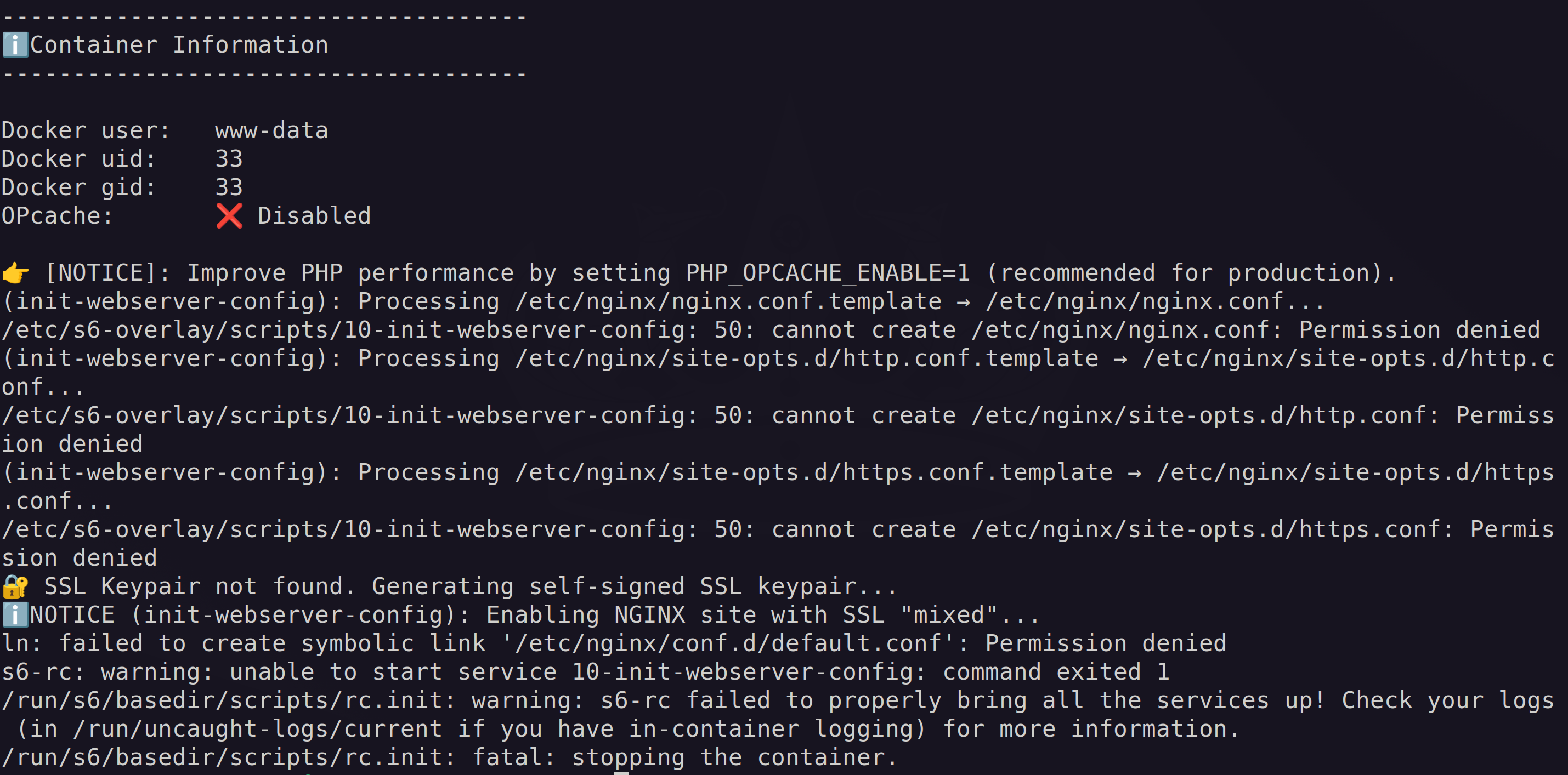
Thanks, everything works like a charm in the development stage by setting UID and GID and changing the users.
But unfortunately i got this error in production when i don't want to make the same UID and GID and i want to run as www-data for security purposes:
My Dockerfile: