Releases: unslothai/unsloth
Release list
Auto compaction (preview) + LAN Remote Access

Thanks for the support for Qwen3.8-27B and Unsloth Desktop last week! For this release, we merged 200+ PRs to introduce many new features, fixes including:
- Auto Compaction (Experimental) for longer chats beyond context limits
- Remote & LAN Access (Preview) for easy network access without Cloudflare links
- Faster Chat - Improved streaming performance, reduced UI lag, and smoother long conversations.
- Support for custom llama.cpp builds. Toggles for Cache RAM, Mmap, Mlock, Checkpoints, Spe Decoding KV Cache, Vision On / Off
- Unsloth Dynamic v3.0 is released. New Qwen3.8-27B Dynamic v3.0 GGUFs deliver >10% higher top-1 accuracy compared to everyone else. Works with Unsloth.
Auto compaction (Experimental)
You can now do long chats and surpass a model's context limit, with evicted turns
remaining searchable.
- Long local chats can continue past the context limit by rolling older turns out of
active context. - Auto compaction creates fresh context epochs instead of permanently trimming replies.
- Evicted conversations remain searchable, with improved fact recall.
- Context window information is shown before chat begins.
How it works
- Entire oldest turns are removed only when needed, never mid-message. The saved transcript stays unchanged.
- Evicted turns are indexed into a per-thread searchable archive using Unsloth's existing RAG pipeline (store, chunker, embedder, retrieval). Lexical search is prioritized because chat recall is usually exact matches like names, numbers, or IDs.
- A recall is forced during eviction instead of relying on the model to search itself. Later retrieval uses
search_conversation. - The archive persists across epochs, allowing future compactions to recover previously evicted context.
- No summarization: it showed little benefit and added ~190s per compaction.
Remote & LAN access (Preview)
Access Unsloth from another device on your network, managed from settings.
- New dedicated Settings section for remote access.
- Enable or disable LAN access without restarting.
- Supports connection addresses, QR codes, and optional auto-start.
- LAN access is disabled by default and requires changing the generated admin password.
Chat + Functionality improvements
- Long chats are faster with optimized streaming and thread handling.
- Projects organize chats, files, and workspaces together.
- Chats remember composer settings, system prompts, and model sampling options.
- Added prompt queueing and customizable keyboard shortcuts.
- Added
edit_filetool for partial file modifications. - Improved tool calling and MCP behavior.
Hardware + inference improvements
- Support for custom llama.cpp builds.
- Toggles for advanced settings - Cache RAM, Mmap, Mlock, Checkpoints, Speculative Decoding KV Cache, Vision On / Off
- Better validation for missing GPU support and oversized GGUF models.
- Improved MTP performance and VRAM handling.
- Better compatibility across ROCm, xFormers, and flash-attention setups.
- Added Intel XPU support.
API + serving
- Responses API supports structured output formatting.
- Improved recovery when llama-server crashes.
- Added OpenCode V2 support for
unsloth start.
Hub + Desktop + training
- Hub supports more image/video workflows.
- Faster and improved GGUF downloads.
- Desktop packaging and permissions improved.
- Training scheduler and preprocessing improvements.
| Platform | Link |
| Windows | Download |
| macOS | Download |
| Linux / Ubuntu (deb) | Download |
| Linux (AppImage) | Download |
| Linux (Arm64) | Download |
What's Changed
- Bump install.sh / install.ps1 pin to unsloth>=2026.8.18 by @danielhanchen in #8836
- Give the llama-flag fixtures the parallelSlotsClamped they now require by @vineethsaivs in #8837
- Studio: preserve pre-tool reasoning inside the GGUF tool loop by @losuler in #8581
- docs: fix dead Linux .deb download link by @yzxcj797 in #8891
- Model hub: show the Meta mark on the Unsloth re-upload of Muse Glimmer by @shimmyshimmer in #8949
- Studio: speed up the local model inventory and keep it off the API loop by @oobabooga in #8770
- Studio: reuse the cached GGUF work a load request has already done by @oobabooga in #8771
- studio: keep each tool-call round separate when the delta index restarts by @mahiatlinux in #8754
- studio: route bare tool-call fragments to the call that owns the index now by @mahiatlinux in #8755
- studio: opt-in model auto-switch for the image and video apis by @mahiatlinux in #8766
- Studio: keep project chats in Recents, add a Projects sidebar section by @shimmyshimmer in #8932
- Studio: find the real Documents folder on Windows for project workspaces by @shimmyshimmer in #8955
- fix(unsloth studio): only preprocess the rows a max_steps run will actually use instead of preprocessing validated datasets by @LeoBorcherding in #8890
- Studio: stop the chat UI falling behind a fast stream by @oobabooga in #8845
- studio: keep each chat's composer pills and settings with the chat by @mahiatlinux in #8686
- studio: allow a per-connection max tokens limit on every provider by @mahiatlinux in #8944
- Crash guard: read dumpability in order, and stop losing crashes to scope and naming by @danielhanchen in #8808
- Studio: size the max_steps row bound for the data-parallel world by @danielhanchen in #8958
- Studio: make the paste-to-attachment threshold a chat setting by @shimmyshimmer in #8963
- Fix CI on main: stale test doubles, a stale router stub, and two source defects by @danielhanchen in #8956
- Make the startup profile a gate, with budgets from its own measurements by @danielhanchen in #8965
- Keep xFormers working when flash-attn 4 is installed, and guard the varlen int32 overflow by @danielhanchen in #8957
- Stop six backend tests waiting on the clock instead of on a signal by @danielhanchen in #8975
- CI: stop three workflows paying for work they throw away by @danielhanchen in #8976
- Give the pasted-text import an extension so the node test runner can load it by @danielhanchen in #8981
- Make the packed-boundary guard reachable on the fused cross-entropy path by @danielhanchen in #8959
- Studio: Fix embedded MTP performance under partial GPU offload by @oobabooga in #8875
- Studio: tokenize the dataset online for plain-text single-pass runs by @danielhanchen in #8960
- Studio: keep K and V equal when the flash-attention retry resets the V cache by @danielhanchen in #8827
- Studio: hold the Auto-layers context exemption only while --fit runs by @danielhanchen in #8825
- Studio: stop a sent prompt staying in the chat composer by @shimmyshimmer in #8849
- Chat: queue prompts with Cmd/Ctrl+Enter and drag to reorder the queue by @shimmyshimmer in #8952
- Studio: repin the permission-mode contract to behaviour, not a declaration by @danielhanchen in #8986
- Cut Repo tests (CPU) roughly in half: stop the synthetic vLLM tests reaping a fake server by @danielhanchen in #8993
- Core: sweep every transformers model_type across a process pool by @danielhanchen in #8995
- Repair the Tauri retry test against the download-marker pipeline by @danielhanchen in #8996
- Studio: read every launcher world size when resolving a step-capped run's passes by @danielhanchen in #9000
- Repair the prompt-queue contract test against the queueing refactor by @danielhanchen in #9026
- studio: stop prom...
Contributors


Assets 8
Qwen3.8-27B

Qwen3.8-27B and Qwen3.8-2.4T can now be run locally in Unsloth!
Run on 17GB RAM via Unsloth Dynamic GGUFs. You can also fine-tune Qwen3.8-27B in Unsloth.
Qwen3.8-27B is by far the strongest model for its size. We also uploaded NVFP4 quants.
Guide: https://unsloth.ai/docs/models/qwen3.8
GGUF: https://huggingface.co/unsloth/Qwen3.8-27B-GGUF
See 1-bit Qwen3.8-2.4T GGUF running in Unsloth:

Highlights
- Qwen3.8-27B + extra llama-server arguments allowed + custom VRAM toggle
- External provider has tool calling + tool support + login with Codex
- Fast FP8 10x faster MiniMax-H3 inference (3 minutes vs 30)
- 10% faster inference for GGUFs + Bypass permissions fixed
Chat + tools
- Connected AI providers can use their own Search or Unsloth Desktop's built-in Search and tools. Tool results are passed back to the model so it can continue multi-step tasks.
- Sign in with a Codex subscription and use Codex tools inside Chat.
- Chat shows live prompt and generation speeds, while long streaming replies use much less CPU.
- Chat settings stay with the conversation across remote sessions.
- Paste a YouTube link to attach its transcript, including the title, channel, duration, link, and caption language.
- Save a full chat or reply into your project's sources while keeping its reasoning, tool calls, and citations.
MiniMax-H3
- MiniMax-H3 can run on smaller supported GPUs by splitting large model parts into pieces that fit.
- The model picker now hides H3 options that the current hardware cannot run instead of letting them fail after selection.
- H3 options are labelled Fast FP8 or Slow, making the large speed difference clear before downloading.
Performance + hardware
- Inference is up to 10% faster in supported cases, with lower VRAM use and a tunable memory limit.
- Idle image and video models can optionally unload to free VRAM for Chat or Training.
- Added better support for AMD RDNA 3, RDNA 4, and Strix Halo systems. VRAM checks no longer reserve extra GPU memory.
- Multi-GPU ROCm device matching is safer.
- Macs now choose context size from the memory that is actually free.
- RAG document indexing uses the CPU by default, so it no longer leaves a large GPU memory block reserved.
- Fixed GGUF image detection when choosing a model for the API.
Custom llama.cpp arguments
- Model settings now include an Extra Arguments box for custom
llama-serverflags. - Unsloth checks flags against the installed build and saves valid ones per model for normal, startup, and API loads. Flags that could break model loading or app security are rejected with a clear message.
Training + exports
- Training checks whether a model needs a newer Transformers version and asks before installing it. The preview also tells you when the model must use 16-bit instead of 4-bit.
- GGUF exports check disk space before starting a long merge, with clearer errors showing how much space is needed.
- On Kaggle, large saves can use the bigger temporary drive when the working folder is too small.
- Fixed LoRA being ignored by vLLM GRPO rollouts on newer TRL versions.
Debugging + reliability
- Settings > Debugging now shows the main server and model-runner logs, with live, 3-second, and manual refresh modes.
- Copy the visible log or its full path for a bug report. Passwords, tokens, and API keys are hidden in the viewer, while files on disk stay unchanged.
- Cached RAG models load first, avoiding long stalls when Hugging Face is unreachable.
- Slow installs can keep running during large downloads and show what they are waiting for.
- Fixed Hugging Face dataset links and linked folders on Windows.
- Pinned models can be reordered by dragging them in the model list.
Download Unsloth Desktop
Unsloth Desktop is free and open source. Download it for:
- Windows
- macOS
- Linux
What's Changed
- Bump install.sh / install.ps1 pin to unsloth>=2026.8.14 by @shimmyshimmer in #8455
- Point the Images rail contract at the in-flow footer padding by @danielhanchen in #8446
- GRPO: dispatch on width at the remaining lm_head matmul call sites by @danielhanchen in #8204
- Studio: let repair proceed past a backend that is not ours by @danielhanchen in #8459
- Studio: keep the download rail in the corner under the welcome composer by @danielhanchen in #8462
- Studio: keep prose that documents call:NAME{...} in the answer by @danielhanchen in #8437
- Studio: name the checkpoint on MiniMax H3 quant chips by @danielhanchen in #8466
- Stop the PowerShell progress bar throttling installer downloads to 0.65 MB/s by @danielhanchen in #8476
- Windows installer: fix single-AMD-GPU detection and the unrecoverable "needs repair" loop by @danielhanchen in #8398
- Studio: ask macOS for zombie status with the flavor that answers by @danielhanchen in #8484
- Auto mode: ask before PyYAML deserialization that can run code by @danielhanchen in #8432
- Drop the inert capacity-sweeper dispatch from the desktop release by @danielhanchen in #8477
- Windows: fix single-AMD-GPU hosts reading as "gpu none" and looping the installer by @danielhanchen in #8461
- Installer: suppress macOS uv developer tools dialog by @wasimysaid in #8479
- Bump install.sh / install.ps1 pin to unsloth>=2026.8.15 by @danielhanchen in #8491
- Read macOS zombie status from sysctl, the call that answers by @danielhanchen in #8493
- Studio: remove obsolete onboarding and model code by @wasimysaid in #8453
- Studio: stop building test scratch paths inside a macOS sensitive root by @danielhanchen in #8485
- CI: run the Studio desktop unit tests on macOS by @danielhanchen in #8487
- Studio: keep the compiled cache when a sibling backend is live by @danielhanchen in #8457
- Drop socket reads that arrive after an h11 connection is closed by @danielhanchen in #8469
- Studio: name a connected model the provider dropped instead of its raw id by @danielhanchen in #8470
- Studio: classify a moved or mixed model folder from the checkpoint, not from directory order by @danielhanchen in #8475
- Route spoofed Strix Halo GPUs to the AMD per-gfx index by @danielhanchen in #8480
- Studio: report host VRAM usage when no single GPU's usage can be attributed by @danielhanchen in #8481
- Studio: stop the memory guards trusting an over-reported free VRAM on Windows ROCm by @danielhanchen in #8482
- Studio: give the tool-call strip one owner and one scan order by @danielhanchen in #8427
- Studio: stop rescanning the whole answer on every streamed token by @danielhanchen in #8538
- Studio: cut backend start time and stop blocking the event loop by @danielhanchen in #8498
- Studio backend performance: five superlinear paths in the routes and data layer by @danielhanchen in #8499
- Studio: read ?model= from the diffusion page's own route match by @NilayYadav in #8260
- Install torchao in Backend CI, and stop one test's allowlist answer leaking into the rest by @danielhanchen in #8486
- Clear the four main CI reds blocking every open PR by @danielhanchen in #8506
- Studio: drop the duplicated HubModelPicker import in model-selector by @danielhanchen in #8534
- Studio: drop a duplicate import that breaks the frontend build by @danielhanchen in #8553
- Unsloth Studio: add ChatGPT subscription chat with Codex tools by @wasimysaid in #8511
- Pin sha256 hashes for triton-xpu 3.6.0 wheels in intelgputorch210 by @danielhanchen in #8543
- security: lockfile audit must block non-registry sources and missing integrity by default by @danielhanchen in #8541
- Studio: verify the flash-attn import after installing it by @danielhanchen in #8465
- Studio: finish the backend CI cleanup #8506 started by @danielhanchen in #8554
- Studio: linear-time tool signal scanning in the safetensors and healer paths by @danielhanchen in #8494
- Studio: only a UI session may define a local (stdio) MCP command by @danielhanchen in #8550
- studio: fa...
Contributors


Assets 8
v0.1.702-beta
Unsloth Desktop is here! The first desktop app to run and train AI models locally. Research, export and deploy from the same open-source app on Windows, macOS and Linux.
v0.1.702-beta Update (August 13th)
- Added tool calling / web search & more for all external providers
- Fixed bypass permissions not working for sandboxing
- UI and UX fixes - VRAM usage is now tunable
- 10% faster inference + reduced VRAM usage and other perf fixes
- Much better AMD RDNA3,4 + Strix Halo, Mac support
- Image diffusion, video generation fixes
- Can login with Codex subscription
- Many bug fixes
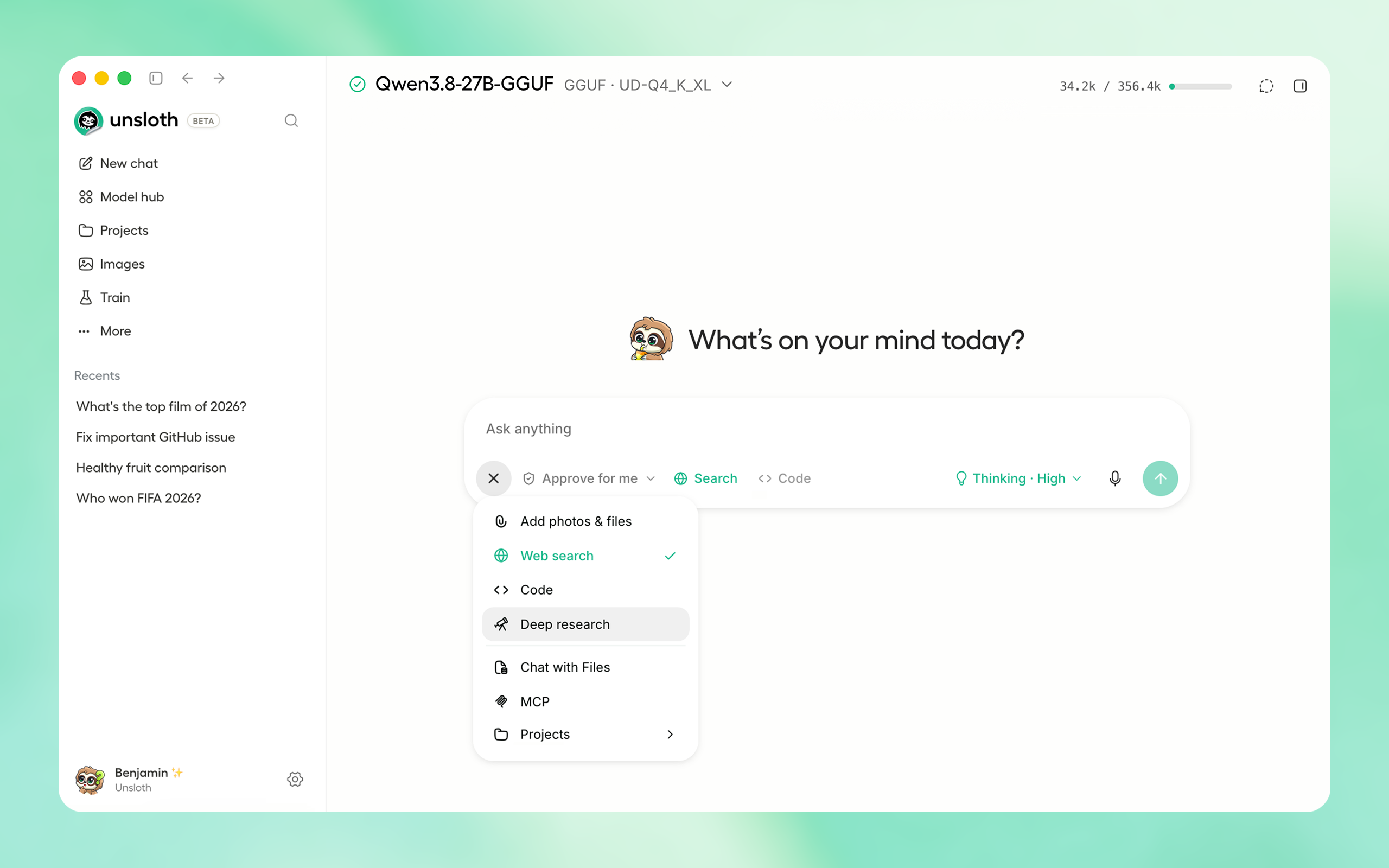
🦥 Download Unsloth Desktop for Linux, Windows, MacOS
Here's what you can do with Unsloth Desktop:
- Get up to 50% more accurate tool calling with self-healing calls and sandboxed code execution.
- Run Muse Glimmer 30B, Kimi K3, Qwen3.8, DeepSeek-V4 Flash 0731, Gemma 4, and more.
- Generate videos with MiniMax-H3, and create images and videos with other diffusion models at up to 2× faster inference on supported workflows.
- Use unlimited private web search, Deep Research, RAG and MCP.
- Export models to NVFP4, GGUF and other formats.
- Access Unsloth remotely through Cloudflare HTTPS.
- Run on CPU or multiple GPUs across NVIDIA, AMD, Intel and Mac.
- Train models without code, using less time and VRAM.
- Use local models through Unsloth's OpenAI-compatible API, or connect OpenAI and Anthropic models.
Tools, private research + APIs
Self-healing tool calling repairs malformed calls instead of dropping them. Models can run Python and Bash inside sandboxed environments, so they can test code, create files and verify their work.
Use unlimited private web search, let Deep Research plan and produce cited reports, or bring your own files into RAG. You can also connect MCP tools for workflows that need external apps, data or actions.
Local models can be served through Unsloth's OpenAI-compatible API for agents and other clients. Inside Desktop, you can also connect OpenAI and Anthropic as cloud model providers.
Muse Glimmer 30B + latest models
Run Muse Glimmer 30B locally for chat, agents, tools and APIs, alongside Kimi K3, Qwen3.8, DeepSeek-V4 Flash 0731 and Gemma 4. Download and manage them in one place through Unsloth Desktop.
MiniMax-H3 + image and video diffusion
Run MiniMax-H3 locally for video generation. Create images and videos locally, edit existing images and train supported diffusion models. Use LoRAs, reference images and ControlNet where available, with up to 2× faster inference on supported workflows.
No-code training, export + remote deployment
Pick a model and dataset, adjust the settings and start training. You can train supported LLMs, diffusion models, TTS models and embedding models without writing code. On supported LLM workloads, training is up to 2× faster and uses up to 70% less VRAM.
Export your trained models to NVFP4, GGUF and other supported formats. You can also securely deploy and access models remotely: turn on Remote access to publish Unsloth through a Cloudflare HTTPS link, then use the app and its local APIs from another device.
Hardware + platform support
Unsloth Desktop runs on Windows, macOS and Linux. Hardware support spans CPU and multi-GPU systems, NVIDIA and AMD GPUs, Intel hardware, and Mac.
CPU support includes Chat and Data Recipes. Training and inference options vary by model and backend.
Download Unsloth Desktop
Unsloth Desktop is free and open source. Download it for:
- Windows
- macOS
- Linux
v0.1.701-beta Update (1PM PDT time August 11th)
- Fixed slow Windows downloading (200x faster due to throttling)
- Fixed Mac asking to download command line tools (uv bug)
- Fixed AMD Strix Halo not being detected
- Other bug fixes
Introducing Unsloth Desktop 🦥
Unsloth Desktop is here! The first desktop app to run and train AI models locally. Research, export and deploy from the same open-source app on Windows, macOS and Linux.
🦥 Download Unsloth Desktop for Linux, Windows, MacOS
Here's what you can do with Unsloth Desktop:
- Get up to 50% more accurate tool calling with self-healing calls and sandboxed code execution.
- Run Muse Glimmer 30B, Kimi K3, Qwen3.8, DeepSeek-V4 Flash 0731, Gemma 4, and more.
- Generate videos with MiniMax-H3, and create images and videos with other diffusion models at up to 2× faster inference on supported workflows.
- Use unlimited private web search, Deep Research, RAG and MCP.
- Export models to NVFP4, GGUF and other formats.
- Access Unsloth remotely through Cloudflare HTTPS.
- Run on CPU or multiple GPUs across NVIDIA, AMD, Intel and Mac.
- Train models without code, using less time and VRAM.
- Use local models through Unsloth's OpenAI-compatible API, or connect OpenAI and Anthropic models.
Tools, private research + APIs
Self-healing tool calling repairs malformed calls instead of dropping them. Models can run Python and Bash inside sandboxed environments, so they can test code, create files and verify their work.
Use unlimited private web search, let Deep Research plan and produce cited reports, or bring your own files into RAG. You can also connect MCP tools for workflows that need external apps, data or actions.
Local models can be served through Unsloth's OpenAI-compatible API for agents and other clients. Inside Desktop, you can also connect OpenAI and Anthropic as cloud model providers.
Muse Glimmer 30B + latest models
Run Muse Glimmer 30B locally for chat, agents, tools and APIs, alongside Kimi K3, Qwen3.8, DeepSeek-V4 Flash 0731 and Gemma 4. Download and manage them in one place through Unsloth Desktop.
MiniMax-H3 + image and video diffusion
Run MiniMax-H3 locally for video generation. Create images and videos locally, edit existing images and train supported diffusion models. Use LoRAs, reference images and ControlNet where available, with up to 2× faster inference on supported workflows.
No-code training, export + remote deployment
Pick a model and dataset, adjust the settings and start training. You can train supported LLMs, diffusion models, TTS models and embedding models without writing code. On supported LLM workloads, training is up to 2× faster and uses up to 70% less VRAM.
Export your trained models to NVFP4, GGUF and other supported formats. You can also securely deploy and access models remotely: turn on Remote access to publish Unsloth through a Cloudflare HTTPS link, then use the app and its local APIs from another device.
Hardware + platform support
Unsloth Desktop runs on Windows, macOS and Linux. Hardware support spans CPU and multi-GPU systems, NVIDIA and AMD GPUs, Intel hardware, and Mac.
CPU support includes Chat and Data Recipes. Training and inference options vary by model and backend.
Download Unsloth Desktop
Unsloth Desktop is free and open source. Download it for:
- Windows
- macOS
- Linux
v0.1.701-beta Update (1PM PDT time August 11th)
- Fixed slow Windows downloading (200x faster due to throttling)
- Fixed Mac asking to download command line tools (uv bug)
- Fixed AMD Strix Halo not being detected
- Other bug fixes
Introducing Unsloth Desktop 🦥
Unsloth Desktop is here! The first desktop app to run and train AI models locally. Research, export and deploy from the same open-source app on Windows, macOS and Linux.

🦥 Download Unsloth Desktop for Linux, Windows, MacOS
Here's what you can do with Unsloth Desktop:
- Get up to 50% more accurate tool calling with self-healing calls and sandboxed code execution.
- Run Muse Glimmer 30B, Kimi K3, Qwen3.8, DeepSeek-V4 Flash 0731, Gemma 4, and more.
- Generate videos with MiniMax-H3, and create images and videos with other diffusion models at up to 2× faster inference on supported workflows.
- Use unlimited private web search, Deep Research, RAG and MCP.
- Export models to NVFP4, GGUF and other formats.
- Access Unsloth remotely through Cloudflare HTTPS.
- Run on CPU or multiple GPUs across NVIDIA, AMD, Intel and Mac.
- Train models without code, using less time and VRAM.
- Use local models through Unsloth's OpenAI-compatible API, or connect OpenAI and Anthropic models.
Tools, private research + APIs
Self-healing tool calling repairs malformed calls instead of dropping them. Models can run Python and Bash inside sandboxed environments, so they can test code, create files and verify their work.
Use unlimited private web search, let Deep Research plan and produce cited reports, or bring your own files into RAG. You can also connect MCP tools for workflows that need external apps, data or actions.
Local models can be served through Unsloth's OpenAI-compatible API for agents and other clients. Inside Desktop, you can also connect OpenAI and Anthropic as cloud model providers.
Muse Glimmer 30B + latest models
Run Muse Glimmer 30B locally for chat, agents, tools and APIs, alongside Kimi K3, Qwen3.8, DeepSeek-V4 Flash 0731 and Gemma 4. Download and manage them in one place through Unsloth Desktop.
MiniMax-H3 + image and video diffusion
Run MiniMax-H3 locally for video generation. Create images and videos locally, edit existing images and train supported diffusion models. Use LoRAs, reference images and ControlNet where available, with up to 2× faster inference on supported workflows.
No-code training, export + remote deployment
Pick a model and dataset, adjust the settings and start training. You can train supported LLMs, diffusion models, TTS models and embedding models without writing code. On supported LLM workloads, training is up to 2× faster and uses up to 70% less VRAM.
Export your trained models to NVFP4, GGUF and other supported formats. You can also securely deploy and access models remotely: turn on Remote access to publish Unsloth through a Cloudflare HTTPS link, then use the app and its local APIs from another device.
Hardware + platform support
Unsloth Desktop runs on Windows, macOS and Linux. Hardware support spans CPU and multi-GPU systems, NVIDIA and AMD GPUs, Intel hardware, and Mac.
CPU support includes Chat and Data Recipes. Training and inference options vary by model and backend.
Download Unsloth Desktop
Unsloth Desktop is free and open source. Download it for:
- Windows
- macOS
- Linux
Unsloth v0.1.62-beta
Meta Muse Glimmer
Meta has released Muse Glimmer, the first open model from Meta Superintelligence Labs. Muse Glimmer is a dense, 30B parameter model by Meta, built for local agentic and coding workflows. Released under the Apache 2.0 license you can run Muse Glimmer 30B via Unsloth and Unsloth Dynamic quants for the best performance.
Run Muse Glimmer
Fine-tune Muse Glimmer
Muse Glimmer 30B can run locally on 20GB RAM/VRAM setups, including Mac and GPUs. You can also train and fine-tune Muse Glimmer 30B using Unsloth on 20GB VRAM.
Other Updates
- MiniMax-H3 video generation support
- Preliminary image diffusion support
- Revamped training page
- Chat now provides downloadable artifacts
Updating / installing Unsloth
macOS, Linux, WSL:
curl -fsSL https://unsloth.ai/install.sh | shWindows:
irm https://unsloth.ai/install.ps1 | iexWhat's Changed
- Studio: judge the cached-pipeline signals on the snapshot the row actually loads by @danielhanchen in #7851
- Bump install.sh / install.ps1 pin to unsloth>=2026.8.3 by @danielhanchen in #7860
- Studio: make the sidebar menu separators visible in dark mode by @shimmyshimmer in #7865
- Studio: run sandbox matplotlib headless by @NilayYadav in #7789
- Don't send desktop startup requests to an unvalidated port 8888 by @NilayYadav in #7852
- Support independent prompt queues across parallel chats by @Imagineer99 in #7629
- add a background image to the macos dmg install window by @mahiatlinux in #7827
- Studio: keep Video under More until a user pins it by @shimmyshimmer in #7863
- Studio: show generated media unrounded, and fix the selected thumbnail by @shimmyshimmer in #7883
- Studio: drop the New badge from the Video nav row by @shimmyshimmer in #7890
- Studio: stop a clicked tooltip from hanging over dialogs by @shimmyshimmer in #7836
- Desktop: move update controls to Settings > General by @oobabooga in #7807
- Fix the stale response-model label assertion that has main red by @danielhanchen in #7874
- Studio: detect stalled Deep Research output streams by @alkinun in #7839
- Guard the release-desktop version input and document the Cargo version by @danielhanchen in #7889
- Studio: add Qwen3-ASR dictation, cancellable downloads, and a download prompt by @shimmyshimmer in #7835
- Studio: even out the gap around the More flyout's rule by @shimmyshimmer in #7899
- Studio: stop the New chat row looking hovered on a blank new chat by @shimmyshimmer in #7898
- Studio: fix remaining translation defects after #7797 by @danielhanchen in #7850
- Studio: fix download card alignment and surface the stop button by @shimmyshimmer in #7848
- Keep the file-edit turn 2 prompt to one instruction, and stop waiving its cap by @danielhanchen in #7846
- Studio: align Tauri sidebar spacing by @wasimysaid in #7901
- Fix sidebar bottom fade cutting off the last row mid-glyph by @shimmyshimmer in #7902
- Bump install.sh / install.ps1 pin to unsloth>=2026.8.4 by @danielhanchen in #7906
- Answer GGUF variants from the cache the request names, and skip an unreadable one by @danielhanchen in #7857
- Desktop: warn before quitting during an update and skip installer fallback on cancel by @NilayYadav in #7793
- Desktop: publish drafts without rebuilding by @wasimysaid in #7907
- Studio: restore locale parity and gate it in CI by @danielhanchen in #7904
- Studio: make training and model-picker copy name UI that exists by @danielhanchen in #7905
- fix(studio): run bash and name the real platform for the terminal tool on Windows by @LeoBorcherding in #7885
- Desktop: fix Linux release asset names by @wasimysaid in #7911
- Unsloth Studio: keep the Images and Video headers clear of the custom titlebar by @LeoBorcherding in #7918
- fix(studio): keep child spawns alive under a pid-1 parent by @mahiatlinux in #7894
- Ask uv for a Python that can import torch, and skip the one that cannot by @danielhanchen in #7830
- Improve desktop startup status by @wasimysaid in #7924
- Tauri smoke: stop uploading the whole target/debug tree (350GB of artifacts) by @danielhanchen in #7930
- Restore warnings_issued for trl trainers on transformers 5.1+ by @danielhanchen in #7854
- Fetch a sentence-transformers model's subfolder weights instead of pruning them by @danielhanchen in #7855
- Do not enter CUDA autocast for a float32 model during generate by @danielhanchen in #7900
- Locate the dictation model search box by test id, not by placeholder copy by @danielhanchen in #7909
- Record a stopped repair update as canceled rather than failed by @danielhanchen in #7910
- Bound dataset_num_proc by memory, and stop treating 1 as "no multiprocessing" by @danielhanchen in #7831
- Studio: quiet the image and video generation progress polls by @danielhanchen in #7869
- Studio: stop the Images Train settings columns overlapping by @danielhanchen in #7895
- Fake the Windows blocklist in the mangled-switch test so it runs off Windows by @danielhanchen in #7934
- Refine desktop media header alignment by @wasimysaid in #7859
- Read the GGUF context length from the snapshot that answered, not the repo cache dir by @danielhanchen in #7920
- Tighten remaining artifact uploads (follow-up to #7930) by @danielhanchen in #7939
- Studio: prevent long streaming Markdown stalls by @oobabooga in #7892
- Fix studio server crash when launched without a console (Windows) by @legobele in #7932
- Fix GGUF export writing outside the chosen save directory on Windows (#7897) by @danielhanchen in #7937
- Fix Windows PowerShell resource path authorization by @Imagineer99 in #7943
- Desktop: fix the mobile-layout fallout of Windows text scaling by @danielhanchen in #7927
- Desktop: make the close button quit outside macOS by @danielhanchen in #7929
- Desktop: pin the shipped backend package version so a shared venv gets upgraded by @danielhanchen in #7926
- Studio: screen the detached-window test against the Windows blocklist too by @danielhanchen in #7936
- Require every declared denoiser, and every shard of it, before a cached pipeline reads as complete by @danielhanchen in #7871
- Fix the Windows-only snapshot path assertion in the diffusion prefetch test by @danielhanchen in #7933
- Studio: paint the image and video pickers from the curated catalog by @danielhanchen in #7896
- Bump install.sh / install.ps1 pins to unsloth>=2026.8.5, unsloth-zoo>=2026.8.4 by @danielhanchen in #7967
- Studio: consistent rounded hover boxes for nav icon buttons by @shimmyshimmer in #7970
- Studio: lead the Context Length note with the automatic fit by @shimmyshimmer in #7988
- Studio: test the Windows launcher shape, not just the path normalizer by @danielhanchen in #7969
- Studio: stop model rows staying lit after the dots menu closes by @shimmyshimmer in #7987
- Update the nav icon button size contract to the 30px box by @danielhanchen in #7979
- Studio: fetch the gated diffusion bases from ungated unsloth mirrors by @danielhanchen in #7952
- Studio: fix training stuck at 100% when the worker will not exit by @danielhanchen in #7938
- Report the rea...
Contributors


Assets 8
Meta Muse Glimmer
Meta has released Muse Glimmer, the first open model from Meta Superintelligence Labs. Muse Glimmer is a dense, 30B parameter model by Meta, built for local agentic and coding workflows. Released under the Apache 2.0 license you can run Muse Glimmer 30B via Unsloth and Unsloth Dynamic quants for the best performance.
Run Muse Glimmer
Fine-tune Muse Glimmer
Muse Glimmer 30B can run locally on 20GB RAM/VRAM setups, including Mac and GPUs. You can also train and fine-tune Muse Glimmer 30B using Unsloth on 20GB VRAM.
Updating / installing Unsloth
macOS, Linux, WSL:
curl -fsSL https://unsloth.ai/install.sh | shWindows:
irm https://unsloth.ai/install.ps1 | iexWhat's Changed
- Studio: judge the cached-pipeline signals on the snapshot the row actually loads by @danielhanchen in #7851
- Bump install.sh / install.ps1 pin to unsloth>=2026.8.3 by @danielhanchen in #7860
- Studio: make the sidebar menu separators visible in dark mode by @shimmyshimmer in #7865
- Studio: run sandbox matplotlib headless by @NilayYadav in #7789
- Don't send desktop startup requests to an unvalidated port 8888 by @NilayYadav in #7852
- Support independent prompt queues across parallel chats by @Imagineer99 in #7629
- add a background image to the macos dmg install window by @mahiatlinux in #7827
- Studio: keep Video under More until a user pins it by @shimmyshimmer in #7863
- Studio: show generated media unrounded, and fix the selected thumbnail by @shimmyshimmer in #7883
- Studio: drop the New badge from the Video nav row by @shimmyshimmer in #7890
- Studio: stop a clicked tooltip from hanging over dialogs by @shimmyshimmer in #7836
- Desktop: move update controls to Settings > General by @oobabooga in #7807
- Fix the stale response-model label assertion that has main red by @danielhanchen in #7874
- Studio: detect stalled Deep Research output streams by @alkinun in #7839
- Guard the release-desktop version input and document the Cargo version by @danielhanchen in #7889
- Studio: add Qwen3-ASR dictation, cancellable downloads, and a download prompt by @shimmyshimmer in #7835
- Studio: even out the gap around the More flyout's rule by @shimmyshimmer in #7899
- Studio: stop the New chat row looking hovered on a blank new chat by @shimmyshimmer in #7898
- Studio: fix remaining translation defects after #7797 by @danielhanchen in #7850
- Studio: fix download card alignment and surface the stop button by @shimmyshimmer in #7848
- Keep the file-edit turn 2 prompt to one instruction, and stop waiving its cap by @danielhanchen in #7846
- Studio: align Tauri sidebar spacing by @wasimysaid in #7901
- Fix sidebar bottom fade cutting off the last row mid-glyph by @shimmyshimmer in #7902
- Bump install.sh / install.ps1 pin to unsloth>=2026.8.4 by @danielhanchen in #7906
- Answer GGUF variants from the cache the request names, and skip an unreadable one by @danielhanchen in #7857
- Desktop: warn before quitting during an update and skip installer fallback on cancel by @NilayYadav in #7793
- Desktop: publish drafts without rebuilding by @wasimysaid in #7907
- Studio: restore locale parity and gate it in CI by @danielhanchen in #7904
- Studio: make training and model-picker copy name UI that exists by @danielhanchen in #7905
- fix(studio): run bash and name the real platform for the terminal tool on Windows by @LeoBorcherding in #7885
- Desktop: fix Linux release asset names by @wasimysaid in #7911
- Unsloth Studio: keep the Images and Video headers clear of the custom titlebar by @LeoBorcherding in #7918
- fix(studio): keep child spawns alive under a pid-1 parent by @mahiatlinux in #7894
- Ask uv for a Python that can import torch, and skip the one that cannot by @danielhanchen in #7830
- Improve desktop startup status by @wasimysaid in #7924
- Tauri smoke: stop uploading the whole target/debug tree (350GB of artifacts) by @danielhanchen in #7930
- Restore warnings_issued for trl trainers on transformers 5.1+ by @danielhanchen in #7854
- Fetch a sentence-transformers model's subfolder weights instead of pruning them by @danielhanchen in #7855
- Do not enter CUDA autocast for a float32 model during generate by @danielhanchen in #7900
- Locate the dictation model search box by test id, not by placeholder copy by @danielhanchen in #7909
- Record a stopped repair update as canceled rather than failed by @danielhanchen in #7910
- Bound dataset_num_proc by memory, and stop treating 1 as "no multiprocessing" by @danielhanchen in #7831
- Studio: quiet the image and video generation progress polls by @danielhanchen in #7869
- Studio: stop the Images Train settings columns overlapping by @danielhanchen in #7895
- Fake the Windows blocklist in the mangled-switch test so it runs off Windows by @danielhanchen in #7934
- Refine desktop media header alignment by @wasimysaid in #7859
- Read the GGUF context length from the snapshot that answered, not the repo cache dir by @danielhanchen in #7920
- Tighten remaining artifact uploads (follow-up to #7930) by @danielhanchen in #7939
- Studio: prevent long streaming Markdown stalls by @oobabooga in #7892
- Fix studio server crash when launched without a console (Windows) by @legobele in #7932
- Fix GGUF export writing outside the chosen save directory on Windows (#7897) by @danielhanchen in #7937
- Fix Windows PowerShell resource path authorization by @Imagineer99 in #7943
- Desktop: fix the mobile-layout fallout of Windows text scaling by @danielhanchen in #7927
- Desktop: make the close button quit outside macOS by @danielhanchen in #7929
- Desktop: pin the shipped backend package version so a shared venv gets upgraded by @danielhanchen in #7926
- Studio: screen the detached-window test against the Windows blocklist too by @danielhanchen in #7936
- Require every declared denoiser, and every shard of it, before a cached pipeline reads as complete by @danielhanchen in #7871
- Fix the Windows-only snapshot path assertion in the diffusion prefetch test by @danielhanchen in #7933
- Studio: paint the image and video pickers from the curated catalog by @danielhanchen in #7896
- Bump install.sh / install.ps1 pins to unsloth>=2026.8.5, unsloth-zoo>=2026.8.4 by @danielhanchen in #7967
- Studio: consistent rounded hover boxes for nav icon buttons by @shimmyshimmer in #7970
- Studio: lead the Context Length note with the automatic fit by @shimmyshimmer in #7988
- Studio: test the Windows launcher shape, not just the path normalizer by @danielhanchen in #7969
- Studio: stop model rows staying lit after the dots menu closes by @shimmyshimmer in #7987
- Update the nav icon button size contract to the 30px box by @danielhanchen in #7979
- Studio: fetch the gated diffusion bases from ungated unsloth mirrors by @danielhanchen in #7952
- Studio: fix training stuck at 100% when the worker will not exit by @danielhanchen in #7938
- Report the real cause when a save or GGUF export fails by @danielhanchen in #7861
- Locate the dictation model search box by test id, not by...
Contributors
Assets 8
Unsloth v0.1.527-beta
What's Changed
- Studio: judge the cached-pipeline signals on the snapshot the row actually loads by @danielhanchen in #7851
- Bump install.sh / install.ps1 pin to unsloth>=2026.8.3 by @danielhanchen in #7860
- Studio: make the sidebar menu separators visible in dark mode by @shimmyshimmer in #7865
- Studio: run sandbox matplotlib headless by @NilayYadav in #7789
- Don't send desktop startup requests to an unvalidated port 8888 by @NilayYadav in #7852
- Support independent prompt queues across parallel chats by @Imagineer99 in #7629
- add a background image to the macos dmg install window by @mahiatlinux in #7827
- Studio: keep Video under More until a user pins it by @shimmyshimmer in #7863
- Studio: show generated media unrounded, and fix the selected thumbnail by @shimmyshimmer in #7883
- Studio: drop the New badge from the Video nav row by @shimmyshimmer in #7890
- Studio: stop a clicked tooltip from hanging over dialogs by @shimmyshimmer in #7836
- Desktop: move update controls to Settings > General by @oobabooga in #7807
- Fix the stale response-model label assertion that has main red by @danielhanchen in #7874
- Studio: detect stalled Deep Research output streams by @alkinun in #7839
- Guard the release-desktop version input and document the Cargo version by @danielhanchen in #7889
- Studio: add Qwen3-ASR dictation, cancellable downloads, and a download prompt by @shimmyshimmer in #7835
- Studio: even out the gap around the More flyout's rule by @shimmyshimmer in #7899
- Studio: stop the New chat row looking hovered on a blank new chat by @shimmyshimmer in #7898
- Studio: fix remaining translation defects after #7797 by @danielhanchen in #7850
- Studio: fix download card alignment and surface the stop button by @shimmyshimmer in #7848
- Keep the file-edit turn 2 prompt to one instruction, and stop waiving its cap by @danielhanchen in #7846
- Studio: align Tauri sidebar spacing by @wasimysaid in #7901
- Fix sidebar bottom fade cutting off the last row mid-glyph by @shimmyshimmer in #7902
- Bump install.sh / install.ps1 pin to unsloth>=2026.8.4 by @danielhanchen in #7906
- Answer GGUF variants from the cache the request names, and skip an unreadable one by @danielhanchen in #7857
- Desktop: warn before quitting during an update and skip installer fallback on cancel by @NilayYadav in #7793
- Desktop: publish drafts without rebuilding by @wasimysaid in #7907
- Studio: restore locale parity and gate it in CI by @danielhanchen in #7904
- Studio: make training and model-picker copy name UI that exists by @danielhanchen in #7905
- fix(studio): run bash and name the real platform for the terminal tool on Windows by @LeoBorcherding in #7885
- Desktop: fix Linux release asset names by @wasimysaid in #7911
- Unsloth Studio: keep the Images and Video headers clear of the custom titlebar by @LeoBorcherding in #7918
- fix(studio): keep child spawns alive under a pid-1 parent by @mahiatlinux in #7894
- Ask uv for a Python that can import torch, and skip the one that cannot by @danielhanchen in #7830
- Improve desktop startup status by @wasimysaid in #7924
- Tauri smoke: stop uploading the whole target/debug tree (350GB of artifacts) by @danielhanchen in #7930
- Restore warnings_issued for trl trainers on transformers 5.1+ by @danielhanchen in #7854
- Fetch a sentence-transformers model's subfolder weights instead of pruning them by @danielhanchen in #7855
- Do not enter CUDA autocast for a float32 model during generate by @danielhanchen in #7900
- Locate the dictation model search box by test id, not by placeholder copy by @danielhanchen in #7909
- Record a stopped repair update as canceled rather than failed by @danielhanchen in #7910
- Bound dataset_num_proc by memory, and stop treating 1 as "no multiprocessing" by @danielhanchen in #7831
- Studio: quiet the image and video generation progress polls by @danielhanchen in #7869
- Studio: stop the Images Train settings columns overlapping by @danielhanchen in #7895
- Fake the Windows blocklist in the mangled-switch test so it runs off Windows by @danielhanchen in #7934
- Refine desktop media header alignment by @wasimysaid in #7859
- Read the GGUF context length from the snapshot that answered, not the repo cache dir by @danielhanchen in #7920
- Tighten remaining artifact uploads (follow-up to #7930) by @danielhanchen in #7939
- Studio: prevent long streaming Markdown stalls by @oobabooga in #7892
- Fix studio server crash when launched without a console (Windows) by @legobele in #7932
- Fix GGUF export writing outside the chosen save directory on Windows (#7897) by @danielhanchen in #7937
- Fix Windows PowerShell resource path authorization by @Imagineer99 in #7943
- Desktop: fix the mobile-layout fallout of Windows text scaling by @danielhanchen in #7927
- Desktop: make the close button quit outside macOS by @danielhanchen in #7929
- Desktop: pin the shipped backend package version so a shared venv gets upgraded by @danielhanchen in #7926
- Studio: screen the detached-window test against the Windows blocklist too by @danielhanchen in #7936
- Require every declared denoiser, and every shard of it, before a cached pipeline reads as complete by @danielhanchen in #7871
- Fix the Windows-only snapshot path assertion in the diffusion prefetch test by @danielhanchen in #7933
- Studio: paint the image and video pickers from the curated catalog by @danielhanchen in #7896
- Bump install.sh / install.ps1 pins to unsloth>=2026.8.5, unsloth-zoo>=2026.8.4 by @danielhanchen in #7967
- Studio: consistent rounded hover boxes for nav icon buttons by @shimmyshimmer in #7970
- Studio: lead the Context Length note with the automatic fit by @shimmyshimmer in #7988
- Studio: test the Windows launcher shape, not just the path normalizer by @danielhanchen in #7969
- Studio: stop model rows staying lit after the dots menu closes by @shimmyshimmer in #7987
- Update the nav icon button size contract to the 30px box by @danielhanchen in #7979
- Studio: fetch the gated diffusion bases from ungated unsloth mirrors by @danielhanchen in #7952
- Studio: fix training stuck at 100% when the worker will not exit by @danielhanchen in #7938
- Report the real cause when a save or GGUF export fails by @danielhanchen in #7861
- Locate the dictation model search box by test id, not by its copy by @danielhanchen in #7914
- CI: drop three macOS legs that assert nothing a Linux runner does not by @danielhanchen in #7974
- CI: fold the mac API smoke into the UI smoke, drop the subsumed install leg by @danielhanchen in #7975
- Installer: preserve rollback state and merge on partial venv move (#7810) by @namdamdoi68-oss in #7891
- CI: fold the mac update smoke into the same job, running last as teardown by @danielhanchen in #7980
- CI: save caches only on main, so PR runs stop evicting the caches they need by @danielhanchen in #7990
- Studio: drop the streaming...
Contributors
Assets 8
DSpark + DeepSeek-V4 Flash 0731
Hey everyone! For folks who missed the news - Kimi K3 & DeepSeek v4 Flash can now run locally with Unsloth Dynamic GGUFs! We now added more efficient and faster downloading for Colab, low memory systems and also high memory and CPU systems - we auto fallback to HTTP as well if XET is stuck
August 7th Update
Many bug fixes + Mac fixes and smoother installations.
DeepSeek V4 Flash 0731 + DSpark
You can run our DeepSeek V4 Dynamic GGUFs through Unsloth. Unsloth automatically detects multi-GPU setups and can offload model layers to system memory.
UD-IQ1_Sis 83GB in disk space.UD-IQ3_XXSis 104GB in disk space and fits in 128GB machines.UD-Q4_K_XLis 155GB in disk space.- For lossless inference, use
UD-Q8_K_XL, which is 162TB in disk space. - DSpark support is now default! Get 2x faster inference!
Read our full DeepSeek V4 Flash guide
Kimi K3
Moonshot AI’s Kimi K3 is a 2.8T-parameter MoE model with 104B active parameters, native vision support and a 1M context window. Kimi K3 is thinking-only and Unsloth supports low, high and max reasoning efforts.
You can run our Kimi K3 Dynamic GGUFs through Unsloth. Unsloth automatically detects multi-GPU setups and offloads layers automatically.
Kimi K3 is a very large model, so plan your hardware accordingly:
UD-IQ1_Sis 595GB in disk space.UD-Q4_K_XLis 1.51TB in disk space.- For lossless inference, use
UD-Q8_K_XL, which is 1.56TB in disk space.
Read our full Kimi K3 guide and learn more about Unsloth Dynamic 2.0 GGUFs.
Updating / installing Unsloth
macOS, Linux, WSL:
curl -fsSL https://unsloth.ai/install.sh | shWindows:
irm https://unsloth.ai/install.ps1 | iexUnsloth is NOT affected by the Keyv security incident
As per, Unsloth uses ESLint which uses keyv==4.5.4, flat-cache==4.0.1, file-entry-cache==8.0.0. The compromised versions are keyv==6.0.0, flat-cache==6.1.24, file-entry-cache==11.1.6
Unsloth DOES NOT use the compromised versions, so you do NOT need to take any action.
However please check your own systems and other non Unsloth packages for any compromise - see for compromised packages
What's Changed
- Bump install.sh / install.ps1 pin to unsloth>=2026.7.6 by @danielhanchen in #7621
- Fix two pre-existing Backend CI failures blocking every open PR by @danielhanchen in #7639
- fix(trainer): warn loudly when requested packing is silently disabled by @eliazonta in #7234
- Preserve reasoning across turns for Qwen3.x by @mahille in #7289
- Make tests/utils runnable again and cover test_packing.py in CI by @danielhanchen in #7642
- Uninstaller: reject unrecognized arguments instead of uninstalling by @oobabooga in #7631
- Make the uninstaller test suites run on macOS and Windows PowerShell 5.1 by @danielhanchen in #7643
- Studio: Don't disarm Ctrl+C in agents launched by unsloth start by @NilayYadav in #7630
- Studio: keep a slow model load alive through a proxy timeout by @danielhanchen in #7635
- Tighten the comments around the uninstaller argument guard by @danielhanchen in #7647
- Route the explicit Vulkan setup failures through the setup failure helpers by @danielhanchen in #7645
- Honor an explicit map_eos_token=False in get_chat_template by @vineethsaivs in #7475
- Fix desktop repair version skew and output decoding by @wasimysaid in #7641
- Desktop: Improve the installation message by @oobabooga in #7657
- Studio: make the API keys list scrollable by @NilayYadav in #7622
- Desktop: notarize the final macOS disk image on release by @oobabooga in #7615
- Desktop: preserve first app window size after setup by @oobabooga in #7659
- data-recipe: recognize current sampling progress log line by @devangpratap in #6760
- Desktop: clean up the backend on Unix termination signals by @oobabooga in #7614
- Desktop: show the app version in Settings > About by @oobabooga in #7612
- Studio: Fix hub search input overlapping the format filter at narrow widths by @NilayYadav in #7658
- Add 2026.7.6 release notes to CHANGELOG.md by @shimmyshimmer in #7671
- Desktop: exit the backend when the app that spawned it dies by @NilayYadav in #7655
- Desktop: open uploaded files via the OS instead of window.open by @NilayYadav in #7660
- Run OpenClaw in the launched project workspace by @Imagineer99 in #7568
- Desktop: drop documents into a chat instead of rejecting them as non-GGUF (#7661) by @LeoBorcherding in #7668
- feat(install): use pre-built Tauri icon for macOS .app bundle by @ArjunDivecha in #7628
- Studio: report active training status by @oobabooga in #7613
- studio: apply saved per-model settings on API loads, add API monitor by @shimmyshimmer in #7473
- fix: replace deprecated transformers attention mask imports by @Taranum01 in #6880
- Offline: detect an unreachable hub, not just dead DNS by @shimmyshimmer in #7591
- Assert the Vulkan installer bailouts fail closed via the setup failure helper by @danielhanchen in #7644
- Studio: charge the split compute-buffer rate on a multi-GPU auto fit by @danielhanchen in #7637
- Add 2026.7.7 release notes to CHANGELOG.md by @danielhanchen in #7685
- Fix multiline prompts through Windows npm shims by @Imagineer99 in #7567
- Revert "Add 2026.7.7 release notes to CHANGELOG.md" by @danielhanchen in #7687
- docs: fix
--quantizationflag in unsloth-cli.py usage example by @latent-9 in #7688 - Studio: Fix GGUF classification for custom MTP scan roots by @Lyxot in #7648
- Studio: complete translation coverage for all supported locales by @oobabooga in #7666
- Guard VLM detection against config.architectures being None in the save paths by @vineethsaivs in #7372
- Centralize device backend helpers by @danielhanchen in #4252
- Make the auto-appended EOS token deterministic by @vineethsaivs in #7702
- Unsloth Studio: fix sidebar rail bottom fade rendering as a lighter block in dark mode by @LeoBorcherding in #7674
- Fix the three CI failures blocking every open PR by @danielhanchen in #7722
- Close two false passes in the uninstaller argument tests, and document the piped help form by @danielhanchen in #7690
- Uninstall the whisper.cpp prebuilt and the node/whisper install locks by @danielhanchen in #7686
- studio update --local: refuse site-packages as the repo root by @danielhanchen in #7693
- studio update: fail instead of reporting success on a damaged install by @danielhanchen in #7691
- studio setup: let Windows PowerShell load its own Security module by @danielhanchen in #7692
- Fix
unsloth runon Windows: the venv entry point is unsloth.exe by @danielhanchen in #7718 - Studio: restore cached models hidden by a dangling HF ref, and stop auto-load downloading after a failed load (#7374) by @Souravrajvi0 in #7375
- Desktop: stop losing the backend's exit, its output and its startup by @danielhanchen in #7719
- Studio setup: report a missing llama.cpp in Tauri mode instead of aborting the install by @danielhanchen in #7720
- Studio: honour the GPU-layer split for DiffusionGemma loads by @LeoBorcherding in #7575
- Desktop: reopen hidden macOS window from Dock by @wasimysaid in #7723
- Fix the six backend tests blocking every PR: companion-only GGUF folders, and ...


