
Real-time audit log explorer for OpenShift and Kubernetes
Who did what, when — across your entire cluster. With AI risk scoring and login tracking.
🌐 audit-radar.com · Docker Hub · Apache 2.0




The problem:
kubectl get eventsshows nothing useful. Enabling audit logs gives you gigabytes of JSON. You want to know who deleted that deployment at 2am — without writing log queries.Audit Radar collects kube-apiserver audit events, enriches them with AI risk scoring, and gives you a live filterable UI. No Elasticsearch, no Kibana, no log management platform required.
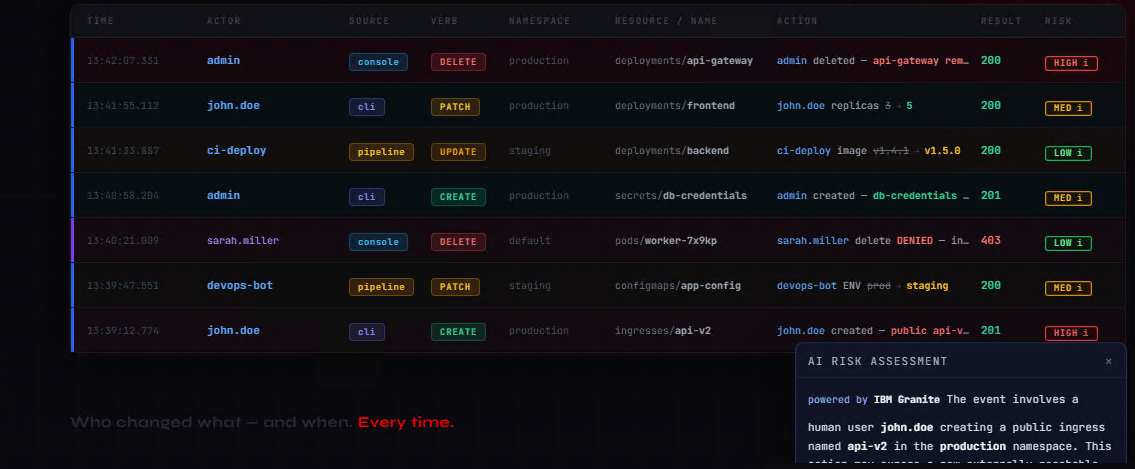
Live audit event stream with AI risk assessment — OpenShift cluster
| 🔴 Live event stream | Real-time audit feed — filter by actor, namespace, verb, resource, risk level |
| 🤖 AI risk scoring | Every event scored HIGH/MEDIUM/LOW by IBM Granite 3.2 via Ollama — runs inside the cluster, no data leaves |
| 🔐 Login tracking | Dedicated Logins tab — who logged in, when, from where, via Web Console or CLI |
| 🔔 Webhook alerts | Slack and email rules — e.g. "DELETE in namespace production → alert #ops" |
| 📊 Summary dashboard | Aggregated view: top actors, risky events, verb breakdown |
| 📥 CSV export | Export filtered events for compliance reporting |
| 🚫 Exclusion filters | Drop noisy service account traffic before it hits the database |
| 🔑 OCP OAuth2 SSO | Login with OpenShift groups (audit-radar-admins, audit-radar-editors, viewer) |
| 🔑 Basic auth | Username/password fallback — works on both OCP and plain Kubernetes |
SOC2 / PCI ready — full audit trail of human and system actions across all namespaces.
kube-apiserver
      │  audit events
      ▼
CLF (OpenShift)          Vector DaemonSet (Kubernetes/k3s)
      │  HTTP POST               │  HTTP POST
      └──────────────┬───────────┘
                     ▼
             audit-collector ──── PostgreSQL
                                      │
                              audit-analyzer (Granite 3.2 via Ollama)
                              audit-alerter  (Slack / email)
                                      │
                                  audit-ui ◄──── OCP OAuth2 / basic auth
                                      │
                                   browser
| Component | Image | Description |
|---|---|---|
| audit-ui | hybrid2k3/audit-ui |
Go HTTP server — UI, API, settings |
| audit-collector | hybrid2k3/audit-collector |
Receives events, normalizes, stores |
| audit-analyzer | hybrid2k3/audit-analyzer |
AI risk scoring via Granite 3.2 |
| audit-alerter | hybrid2k3/audit-alerter |
Slack/email alerts on rules |
| ollama | ollama/ollama |
Local LLM runtime |
| postgres | registry.redhat.io/rhel9/postgresql-15 (OCP) / postgres:15 (k8s) |
Event storage |
Two separate charts — one per platform:
| Chart | Path | Platform |
|---|---|---|
audit-radar-openshift |
Helm/audit-radar-openshift/ |
Red Hat OpenShift 4.x |
audit-radar-k8s |
Helm/audit-radar-k8s/ |
Kubernetes / k3s |
- OpenShift 4.x with cluster-admin
- Helm 3.x
oc apply -f deploy/04b-logging-operator.yaml
# Wait ~2-3 minutes for Succeeded
oc get csv -n openshift-logging -whelm install audit-radar ./Helm/audit-radar-openshiftAll secrets (PostgreSQL password, OAuth client secret, basic auth password) are generated automatically — no manual configuration required.
# Cluster Log Forwarder — forwards audit events to the collector
oc apply -f deploy/05-clf.yaml
# APIServer audit policy — enables field-level change capture
# ⚠ WARNING: Triggers a rolling restart of kube-apiserver pods (~5-10 min).
# Cluster stays available. Monitor with: oc get pods -n openshift-kube-apiserver -w
oc apply -f deploy/07-apiserver-audit.yamloc adm groups add-users audit-radar-admins <your-username>oc get route audit-ui -n audit-visionoc get secret audit-ui-basic-secret -n audit-vision \
-o jsonpath='{.data.AUTH_BASIC_PASS}' | base64 -d && echoLogin with admin and the password above.
- Kubernetes 1.24+ or k3s with cluster-admin
- Helm 3.x
- Audit logging enabled on kube-apiserver
Audit Radar requires the kube-apiserver to write audit logs to a file on the node. Refer to your distribution's documentation. The audit log path must match vector.auditLogPath in values (default: /var/log/k3s-audit.log).
Example audit policy is included in deploy-k8s/audit-policy.yaml.
helm install audit-radar ./Helm/audit-radar-k8s \
--set ui.ingress.host=audit.192.168.10.30.nip.iokubectl get ingress -n audit-visionkubectl get secret audit-ui-basic-secret -n audit-vision \
-o jsonpath='{.data.AUTH_BASIC_PASS}' | base64 -d && echoLogin with admin and the password above.
⚠ Change the basic auth password before exposing the UI externally.
The Helm chart auto-generates a password on install. Retrieve it with the commands in the install section above, or:
# OpenShift
oc get secret audit-ui-basic-secret -n audit-vision \
  -o jsonpath='{.data.AUTH_BASIC_PASS}' | base64 -d && echo
# Kubernetes
kubectl get secret audit-ui-basic-secret -n audit-vision \
-o jsonpath='{.data.AUTH_BASIC_PASS}' | base64 -d && echoWhen installed without Helm, default credentials are admin / changeme — change immediately.
| Source | Role | Access |
|---|---|---|
OCP group audit-radar-admins |
admin | Full access including settings |
OCP group audit-radar-editors |
editor | Alert rules, no settings |
| Any authenticated OCP user | viewer | Read-only event stream |
| Basic auth user | admin | Full access |
oc adm groups add-users audit-radar-admins alice
oc adm groups add-users audit-radar-editors bobSingle basic auth user. Multi-user support with individual roles requires an OIDC provider (Keycloak, Dex).
| Parameter | Default | Description |
|---|---|---|
collector.retentionDays |
30 |
Event retention in days |
ui.auth.adminGroup |
audit-radar-admins |
OCP group for admin role |
ollama.enabled |
true |
Deploy AI analyzer |
ollama.model |
granite3.2:2b |
Model (~1.5GB) |
alerter.slack.webhookUrl |
"" |
Slack incoming webhook URL |
| Parameter | Default | Description |
|---|---|---|
ui.ingress.host |
audit.192.168.10.30.nip.io |
Ingress hostname — change this |
vector.auditLogPath |
/var/log/k3s-audit.log |
Path to audit log on host |
ollama.enabled |
true |
Deploy AI analyzer |
helm install audit-radar ./Helm/audit-radar-k8s \
  --set ollama.enabled=false \
--set analyzer.enabled=falseDrop noisy service account traffic in Settings → Exclusion Filters. Wildcard matching supported:
system:serviceaccount:cert-manager:*
system:serviceaccount:openshift-*
Rules reload every 30 seconds — no restart required.
# Upgrade
helm upgrade audit-radar ./Helm/audit-radar-openshift   # or audit-radar-k8s

# Uninstall — OpenShift
helm uninstall audit-radar
oc delete namespace audit-vision
oc delete clusterrole audit-ui-groups-reader audit-ui-oauth-sync audit-vision-collector
oc delete clusterrolebinding audit-ui-groups-reader audit-ui-oauth-sync audit-vision-collector
oc delete oauthclient audit-radar

# Uninstall — Kubernetes
helm uninstall audit-radar
kubectl delete namespace audit-vision
kubectl delete clusterrole audit-vision-collector
kubectl delete clusterrolebinding audit-vision-collector| Image | Link |
|---|---|
| audit-ui | hybrid2k3/audit-ui |
| audit-collector | hybrid2k3/audit-collector |
| audit-analyzer | hybrid2k3/audit-analyzer |
| audit-alerter | hybrid2k3/audit-alerter |
Apache 2.0