

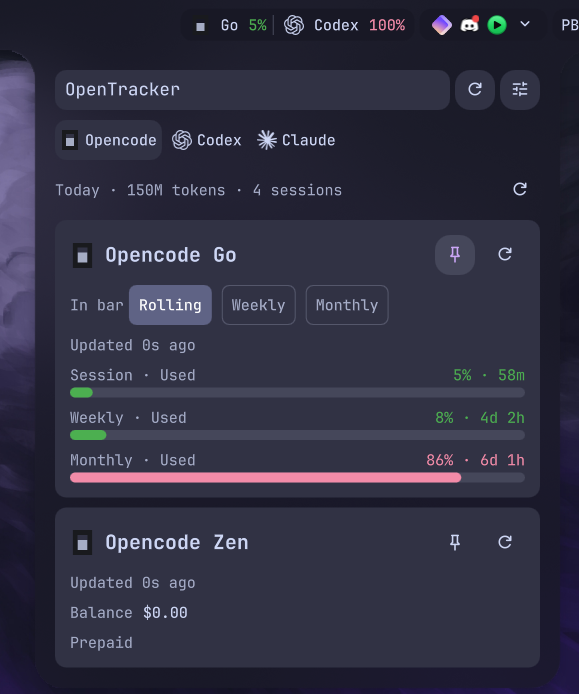
DankMaterialShell plugin that tracks Opencode Go usage limits, Opencode Zen balance, and OpenAI Codex and Claude usage limits via the opentracker CLI.
- opentracker-cli:
yay -S opentracker-cli
dms plugins install openTrackerBarThen add the widget to a DankBar in DMS settings.
Alternatively, find OpenTrackerBar by searching in DMS Settings → Plugins, or browse the Dank plugins directory.
opentracker login opencode-go
# Log in via browser, export Netscape cookies to ~/.config/opentracker/opencode-cookies.txt
opentracker fetch opencode-go
# First run will prompt for your workspace ID

opentracker fetch opencode-zen
# Check your Zen balance after configuring access in opentracker

opentracker fetch codex
# Shows OpenAI/Codex primary and secondary usage windows

opentracker fetch claude
# Requires an opentracker build with Claude support and configured Claude accessEnable the OpenTrackerBar plugin in DankMaterialShell settings. Click the widget and switch between the Opencode, Codex, and Claude tabs. The Opencode tab groups Go usage limits and the Zen pay-as-you-go balance.
- Zen shows a dollar balance, not a usage percentage. A zero balance is displayed as
$0.00. - Automatic refresh uses the configured interval; manual refresh adds
--force. - Each source has its own last-successful-update time. Failed refreshes preserve the last available data and show an error; data older than two refresh intervals is marked stale.
- Use the pin button on each provider card in the widget popout to show or hide Go, Zen, Codex, and Claude independently in the bar. Any combination is supported and saved immediately; no source is selected automatically. With all sources deselected, a small placeholder keeps the widget accessible so you can open it and pin a provider again. Adding Claude does not change existing pin selections.
- Older
barProvidersettings are used only until you make your first selection:opencodebecomes Go + Zen,openaibecomes Codex, andauto,both, or an unset value become all three sources. - Hover over the bar for quota-window, reset, and balance details.
- Pinned Go, Codex, and Claude cards let you choose which available quota window appears in the bar. Claude supports five-hour, weekly, and optional Sonnet/Opus windows; only returned windows and plan information are shown. The cards and notifications still cover all available windows; Zen remains a dollar balance.
- Refresh a single source from its card without refetching the others. Error hints offer a fixed recovery command to copy; the widget never runs login or installation commands for you.
- Project links in settings open GitHub in your browser. Giving the project a star is an explicit action on GitHub, not an automatic action by the plugin.
Provider authentication and cookies are handled by opentracker, not by this plugin.
With a compatible opentracker build and CLIProxyAPI configured, the existing Codex and Claude tabs also show proxy accounts returned by opentracker fetch codex and opentracker fetch claude. Each account can be pinned and configured independently; existing pins do not change. Refreshing an account refreshes its entire provider family, as the CLI does not provide a per-account fetch.
The CLI handles Codex deduplication. If a fetch partially succeeds, successful accounts are updated and the widget warns that some accounts could not be refreshed. Previous data for missing accounts remains available until a complete successful refresh, with its original update time.
Account identifiers are retained in local DMS plugin settings and alert state to keep pins and alert history associated with the correct account. When an email is available, the widget shows only a masked hint in account labels; it does not store the full email in settings or alert state. Proxy credentials and configuration remain managed by opentracker.
Codex cards show available banked resets when opentracker reports them; an unknown count is not treated as zero. This information is read-only: the widget does not provide or execute a reset action.
Reported expiry dates are listed separately for each reset and highlighted red when five hours or less remain. A missing expiry is unknown; an explicit null means no expiry. Some providers may not return a complete list.
In the popout preferences, choose whether email labels show a short prefix or the full domain, and select the masking character and its length. Domain mode reveals the email provider, but not the account's local part.
You can also hide all provider labels in the bar, leaving only icons and values. Cards and tooltips remain unchanged.
Open the preferences section in the widget popout to choose Used or Remaining. The setting applies to quota percentages and progress bars, not to the Zen dollar balance. Warning colors always reflect usage: 5% remaining is still a high-usage warning.
Notifications are opt-in. Enable them in the same section for Go, Codex, and Claude quota alerts at 80% and 95% used and a Zen low-balance alert. The Zen threshold is editable and defaults to $1.00. Pinning controls bar visibility only; it does not enable or disable monitoring.
The first successful observation establishes a quiet baseline. Alerts report subsequent threshold crossings, not old readings at startup. Enabling notifications or changing the Zen threshold also establishes a new baseline. Quota alerts use each window independently; repeated readings do not repeat an alert. Zen alerts trigger at or below the configured balance, and a top-up above it allows a future alert.
Desktop notifications are sent through the host's dms notify command at normal urgency and respect the notification daemon's Do Not Disturb rules. Alert state is stored through DMS's plugin-state API to prevent duplicates after a restart.
Enable local statistics in the popout preferences for a small today's tokens and sessions summary in the Opencode tab. This is local activity, not a usage limit or Zen balance, and is not included in bar pinning or quota alerts.
This requires an opentracker build supporting opentracker stats opencode and an installed OpenCode CLI supporting stats --json --standalone --days 0. No cost estimates, project paths, messages, model lists, or historical charts are displayed. If the widget reports that the OpenCode CLI was not found, install it or make it visible outside terminals: opentracker checks OPENCODE_BIN, then PATH, then ~/.bun/bin, ~/.local/bin, and /usr/local/bin.
Statistics are requested only when the summary is enabled and the Opencode tab is open, with a five-minute cache and an explicit refresh action. They are not part of periodic quota refreshes. The CLI delegates aggregation to OpenCode rather than reading its database directly; OpenCode may create or migrate its own local storage when invoked.
node --test tests/provider-logic.mjs
tests/reset-credits-qml.sh
These offline tests exercise the widget's JavaScript helpers with synthetic fixtures. The QML test requires Qt 6's qmltestrunner and checks reset-credit sequences in a real Qt delegate. Neither test runs opentracker or authenticates; they do not validate the rendered DMS interface.
zakstam - dms-codexbar